
Livraison le jour même ou le lendemain

Qualité garantie

Débloquez vos offres de bienvenue: Livraison GRATUITE | Jusqu'à -80 % | 30 jours d'essai gratuits à JoyPlus
Téléchargez l'application
Long hours spent working from home or in the office put a major strain on our bodies. Poor posture takes its toll: discomfort, fatigue, and, of course, the dreaded back pain. Investing in an ergonomic office chair is no longer a luxury, but an essential investment in your daily health and well-being.
With an overwhelming number of options available, it's hard to know where to start. Our goal is to give you the key insights to find the model that's perfectly suited to your needs and body type, without getting fooled by marketing jargon.
Before diving into our top picks, let's review the essential criteria for making the right choice.
A good ergonomic office chair is, first and foremost, a chair that takes care of your lower back. Effective lumbar support should conform to the natural curve of your spine to relieve pressure on the intervertebral discs.
Opt for an office chair with lumbar support that is adjustable in height and, ideally, in depth. The goal is to position the support right in the small of your back. This is a crucial adjustment to prevent slouching over your keyboard after a few hours and to maintain a healthy posture throughout the day.
A wide range of adjustments is the secret to tailor-made comfort. An adjustable office chair is therefore a must-have. Here are the key points to consider:
The choice of upholstery isn't just about aesthetics; it plays a key role in comfort and durability.
Ultimately, the choice will depend on your personal preferences and the temperature of your workspace.
To guide you, we've scoured the market and selected three models that stand out for their features and value for money.

Why we love it: This model checks all the boxes for the perfect, versatile ergonomic chair for remote work. It combines a breathable mesh back with all the essential adjustments, including adjustable lumbar support and a headrest.
Key features:
Who is it for? For those who spend long hours in front of their screen and worry about overheating. Its multiple adjustments make it a great all-rounder, capable of adapting to many body types.
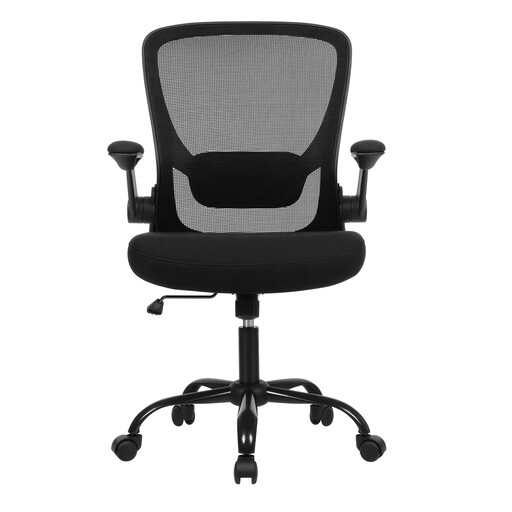
Why we love it: Here, the focus is on plush comfort, thanks to the fabric upholstery and padded lumbar support. It's an excellent, well-balanced solution for daily office use.
Key features:
Who is it for? This model is perfect for users who prefer the softness and cosy feel of fabric over the coolness of mesh, without sacrificing essential ergonomic adjustments.

Why we love it: Built to last, this chair stands out from the crowd with its high weight capacity and comprehensive adjustments. A safe bet for heavy use.
Key features:
Who is it for? The ideal choice for larger body frames or for anyone looking for an ultra-sturdy and durable chair without compromising on adjustment options and comfort.
What if your top priority is relaxation? If you're dreaming of advanced features like a built-in footrest, other options are available.
Take a look at our selection of reclining office chairs with footrests to turn your breaks into true moments of decompression.
A standard chair often offers only the bare minimum: height adjustment. In contrast, an ergonomic office chair is designed to adapt to your body. It provides multiple adjustments (lumbar support, armrests, seat depth, tilt...) to promote good posture, reduce fatigue, and prevent musculoskeletal disorders (MSDs).
Allow a few days, or even a week, to get accustomed to it. If your body has developed poor posture habits, the active support of an ergonomic seat might feel surprising at first. That's a good sign: your posture is correcting itself! Take the time to fine-tune each setting to ensure a smooth transition.
Our checklist for the perfect setup: