
Livraison le jour même ou le lendemain

Qualité garantie

Débloquez vos offres de bienvenue: Livraison GRATUITE | Jusqu'à -80 % | 30 jours d'essai gratuits à JoyPlus
Téléchargez l'application
Remote work, marathon gaming sessions, endless study nights… we spend a growing portion of our days sitting down. In this context, an ergonomic office chair is no longer a luxury, but an essential investment to protect your back and maintain focus. The problem: the market is saturated with marketing promises and technical jargon that make the choice daunting. As a product expert for the editorial team, my mission is to decode this jargon to help you identify the features that truly matter.
Before you even start comparing models, it's crucial to learn how to see through the marketing claims that too often lead to buyer's remorse.
The Myth of "Fully Adjustable": Many chairs boast about being "fully adjustable" (height, armrests, backrest…). The catch? The range of these adjustments is often so limited it becomes trivial, if not useless. A true adjustable office chair must offer customisation that genuinely adapts to your body, not just token adjustments. A mechanism that feels flimsy or has play in the adjustments are other red flags.
The "Looks Premium" Materials Trap: In a photo, a chair can appear sturdy and comfortable. The reality often reveals itself with use. Low-density foam padding will sag within a few months, turning your comfortable seat into something as hard as a wooden board. The same goes for low-quality faux leather upholstery: it's not breathable, quickly becomes unbearable in the summer, and is likely to crack after one season.
To avoid making a mistake, forget the marketing and focus on these objective criteria, which guarantee comfort and durability.
Lumbar support is the core of an ergonomic chair. It's not just a simple bulge in the lower backrest. The options vary:
A chair's ability to recline is fundamental for varying your posture and relieving pressure on your spine. There are two main systems:
The choice of material has a direct impact on thermal comfort and ease of maintenance.
Instead of searching for the "one-size-fits-all" holy grail, it's better to choose a model tailored to your primary use.
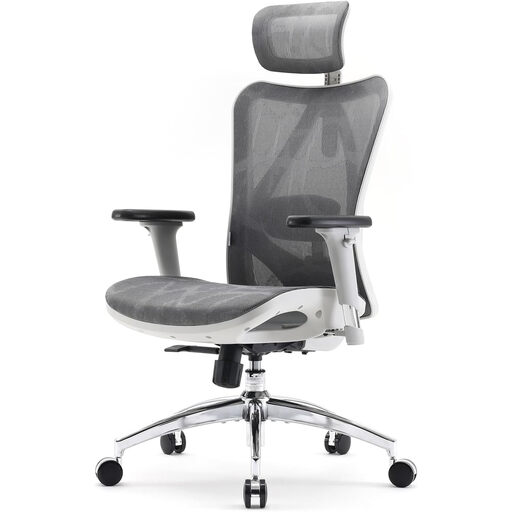
Why It Stands Out: Perfect for long workdays, its mesh back ensures excellent ventilation. Its 3D armrests (adjustable in height, depth, and rotation) and adjustable lumbar support help you find the ideal posture, whether you're typing intensely or in a video conference.
This chair avoids the "fake adjustable" trap by offering genuinely useful adjustments (3D armrests, lumbar support) that go far beyond simple height settings.
Its excellent balance of breathability, relevant ergonomic adjustments, and a minimalist design that fits easily into an office or *home office*.
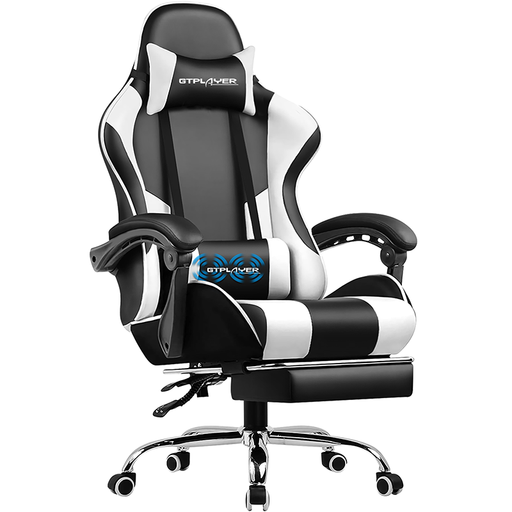
Why It Stands Out: This gaming chair is built for marathon sessions. Its high back, headrest, and massaging lumbar cushion are designed to reduce fatigue. The retractable footrest and its deep recline (up to 135 degrees) provide genuine moments of relaxation between matches.
It doesn't rely on looks alone. It avoids the trap of seemingly premium materials by adding concrete comfort features (footrest, massage) that provide real added value during intensive use.
Its relaxation-oriented features (footrest, massaging cushion) clearly set it apart from a standard office chair and make it an ally for taking breaks.
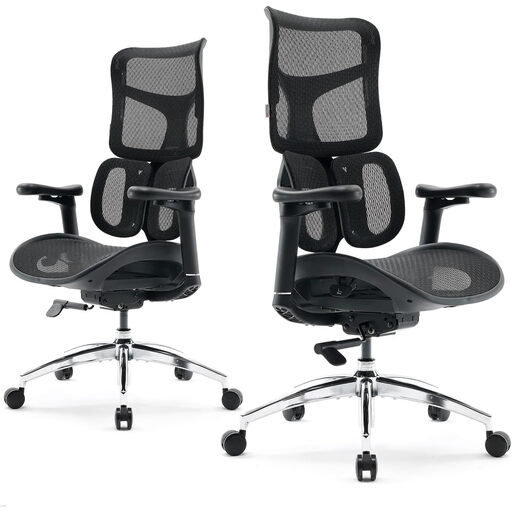
Why It Stands Out: For those seeking precise and responsive support. Its dual dynamic lumbar support adjusts to your movements in real time, while its 4D armrests synchronise with the backrest's recline. It's the choice for those who want to make no compromises on ergonomics.
This model is the antithesis of "fake adjustable." Every adjustment has a precise and dynamic ergonomic function, offering state-of-the-art customisation that justifies its price point.
The dynamic lumbar support and coordinated 4D armrests provide a level of personalised, active support rarely seen in this price range.
We have selected a full range of products that meet our selection criteria and safety standards.
A chair's longevity depends heavily on the quality of its components and the intensity of its use. An entry-level model will show signs of wear after 1 to 2 years (foam sagging, play in the mechanism). A well-made chair with a metal frame, high-density foam, and a quality mechanism can easily last 5 to 10 years, or even longer. The warranty period is often an excellent indicator of the manufacturer's confidence in its product.
Not necessarily. Its usefulness depends on how you use the chair. If you like to lean back to think or take calls, it offers excellent neck support. However, for someone who sits upright and focused on their screen, it's less crucial. If you opt for a model with a headrest, make sure it is adjustable in height and angle for a perfect fit.
A good setup is the key to comfort. Here are the 3 fundamental steps: