
Livraison le jour même ou le lendemain

Qualité garantie

Débloquez vos offres de bienvenue: Livraison GRATUITE | Jusqu'à -80 % | 30 jours d'essai gratuits à JoyPlus
Téléchargez l'application
Spending hours at a desk, whether for remote work, studying, or gaming, takes a real toll on the body. A good ergonomic office chair isn't a luxury; it's an essential investment in your comfort and health. The problem? The market is saturated with products making tempting marketing promises that often fall short.
As a product expert at Joybuy, my role is to help you navigate the options. Together, let's break down the most common pitfalls and the technical criteria to check so you can make an informed decision, without being fooled by purely promotional claims.
Buying an office chair can quickly become a headache. Here are three common pitfalls that lead directly to disappointment and wasted money.
To make the right choice, focus on objective, verifiable features. Here are the three technical points to inspect first.
Lower back support is non-negotiable. The question isn't whether a chair has it, but whether it's effective.
A good chair should encourage movement. The tilt mechanism plays a key role in this.
The choice of material affects both comfort and maintenance.
Rather than just talking about it, we've matched user profiles directly with models that tick all the quality boxes we've just discussed.
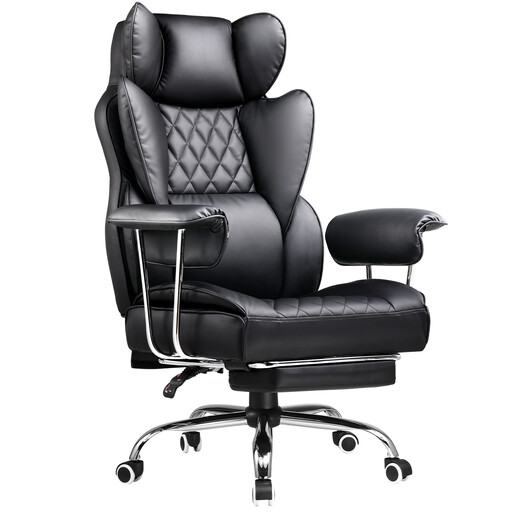
Why we chose it: Ideal for marathon gaming or work sessions, this chair offers full-body support, a deep recline, and features designed for long-term comfort.
Unlike entry-level bucket seats, it includes genuine lumbar support and a high backrest for perfect alignment, going far beyond a simple "racing" look.
Its retractable footrest and deep recline allow for truly relaxing breaks between intense sessions.

Why we chose it: Perfect for a work-from-home chair that needs to blend into a home office. Its understated design, breathable mesh back, and flip-up armrests make it a choice that's as practical as it is discreet.
It avoids the pitfall of being bulky. Its flip-up armrests allow it to slide completely under a desk to free up space, without sacrificing comfort during work.
Its breathable mesh back and generous high-density foam seat ensure excellent comfort, even in the middle of summer.
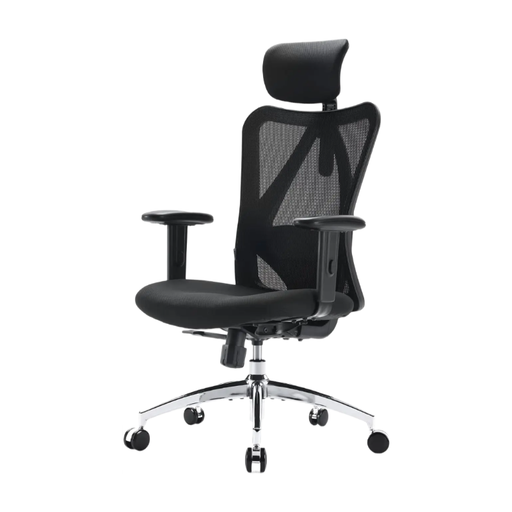
Why we chose it: The excellent compromise, offering a full suite of ergonomic adjustments at an accessible price point. A smart choice for anyone looking for a reliable chair without breaking the bank.
It doesn't just rely on the "ergonomic" label; it offers 5 adjustment zones (head, back, height, tilt, armrests) for deep customisation.
Its BIFMA certification and 150 kg weight capacity are a testament to its sturdiness, avoiding the pitfall of models that wear out too quickly.
Explore our full selection of chairs that meet our demanding specifications for comfort and durability.
A chair's longevity depends on the quality of its components and its usage. A model with a metal base, quality casters, and BIFMA certification can easily last 5 to 10 years. Wear-and-tear parts like the gas lift or casters are often the first to fail, but they are usually replaceable.
Absolutely. These models are designed for long hours of sitting and often offer very comprehensive adjustments (deep recline, 4D armrests...). However, their bold office chair design can clash with some home or office decors. The key is to ensure it offers real ergonomic features (like adjustable lumbar support) and not just flashy aesthetics.
Here are the 4 key steps for a perfect setup: