
Livraison le jour même ou le lendemain

Qualité garantie

Débloquez vos offres de bienvenue: Livraison GRATUITE | Jusqu'à -80 % | 30 jours d'essai gratuits à JoyPlus
Téléchargez l'application
Neck strain, back pain, dwindling concentration... The long hours spent in front of a screen, whether working from home or in the office, eventually take their toll. Far from being a luxury, a good ergonomic office chair is a true investment in your health and productivity. But with the overwhelming number of models available, how do you make the right choice?
This guide is here to help you navigate the options. We'll break down the essential criteria and present our selection of chairs suited for every need and budget.
Before settling on a model, it's crucial to understand what separates a simple chair from a truly ergonomic office chair. Here are the key points to scrutinise.
A good ergonomic chair should adapt to your body, not the other way around. Make sure the model that catches your eye offers a maximum number of customisation options. The most important ones are:
The upholstery of your chair directly impacts your comfort, especially after several hours of use.
A swivel chair is standard, but its stability depends entirely on its base. Opt for a five-star base, which guarantees balanced weight distribution and anti-tip security. Quality castors are also essential for moving around effortlessly without damaging your floor.
Here are the models that caught our attention for their performance, design, and value for money.
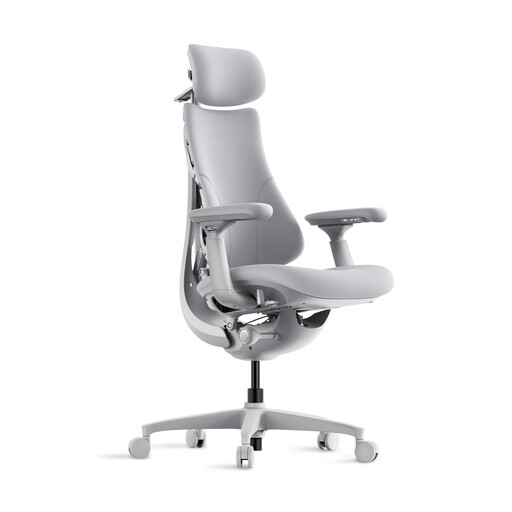
The LiberNovo Omni Dynamic chair combines a modern, minimalist design with flawless ergonomics. Its breathable mesh backrest and multiple adjustments make it an excellent companion for long workdays.
For professionals and remote workers looking for a high-performance, understated chair designed for intensive work sessions, without sacrificing style.
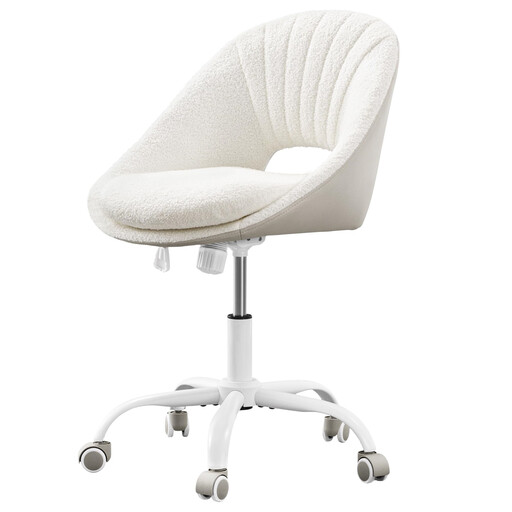
This HaluPeit chair breaks the mould with its cosy look and comfort-first approach. With its bouclé fabric (Sherpa) upholstery and rocking function, it transforms any workstation into a comfortable cocoon.
For those who prioritise style and a cosy atmosphere above all. An excellent option if your office is an integral part of your living space and you want to avoid the "corporate" look.

The Ochama model focuses on robustness and highly advanced ergonomics. With its headrest, lumbar cushion, and high load capacity, it is designed to accommodate all body types.
Ideal for larger individuals, for those seeking maximum adaptability, or for anyone who wants full head-to-lumbar support for intensive use.
Did none of these models catch your eye? Don't worry, an office chair can be both ergonomic and a perfect match for your decor.
? Discover our complete collection of modern style chairs to find inspiration and the model that will enhance your space.
A standard office chair simply gives you a place to sit. An ergonomic office chair, on the other hand, is designed to support your body in a healthy, natural posture. Thanks to its multiple adjustments (height, armrests, lumbar support, tilt...), it adapts to your body shape to reduce strain and the risk of musculoskeletal disorders (MSDs) associated with prolonged sitting.
Here are the 4 key steps for a perfect setup:
It usually takes a few days, or even up to a week. If your old chair was poorly suited for you, your body needs to unlearn bad postural habits. So don't be surprised if you feel slight discomfort at first: it's a sign that your muscles are adapting to better support.