
Livraison le jour même ou le lendemain

Qualité garantie

Débloquez vos offres de bienvenue: Livraison GRATUITE | Jusqu'à -80 % | 30 jours d'essai gratuits à JoyPlus
Téléchargez l'application
By the Joybuy Editorial Team, July 21, 2026
Remote work, office life, endless gaming sessions… We spend more and more of our days sitting, and our bodies are paying the price. Back pain, a stiff neck, general fatigue: these are often the warning signs of a poor setup. A good ergonomic office chair is therefore not a luxury, but a real investment in your health and productivity.
But with a jungle of models to choose from, how do you make the right choice? This guide is here to break down the essential criteria and present our selection of the best models available today, suited for every need and budget, to help you make an informed decision.
Before you dive in, a few technical features make all the difference. Here are the key points to check to find the perfect comfortable office chair for you.
The golden rule of a good adjustable office chair? It adapts to your body, never the other way around. Make sure these elements are customisable:
This is often the deal-breaking feature: good lumbar support. It is essential for maintaining the natural curve of your spine and avoiding ending the day slumped over and sore. This support can be fixed, but a model that is adjustable in height and depth offers far superior customisation. It's the secret weapon of a good chair for back pain.
The upholstery has a direct impact on comfort, durability, and maintenance.
Some models, like the gaming chair with a footrest, blur the lines by adding a relaxation dimension, making them as perfect for work as they are for leisure.
After analysing dozens of models, here are the ones that caught our attention for their ergonomics, comfort, and excellent value for money.

Why we love it: It strikes the perfect balance between essential ergonomic features and a versatile design. Its breathable mesh back and adjustable lumbar support make it a very smart choice for intensive office use.
Key features:
Who is it for? The sensible choice for professionals in remote work or in the office who are looking for a breathable and effective solution for long work sessions.
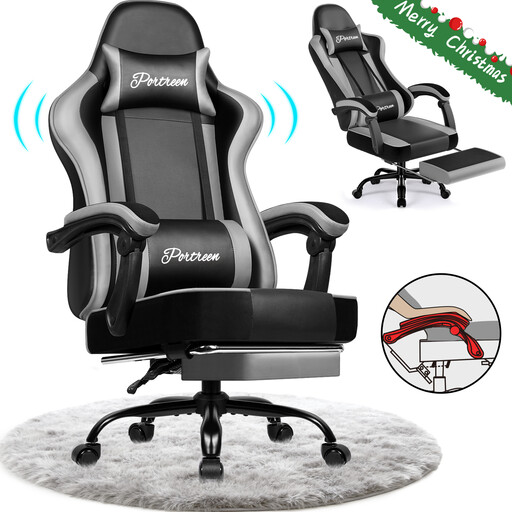
Why we love it: This ergonomic office chair embraces its gaming aesthetic while packing comfort features worthy of a lounge chair. Its standout feature is its telescopic footrest, which transforms it into a true cocoon of relaxation.
Key features:
Who is it for? For gamers, of course, but also for anyone who wants a versatile seat that can switch from focused worker mode to relaxation mode in the blink of an eye.
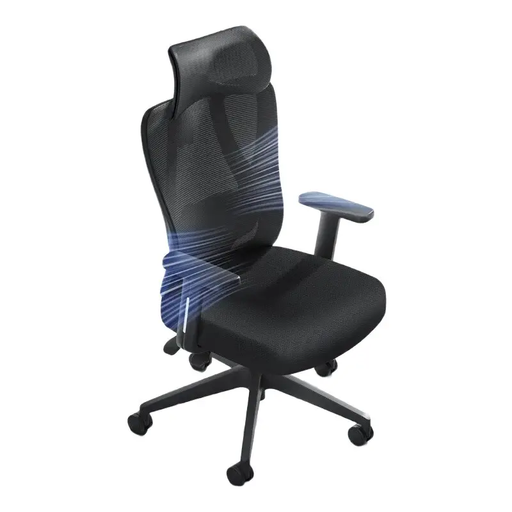
Why we love it: This hybrid brings together the best of both worlds: the plush comfort of an armchair and the technical features of a high-end ergonomic seat. Its 4D dynamic lumbar support is a stunning feature, offering support that follows your every move.
Key features:
Who is it for? For the most demanding users, who refuse to compromise between cutting-edge ergonomic support and enveloping comfort, whether for working or gaming for hours on end.
If you have more specific needs, for example for creative activities that require a different posture, other models might be a better fit.
? Explore our range of drafting chairs with footrests to find the right model for your activities.
While both promise long-term comfort, their approaches differ. An ergonomic office chair prioritises a subtle design, breathable materials like mesh, and fine-tuned adjustments for a healthy work posture. A gaming chair focuses on an enveloping (bucket-seat style) design, generous padding, bolder colours, and relaxation-oriented features like extreme reclining and a footrest.
For an optimal setup, follow these steps:
Absolutely. An ergonomic office chair is designed to promote good posture and limit stress on the spine. By providing proper support, especially at the lumbar level, it helps to significantly reduce muscle tension associated with prolonged sitting. However, a good chair is not a substitute for medical advice in cases of chronic pain. It is part of a holistic approach to well-being, which also includes taking regular breaks to stand up and move around.