
Livraison le jour même ou le lendemain

Qualité garantie

Débloquez vos offres de bienvenue: Livraison GRATUITE | Jusqu'à -80 % | 30 jours d'essai gratuits à JoyPlus
Téléchargez l'application
Whether you're working from home, in a marathon gaming session, or at the office, spending hours sitting down puts a heavy strain on the body. Experiencing tension in your back, neck, or shoulders? The culprit is often easy to identify: an unsuitable chair. Far from being a luxury, choosing an ergonomic office chair is a true investment in your daily health and comfort.
This guide breaks down the essential features to look for and presents our selection of the best models of 2026 to help you find the perfect chair for your body type and needs.
By our product experts, July 10, 2026
Before comparing models, let's review the criteria that truly make a difference. Remember the golden rule: a good chair should adapt to you, not the other way around.
Customisation is the cornerstone of ergonomics. A chair worthy of the name must offer a full suite of adjustments to perfectly match your body shape. Make sure it includes at least the following:
An office chair with lumbar support is crucial for maintaining the natural curve of your lower back. Without it, the tendency is to slouch, which puts harmful pressure on the spine. Some models offer fixed lumbar support, while more sophisticated ones allow for height and depth adjustments for a precise fit. This feature becomes essential if you spend more than four hours a day sitting.
Your activities determine which features to prioritise.
The line between these two worlds is increasingly blurred, and many hybrid models excel at combining the best of both.
Here are a few models that have caught our attention, each catering to various needs and budgets.
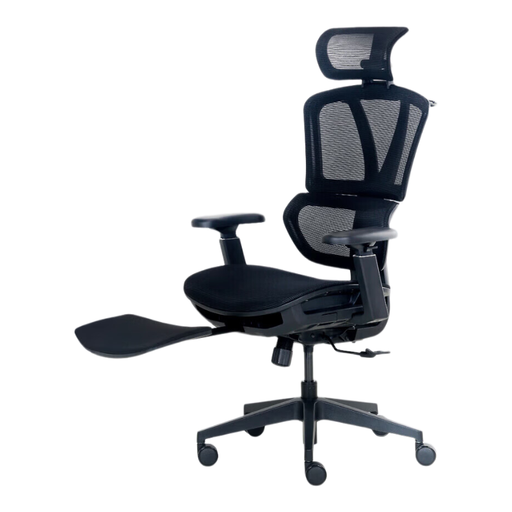
What sets it apart This model stands out with its clever dual-back support that contours to the shape of the back for optimised lumbar comfort. Its great versatility makes it just as suitable for work as it is for play. Its three-position adjustable recline of up to 140° and its integrated footrest make it an excellent choice for those who like to alternate between postures throughout the day.
Advantages
Who is it for?? For users in search of a versatile ergonomic chair that can switch from an intense work session to a relaxing break or a heated gaming match, without ever sacrificing back support.
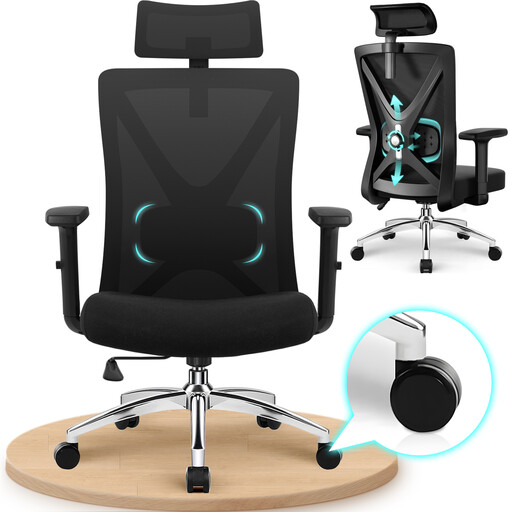
What sets it apart This chair makes customisation its priority. Its key feature? A flexible lumbar support adjustable by 6 cm in height and 3 cm in depth, for millimetre-perfect support. The high-density nylon mesh back ensures excellent breathability, a decisive advantage during long workdays. Its robust frame supports up to 150 kg.
Advantages
Who is it for?? Ideal for professionals working remotely or in an office who put in long hours sitting and require an ultra-adjustable chair to prevent back pain. A prime choice for those who prioritise breathability and precise adjustments.
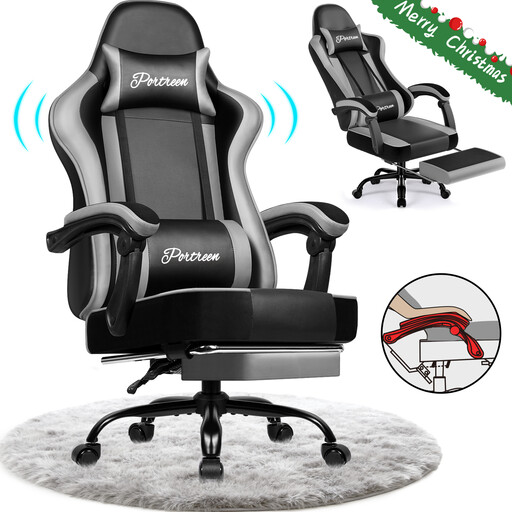
What sets it apart Built for marathon sessions, this gaming chair combines an enveloping design with advanced comfort features. Its extreme recline, from 90° to 170°, allows you to switch from an upright work posture to a near-flat position. The telescopic footrest and cushions for the head and lumbar region provide full-body support. Its PU leather upholstery is treated to be water and stain-resistant.
Advantages
Who is it for?? Primarily aimed at gamers, this chair will also appeal to remote workers who appreciate an enveloping seat with advanced relaxation options. It's the perfect companion for immersive activities, whether it's gaming, watching movies, or reading.
Our selection highlights models that meet specific needs. If you haven't found what you're looking for or wish to explore other styles and materials, feel free to browse our full catalogue.
Discover our complete collection of Comfortable PU Chairs for more choices.
While both aim for long-lasting comfort, their approach differs. The ergonomic office chair prioritises discreet and precise adjustments, a neutral posture, and materials like mesh for breathability. The gaming chair, on the other hand, adopts a "bucket" seat style inspired by auto racing, with more pronounced side supports, extreme recline angles, and accessories like a footrest, promoting a more relaxed and immersive posture.
Expect an adjustment period of a few days to a week. At first, a new ergonomic chair might feel a bit firm or unfamiliar: this is normal, as it's encouraging you to correct your posture. Take the time to fine-tune each setting (height, lumbar, armrests) to find the configuration that's right for you.
For occasional use, it's not a requirement. However, for anyone who spends more than two hours a day sitting, lumbar support is highly recommended. It helps maintain the natural "S" curve of the spine, which reduces pressure on the vertebrae and prevents the development of chronic lower back pain.