
Livraison le jour même ou le lendemain

Qualité garantie

Débloquez vos offres de bienvenue: Livraison GRATUITE | Jusqu'à -80 % | 30 jours d'essai gratuits à JoyPlus
Téléchargez l'application
Whether you're working from home, in an intense gaming session, or facing long study days, we are spending more and more time sitting down. The problem? This sedentary lifestyle comes at a price: back pain, fatigue, poor posture... Investing in an ergonomic office chair is no longer a luxury, but a necessity for protecting your health and daily comfort.
But with an overwhelming number of options, how do you make the right choice? This guide is here to provide clear benchmarks and practical advice, free of marketing jargon, to help you find the chair that's perfectly suited to your needs.
Before diving into our selection, let's review the essential criteria that separate a good chair from an uncomfortable gimmick.
A good office chair must adapt to your body, not the other way around. This is non-negotiable. Look for an adjustable swivel chair that offers at a minimum:
An ergonomic chair with lumbar support is designed to follow the natural curve of your lower back. This feature is crucial for maintaining good posture and preventing pain. Some models offer fixed support, while others provide a cushion or an adjustable mechanism (height and depth) for a custom fit.
The upholstery of your chair directly impacts your comfort as well as its ease of maintenance.
To guide you, we have selected three models with varied features and price points.
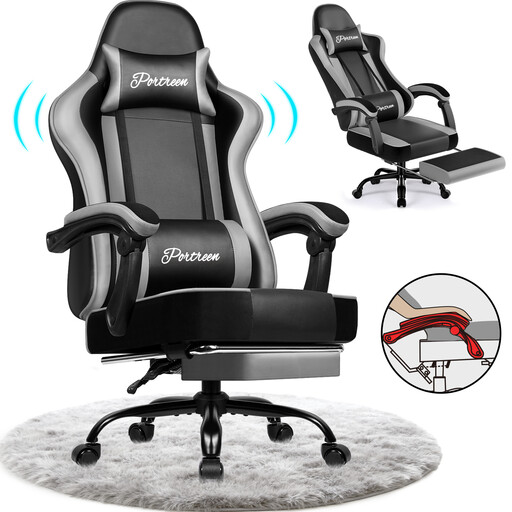
Why It Stands Out This versatile model blurs the line between a gaming chair and a classic office chair. Its key feature? A retractable footrest that transforms your workstation into a relaxation zone in an instant. Its backrest reclines up to 170 degrees, allowing for a truly restorative nap. The PU leather upholstery is designed to be water-resistant and easy to clean.
Pros
Who Is It For? Ideal for gamers, of course, but also for remote workers who like to punctuate their days with real breaks without leaving their desk. An excellent choice for those seeking an ultra-versatile and sturdy chair.
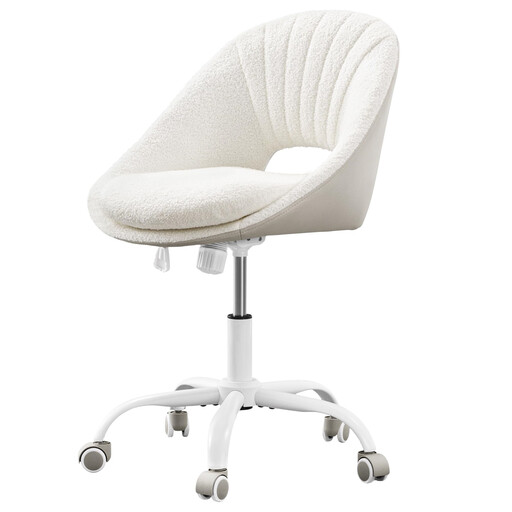
Why It Stands Out Here, the focus is on style and cosy comfort. With its ultra-soft Sherpa fabric and clean design, it fits perfectly in a bedroom, a living room corner, or a home office. Its gentle rocking function invites relaxation. The 10?cm thick seat cushion and the removable, machine-washable cover are the practical details that make all the difference.
Pros
Who Is It For? Perfect for those who prioritise aesthetics and are looking for a comfortable accent chair for various uses (occasional office work, reading, vanity). While less suited for intensive 8-hour-a-day use, it excels as a decorative piece that is as beautiful as it is comfortable.

Why It Stands Out This model is the archetypal office chair designed for teleworking marathons. Its breathable mesh back is a blessing for staying cool, even in the height of summer. The focus is on hyper-customised posture: the lumbar support, headrest, and armrests are all adjustable for a precise fit tailored to your body. Its understated and versatile design blends into any work environment.
Pros
Who Is It For? The sensible choice for professionals who work long hours, people sensitive to heat, and anyone who demands maximum adjustability for impeccable postural support.
Our selection covers several needs, but your office setup project may be more extensive. If you want to create a complete and cohesive workspace, why not opt for an all-in-one solution?
Discover our range of complementary products, including our chair and desk sets, to create a workspace that is as harmonious as it is functional.
1. What is the difference between an ergonomic office chair and a gaming chair? Although both aim for long-term comfort, their philosophies differ. The classic ergonomic chair prioritises neutral postural support and fine-tuned adjustments for work. A gaming chair, on the other hand, often features a bolder aesthetic (like a bucket seat), reinforced side bolsters, and relaxation-oriented features, such as an extreme recline or a footrest.
2. How do you properly adjust your office chair? Your checklist for the perfect setup:
3. How long does it take to get used to a new ergonomic chair? An adjustment period of a few days to a week is completely normal. A good ergonomic chair often corrects years of poor posture, which can cause slight discomfort at first. Our advice: start by using it for a few hours a day, then gradually increase the duration. This is a sign that your body is getting used to better support.