
Livraison le jour même ou le lendemain

Qualité garantie

Débloquez vos offres de bienvenue: Livraison GRATUITE | Jusqu'à -80 % | 30 jours d'essai gratuits à JoyPlus
Téléchargez l'application
Whether you're working from home or in the office, spending hours glued to your chair has become the daily reality for many of us. The downside? Back pain, neck strain, and dwindling concentration. An ergonomic office chair isn't a luxury; it's an investment in your daily well-being and efficiency.
This guide is here to help you make sense of it all. We'll break down the essential criteria and present a selection of models suited to different needs—all without the unnecessary marketing jargon.
Choosing the right chair is about much more than just aesthetics. To ensure lasting comfort and optimal support, three main criteria should guide your decision.
A good office chair with lumbar support is essential. It should hug the natural curve of your spine to relieve pressure on your lower back. Ideally, this support is adjustable in height and depth to fit your body shape precisely.
But other adjustments are just as crucial:
A reclining office chair offers valuable flexibility. The ability to tilt the backrest allows you to change positions regularly, which promotes blood circulation and relieves pressure on your intervertebral discs. Look for models with a multi-position locking mechanism—ideal for switching from an upright, focused work posture to a more relaxed mode.
The choice of upholstery has a direct impact on comfort and durability.
To help you choose, we've reviewed three models that stand out for their features and value for money.
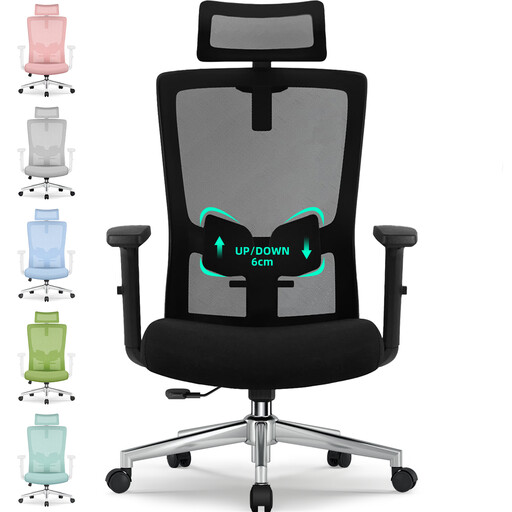
Its strengths: This model is all about customisation. Its S-shaped ergonomic backrest contours to your body, while the adjustable lumbar support (6 cm range) and headrest (height-adjustable and 120° tilt) allow for pinpoint precision. On the safety front, it's top-notch: the gas lift and base are BIFMA and SGS certified, guaranteeing sturdiness.
What we love:
Who is it for? Ideal for those who spend more than 8 hours a day at their screen and are searching for the holy grail of adjustments to find their perfect posture. It suits most body types (from 155 cm to 185 cm).

Its strengths: This ergonomic office chair strikes a perfect balance: all the ergonomic essentials with added simplicity. It includes a soft lumbar cushion and an adjustable headrest for personalised support. Its breathable mesh back and thick foam seat make it a trusted ally for long workdays.
What we love:
Who is it for? Perfect for professionals and students looking for a comfortable, breathable, and easy-to-assemble computer chair. It provides the essential ergonomic adjustments to maintain good posture without breaking the bank.
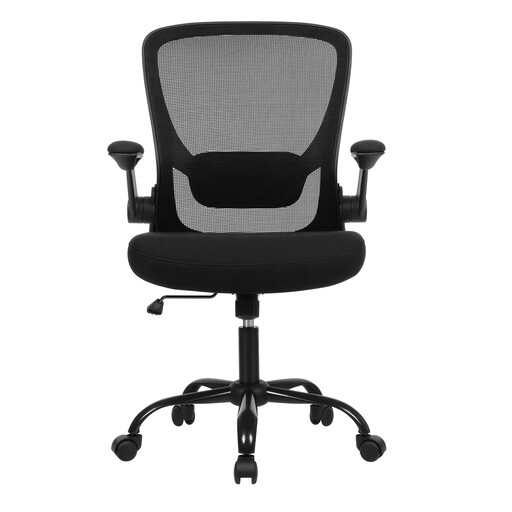
Its star feature: This chair's key advantage is undoubtedly its flip-up armrests. This is an ultra-practical feature for sliding the chair completely under the desk to save space in a home office or studio. Its fabric upholstery and thick seat provide an immediate sense of cosy comfort.
What we love:
Who is it for? The smart choice for those working in a limited space and looking for a practical solution without sacrificing comfort. It will also appeal to anyone who prefers the warmer feel of fabric.
Our selection covers three typical profiles, but choosing an office chair remains a very personal matter. If these models don't check all your boxes, don't worry—there are countless other configurations available.
Explore a wider variety of styles, materials, and features to find the model that will perfectly fit your space and budget. ? Discover our complete collection of Self-Assembly Chairs
A standard chair simply offers basic seating with few or no adjustments. In contrast, an ergonomic office chair is designed to adapt to your body. Thanks to its multiple adjustments (height, lumbar support, armrests, tilt, etc.), it promotes a healthy posture, reduces fatigue, and helps prevent the musculoskeletal disorders (MSDs) so common with prolonged sitting.
Expect a short adjustment period, from a few days to a week. Your body, often accustomed to poor posture, needs to get used to being properly supported. Take the time to fine-tune each setting (seat height, lumbar position, armrests, etc.) to reap the full benefits.
It all depends on your habits. If you always work with your back straight and focused on your screen, it's not essential. However, if you like to lean back to think, take a call, or simply stretch, an adjustable headrest becomes a real bonus for relieving neck and shoulder strain.
By the Joybuy editorial team