
Livraison le jour même ou le lendemain

Qualité garantie

Débloquez vos offres de bienvenue: Livraison GRATUITE | Jusqu'à -80 % | 30 jours d'essai gratuits à JoyPlus
Téléchargez l'application
Whether you're working from home, at the office, or in the middle of a study session, spending hours glued to a chair has become a part of our daily lives. The problem?? This static posture often comes at a cost?: tension, back pain, flagging concentration... Far from being a luxury, a good ergonomic office chair is a true investment in your health and efficiency.
But with a dizzying array of options on the market, how do you find your way?? Our mission is simple?: to decode the market for you, give you the keys to make an informed choice, and present a selection of models that have caught our attention. All without the unnecessary marketing jargon.
Before diving into our selection, let's review the essential points to check to ensure your future ergonomic office chair is perfectly suited to your body and your needs.
A truly comfortable chair is, above all, a chair that adapts to you, not the other way around. Look for a model of adjustable office chair with these crucial features?:
That notorious back pain often stems from poor posture that leaves the lower back unsupported. An office chair with lumbar support fills this gap to maintain the natural curve of your spine. Whether it's fixed or, even better, adjustable in height and depth, it's a non-negotiable feature for anyone looking for an office chair for back pain or simply wanting to protect their back.
The choice of upholstery and seat foam is crucial for both daily comfort and the chair's longevity.
We have selected three models that check all the boxes, for a variety of needs and budgets.

Why we love it?: This is the Swiss Army knife of ergonomics, an ultra-comprehensive solution for anyone seeking maximum adaptability. Headrest, lumbar support, armrests?: everything is adjustable for a fine-tuned fit. Its breathable mesh back is a real treat during long workdays, especially when the temperature rises.
Pros:
Who is it for?? The remote work pros and office marathoners who put in 8-hour+ days. A chair that adjusts perfectly to maintain good posture, even at the end of the day.
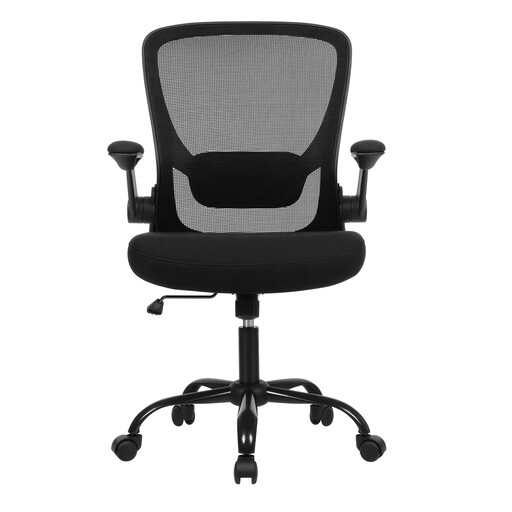
Why we love it?: This chair takes a simple and practical approach. Its real bonus?? The flip-up armrests, which allow it to be stored under any desk. A game-changing detail for optimising space. Its fabric upholstery and thick seat provide welcoming comfort from the very first minute.
Pros:
Who is it for?? Perfect for home offices, student rooms, or co-working spaces where every square inch counts. It offers the necessary comfort for work sessions lasting several hours.
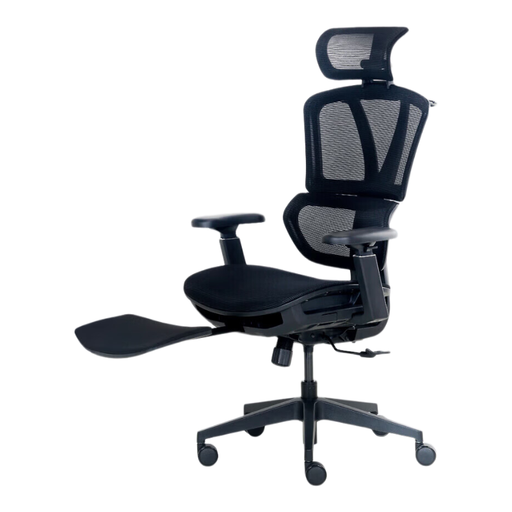
Why we love it?: We're stepping up a level with this versatile model, at the crossroads of an ergonomic gaming chair and a premium office chair. It pushes the comfort sliders to the max?: dynamic lumbar support, a 140° recline, and even an integrated footrest. A true invitation to work... and to nap.
Pros:
Who is it for?? Gamers, developers, creatives... In short, anyone who spends a considerable amount of time at their desk and wants a cocoon to work and relax in, with the ability to almost fully lie down.
This selection gives you a good overview of the possibilities. If relaxation features like a near-flat recline and a footrest catch your eye, other models might interest you.
? Discover our selection of office chairs with footrests and deep recline
Although they share a common ergonomic foundation (adjustments, lumbar support), the ergonomic gaming chair is often recognisable by its bolder look, a more enveloping bucket-style backrest (which supports the head and shoulders), and comfort options designed for long sessions, like removable cushions or a footrest. The classic ergonomic office chair, on the other hand, focuses on a more understated aesthetic and adjustments purely geared towards work posture.
A few simple steps are all it takes to find the ideal posture?:
It all depends on the quality of the materials (steel base, foam density, fabric resistance) and the intensity of use. In general, a well-made model that is used and maintained properly can easily last for 5 to 10 years. To judge its robustness, look at the maximum supported weight and the chassis materials.