
Livraison le jour même ou le lendemain

Qualité garantie

Débloquez vos offres de bienvenue: Livraison GRATUITE | Jusqu'à -80 % | 30 jours d'essai gratuits à JoyPlus
Téléchargez l'application
By the Joybuy Editorial TeamPublished: July 22, 2026
Working from home, studying, gaming sessions… Spending hours sitting down puts a major strain on our bodies, with our backs, necks, and shoulders being the first to suffer. An ergonomic office chair isn't a luxury; it's a crucial investment in your well-being and focus.
But with the sheer number of models available, how do you make the right choice? This guide is here to help. We'll break down the essential criteria and present our selection of the best chairs on the market today.
Before you buy, here are the key points to check. These are the features that will make all the difference in your daily comfort.
A good adjustable computer chair should adapt to your body, not the other way around. Look for the following adjustment options:
An office chair with lumbar support is essential for maintaining the natural curve of your spine. Some models offer fixed support, while others provide a cushion that's adjustable in height, or even depth, for a more precise fit. This feature is critical for preventing lower back pain, especially if you sit for long hours.
The upholstery of your chair plays a key role in both comfort and maintenance:
Here are three models that cater to a variety of needs, whether you're looking for a comfortable office chair for remote work or a high-performance gaming chair.

Why it stands out: This model focuses entirely on breathability and comprehensive ergonomics. It's an excellent choice for a professional office or a work-from-home setup.
Key features:
Who is it for? Professionals and students who spend long hours in front of their screens. It's ideal for those seeking excellent ventilation and complete ergonomic support in a sleek, efficient design.
See details for the Ochama chair
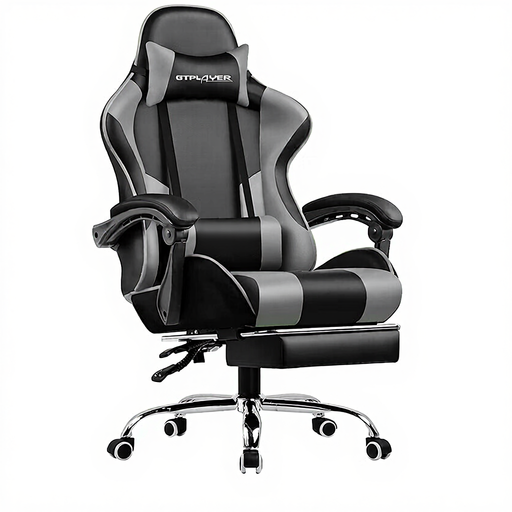
Why it stands out: This chair combines the look of a gaming chair with features designed for relaxation, like its massaging lumbar cushion and retractable footrest.
Key features:
Who is it for? Gamers, as well as anyone who wants a versatile and immersive seat with real perks for break time.
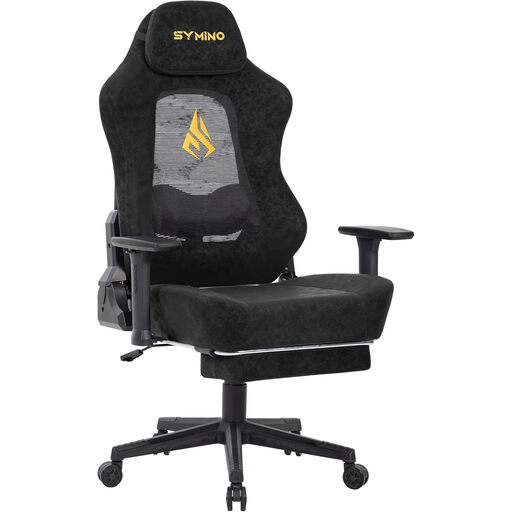
Why it stands out: Its hybrid design is its greatest strength, combining the breathability of mesh with the bold look of a gaming chair. Its wingless seat design ensures total freedom of movement.
Key features:
Who is it for? Those who love the gaming aesthetic but refuse to compromise on breathability. A must-have for people who move around a lot in their seat and want lumbar support that adjusts in real time.
Love the look and feel of leather? Other options might be the perfect fit for you. A high-quality genuine or synthetic leather finish brings a touch of timeless elegance to any office.
? Discover our collection of leather chairs and find the perfect model for your space.
A classic ergonomic office chair primarily focuses on a minimalist design, precise adjustments, and materials like mesh, all intended for intensive professional use. A gaming chair, on the other hand, often draws inspiration from racing car bucket seats, featuring a bolder design, bright colours, reinforced side support, and extras like a footrest or extreme recline. Today, the line between the two is becoming increasingly blurred, with many hybrid models emerging.
The lifespan of an office chair depends on the quality of its components (gas lift, base, casters, upholstery) and the intensity of its use. An entry-level model will last 2 to 3 years on average. In contrast, a well-made chair with a steel frame and robust materials can last for 5 to 10 years, or even longer, with proper care.