
Livraison le jour même ou le lendemain

Qualité garantie

Débloquez vos offres de bienvenue: Livraison GRATUITE | Jusqu'à -80 % | 30 jours d'essai gratuits à JoyPlus
Téléchargez l'application
Back pain, a stiff neck, persistent fatigue… If these ailments sound familiar after a long day at work, it's high time to reconsider your seating. Whether you're working from home, in the office, or cramming for exams, an unsuitable chair can quickly turn your daily routine into an ordeal. Investing in an ergonomic office chair is no longer a luxury, but an essential investment in your health and comfort.
This guide is here to demystify the topic and help you navigate the jungle of office chairs. Our team of experts has scoured the market to bring you practical, objective advice, free of marketing jargon, so you can make the best choice.
Before diving into our selection, let's review the essential criteria for finding the office chair that will perfectly suit your body type and adapt to your daily life.
A good ergonomic chair for back pain must offer impeccable lower back support. Effective lumbar support hugs the natural curve of your spine to relieve pressure on the intervertebral discs. The ideal choice? A model that is adjustable in height and depth, allowing for pinpoint adjustment to your body and helping you maintain a healthy posture, even after several hours.
The principle of ergonomics is simple: the chair should adapt to you, not the other way around. A truly comfortable chair must therefore offer a full range of adjustments. Here are the essentials?:
The upholstery of your chair plays a major role in your daily comfort. A breathable office chair, with its mesh back, is the best ally against overheating and perspiration, as it allows air to circulate freely. It's the sensible choice for long work sessions. For the seat, opt for high-density foam: it provides excellent cushioning and distributes your weight evenly to avoid painful pressure points.
Here are the models that caught our attention for their thoughtful design, features, and excellent comfort-to-price ratio.
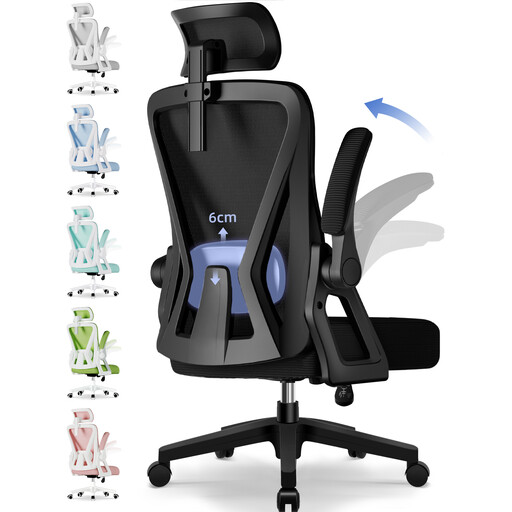
What sets it apart?: This GTIMEX model is a true Swiss Army knife of ergonomics, offering ultra-personalised adjustment from head to lower back. Its robust design and high load capacity make it a heavy-duty ally for intensive use.
Highlights?:
Who is it for?? Professionals, remote workers, and gamers looking for an ultra-versatile chair that offers comprehensive support and can withstand intensive use.

What sets it apart?: This Ochama chair strikes the perfect balance between comfort, essential features, and practicality. Its key strength lies in its wide seat and generous cushion, designed to relieve pressure during long hours of work.
Highlights?:
Who is it for?? Ideal for home offices where every square inch counts. We recommend it for those who prioritise the comfort of a generous seat and the convenience of space-saving flip-up armrests.
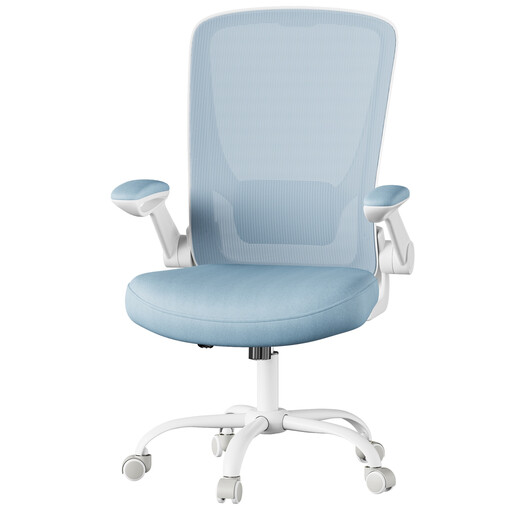
What sets it apart?: This Ochama chair combines ergonomic essentials with a pop of colour. It's the smart, stylish option for energising a workspace without sacrificing comfort.
Highlights?:
Who is it for?? An excellent choice for students or remote workers who want a functional, comfortable swivel chair that can add a splash of personality to their desk or room.
If the colourful design of the Ochama model caught your eye, or if you simply want to explore other options for your setup, take a look at our other collections.
? Explore our collection of blue office chairs to add a splash of colour to your workspace.
In a word: customisation. While a standard chair often only offers height adjustment, an ergonomic office chair provides a full range of settings (lumbar support, armrests, seat depth, tilt...). The goal is to adapt perfectly to your body to promote good posture and reduce muscle strain, even after hours of sitting.
Here is the 4-point checklist?:
Expect an adjustment period of about a week. If your body has become accustomed to poor posture, sitting correctly might feel a bit strange at first. That's a good sign! It means your body is realigning to a healthier posture. Be patient and take the time to fine-tune the settings to perfectly match your body type.