
Livraison le jour même ou le lendemain

Qualité garantie

Débloquez vos offres de bienvenue: Livraison GRATUITE | Jusqu'à -80 % | 30 jours d'essai gratuits à JoyPlus
Téléchargez l'application
Spending hours at a desk—whether for work, study, or leisure—is now a part of our daily lives. Yet, for many, comfort remains a luxury, often sacrificed for unsuitable equipment. A bad chair can not only harm your productivity but also lead to chronic pain. Choosing an ergonomic office chair isn't just a matter of aesthetics; it's a real investment in your health and well-being.
The problem is, the market is saturated with confusing marketing promises and technical jargon. As the Head of Product Recommendations at Joybuy, my mission is to help you see things more clearly. To navigate this jungle, let's break down the pitfalls to avoid and the criteria that truly matter.
The initial excitement of a purchase can quickly turn to disappointment if your new chair proves to be uncomfortable or lacks durability. Here are the three most common issues to watch out for:
To make the right choice, focus on the technical features that make a real difference in a true ergonomic office chair.
A good adjustable office chair does more than just go up and down. For a perfect fit tailored to your body and habits, check for the following adjustments:
The choice of materials directly impacts your comfort, especially over the long term. This is a key criterion, particularly if you're looking for a chair for back pain relief.
To put theory into practice, here are a few models that meet different needs and budgets, all selected according to the quality criteria we've just detailed.

Why we chose it: Ideal for remote work or a home office, this model brings together essential ergonomic features without sacrificing practicality. It's the perfect choice for a first serious, functional setup.
It includes adjustable lumbar support and flip-up armrests, solving the problem of fixed armrests that prevent the chair from sliding under a desk.
Its breathable mesh back and dense foam seat offer an excellent balance of support and comfort for standard workdays.
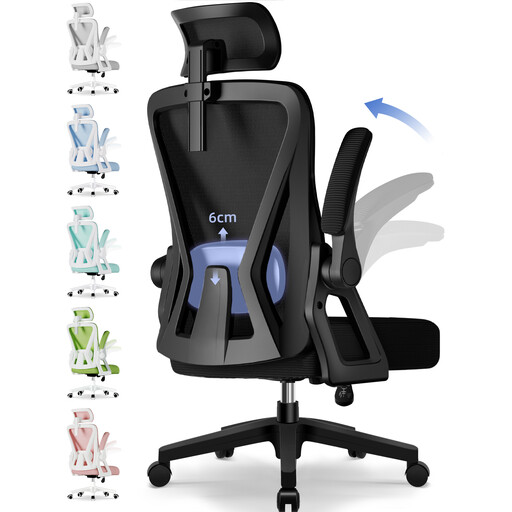
Why we chose it: Designed for those who spend long days seated, this chair is all about customisation. It's aimed at demanding users seeking precise support and rock-solid durability.
It tackles the "gimmicky" lumbar support pitfall head-on with 6 cm of precise adjustment. Its 150 kg weight capacity is a good indicator of its sturdiness and foam quality.
The combination of an adjustable headrest, lumbar support, and armrests, paired with a recline of up to 135°, makes it a complete solution for maintaining good posture and taking relaxing breaks.
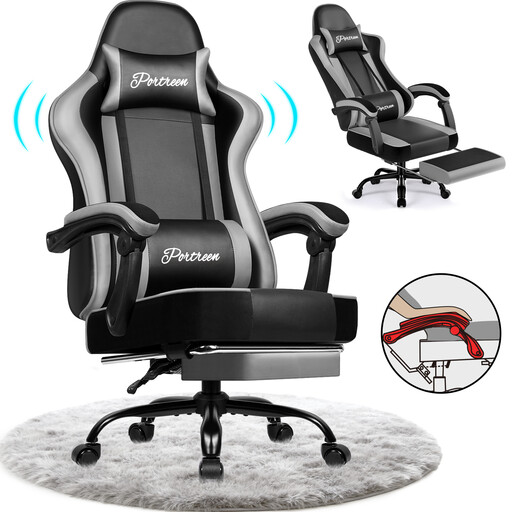
Why we chose it: This chair is built for long sessions, whether for gaming or intensive work. Its retractable footrest and deep recline transform it into a relaxation cocoon in an instant.
Far from a gimmick, the lumbar support here is a removable and adjustable cushion, as is the headrest. Its metal frame and high-density foam are calibrated for heavy use and support up to 150 kg.
Its versatility: it's both a high-performance office chair, reclining up to 170 degrees, and a true relaxation seat thanks to its integrated footrest.
We have curated a complete selection of products that meet strict selection criteria and current standards.
A chair's longevity largely depends on the quality of its materials and the intensity of its use. An entry-level model will show signs of wear (sagging foam, fragile mechanism) after only 1 to 2 years. Conversely, a mid-range or high-end chair with a metal frame and quality foam can last for 5 to 10 years, or even longer. The warranty period is often an excellent indicator of the product's durability.
Yes, a gaming chair can be an excellent solution for remote work, as it is specifically designed for long sessions. These models typically include a wide range of adjustments, lumbar and neck support (often via removable cushions), and a deep recline. Their often-bold aesthetics and PU leather upholstery, which is less breathable than a mesh back, are the main points to consider. It all depends on your priorities between ergonomic performance and a more understated look.
Here are the 4 key steps for a basic adjustment: