
Livraison le jour même ou le lendemain

Qualité garantie

Débloquez vos offres de bienvenue: Livraison GRATUITE | Jusqu'à -80 % | 30 jours d'essai gratuits à JoyPlus
Téléchargez l'application
Remote work, gaming, long study nights… Spending hours glued to your desk can quickly become a nightmare for your back. A bad chair is often the prime culprit behind back pain and chronic fatigue. Faced with a sea of options, it's easy to get lost in marketing claims and end up regretting your purchase. Before you choose your next ergonomic office chair, let's break down the common pitfalls to avoid.
The classic mistake? Falling for an aggressive design that hides subpar ergonomics, or settling for a so-called "lumbar support" that's just a removable cushion, about as useful as a gimmick in the long run. Also, beware of low-end tilt mechanisms that creak, jam, or lose their smoothness after just a few months. Our mission: to help you see beyond appearances and make a truly informed choice.
To find a comfortable office chair that's truly designed for intensive use, you need to focus on a few non-negotiable technical features. These are the guarantee of your daily well-being.
The true engine of a good office seat is its mechanism. Forget basic tilt systems where the seat and backrest recline as a single unit. Insist on a synchronous mechanism: it allows the backrest to recline more than the seat, promoting a dynamic posture, stimulating blood circulation, and relieving pressure on the intervertebral discs. Also, make sure it has multiple adjustments:
A reclining office chair that checks these boxes offers a level of customisation that makes all the difference, especially for a chair for remote work.
A simple cushion does not constitute lumbar support. True ergonomic support must be integrated into the backrest's structure and, ideally, be adjustable in height and depth to perfectly conform to the curve of your back. The best models go even further with dynamic lumbar support, which adjusts to your movements in real time to maintain constant contact with your lower back. This is a non-negotiable feature for anyone who wants to put an end to back pain.
The choice of material has a direct impact on your comfort and the chair's lifespan.
To guide you, here is our selection of models that check all the right boxes, matched with typical user profiles.
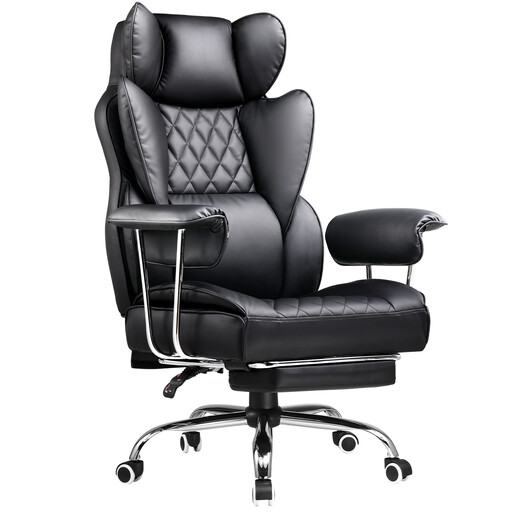
Ideal for those who switch between gaming sessions and workdays. This gaming chair combines a bold aesthetic with features designed for the long haul, like its high backrest and integrated footrest.
Unlike entry-level models, it includes a proper footrest and a robust reclining mechanism, a far cry from flimsy gimmicks.
Its high, reclining backrest for perfect back and neck support, and the retractable footrest for breaks.
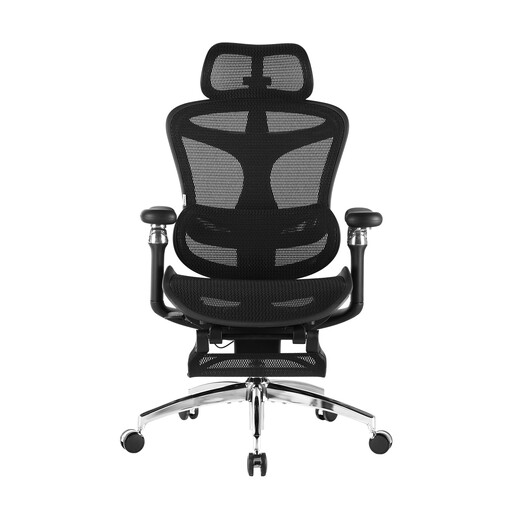
Designed for those who spend over 8 hours a day at their screen and refuse to compromise on ergonomics. This model focuses on advanced adjustments for tailor-made support.
There's no simple cushion here. The lumbar support is dynamic and integrated, following your movements for constant contact and optimal support.
Its 6D armrests and dynamic lumbar support for cutting-edge ergonomics. The breathable mesh upholstery ensures perfect thermal comfort.
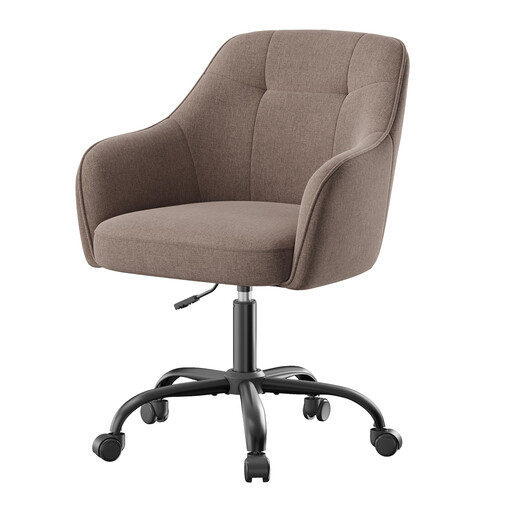
Perfect for setting up a desk corner in a student's room or for a first remote work position. It combines a compact design with essential comfort for a few hours of work, all without breaking the bank.
It gets straight to the point: a solid frame, quality padding, and reliable height adjustment. No superfluous and potentially fragile features.
Its excellent value for money. Its clean design fits in anywhere, and its fabric upholstery is as soft as it is durable.
Discover our full selection of chairs that meet our quality charter and current safety standards.
Absolutely, as long as you don't sacrifice ergonomics at the altar of design. Many models, like those from GTPLAYER or GTIMEX, are designed for marathon sessions and include highly relevant features: a high backrest, adjustable support cushions, a wide recline range, and more. The important thing is to verify that the adjustments (armrests, height) and lumbar support are suited to your body, beyond just the aesthetics.
The lifespan of an ergonomic chair depends entirely on the quality of its components and the intensity of its use. An entry-level model will show its limits (creaky mechanism, failing gas lift, peeling upholstery) after 1 to 2 years. Conversely, a mid-range or high-end chair with a metal frame, a quality synchronous mechanism, and durable upholstery can easily last between 5 and 10 years. It's a real investment in your health.
For a perfect setup, follow these four steps: