
Livraison le jour même ou le lendemain

Qualité garantie

Débloquez vos offres de bienvenue: Livraison GRATUITE | Jusqu'à -80 % | 30 jours d'essai gratuits à JoyPlus
Téléchargez l'application
Whether you're working from home or in the office, one reality is clear: we spend hours glued to our chairs. While this sedentary lifestyle is often unavoidable, the resulting back pain, neck strain, and fatigue are not. Far from being a luxury, a well-chosen ergonomic office chair is a true investment in your health and productivity.
But with an overwhelming number of options, how do you navigate it all? Don't worry. We've broken down the essential criteria and selected models that cater to very different needs. The goal: to help you find THE comfortable office chair that's right for you.
Before you jump on the first model you see, let's review the features that make all the difference. The basic principle is simple: a good office chair should adapt to your body, not the other way around.
Customisation is the watchword of ergonomics. A chair must be able to adjust to your body with precision. Here are the essential adjustments:
The upholstery of your computer chair has a direct impact on your comfort, especially after several hours.
Stability is non-negotiable. A five-star base is the standard and a guarantee of balance. A swivel chair is essential to follow your movements without strain. Finally, a detail that's anything but: the castors. Check that they are suitable for your floor (hard floors or carpet) for smooth, quiet movement that won't scratch your flooring.
After reviewing dozens of spec sheets and user reviews, our editorial team has selected three models that stand out for their value and features.

Why we love it: This is the most feature-complete model in our selection for anyone seeking maximum customisation without breaking the bank. A breathable mesh back, adjustable lumbar support, an adjustable headrest... it has everything you need to tackle long workdays. The bonus: a reclining backrest to take a real break between meetings.
Key features:
Who is it for? For remote work pros and anyone who spends more than 8 hours a day in front of a screen. If you're looking for tailored support to protect your back, this is an excellent choice.
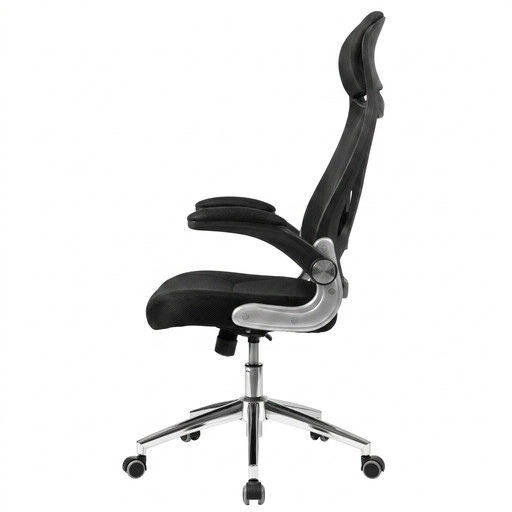
Why we love it: Its main advantage is its intelligent design. The flip-up armrests are a stroke of genius for those short on space: once raised, the chair slides neatly under the desk. Its rocking function is perfect for stretching or thinking for a few moments.
Key features:
Who is it for? The smart choice for small apartments, home offices, or shared spaces where every square inch counts. An excellent chair for remote work that has a small footprint.
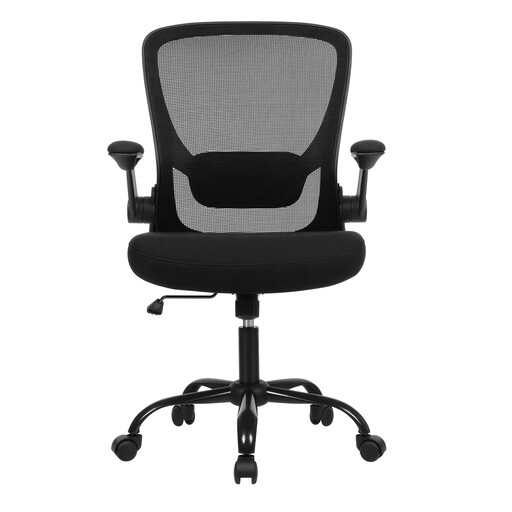
Why we love it: The focus here is on immediate comfort. The fabric upholstery and generous seat cushion provide a very welcoming feel. With its understated design, lumbar support, and flip-up armrests, it strikes the perfect balance between comfort, ergonomics, and daily practicality.
Key features:
Who is it for? Excellent value for money for students or remote workers who want the essentials without sacrificing comfort. Ideal for daily use, even if intensive.
Our selection highlights very versatile models, but your workspace may have specific constraints. For a student's room or a small office, more compact models or those with a different design might be more suitable.
? Discover our full range of the best office chairs for bedrooms to find the model that will fit perfectly into your space.
To put it simply, a standard chair is passive, while an ergonomic office chair is active. It doesn't just offer a surface to sit on, but provides true dynamic support thanks to its multiple adjustments (height, lumbar, armrests, etc.). The goal is to adapt to your body to encourage good posture and prevent musculoskeletal disorders (MSDs) related to prolonged sitting.
Allow a few days, or even a week. If your body was used to poor posture, it will need a little time to adjust to proper support. Use the first few days to test and fine-tune the settings until you find the perfect configuration for you.
Follow these 4 simple steps: