
Livraison le jour même ou le lendemain

Qualité garantie

Débloquez vos offres de bienvenue: Livraison GRATUITE | Jusqu'à -80 % | 30 jours d'essai gratuits à JoyPlus
Téléchargez l'application
Remote work, long days at the office… Spending long hours sitting down can quickly turn into a nightmare for your back and your energy levels. Far from being a luxury, an ergonomic office chair is a true investment in your health and productivity. But with an overwhelming number of options, how do you find your way? This guide is here to help you make sense of it all, with simple selection criteria and tried-and-tested models.
Before jumping on the first sale, it's crucial to understand the features that make all the difference. A good office chair should adapt to your body and your workspace, not the other way around.
Back pain is often the result of poor posture that forces the lower back to curve unnaturally. An adjustable lumbar support is therefore not an option: it's a non-negotiable feature. It must be adjustable in height and, ideally, in depth to perfectly conform to the natural curve of your spine. This is what will allow you to maintain a healthy posture and relieve pressure on your intervertebral discs, even after a marathon day.
The choice of materials has a direct impact on the comfort, breathability, and lifespan of your chair.
A comfortable office chair is, above all, a chair that caters to your every need. Here are the adjustments not to be overlooked:
To guide your choice, we have reviewed several models, focusing on their technical specifications, versatility, and overall design.

Why it stands out
This model offers an excellent balance between essential features and an accessible price point. With its understated design and flip-up armrests, it's a smart choice for small workspaces where every inch counts.
Key features
Who is it for?
Ideal for remote professionals or students looking for a functional and comfortable ergonomic chair that is easy to integrate into a bedroom or home office.
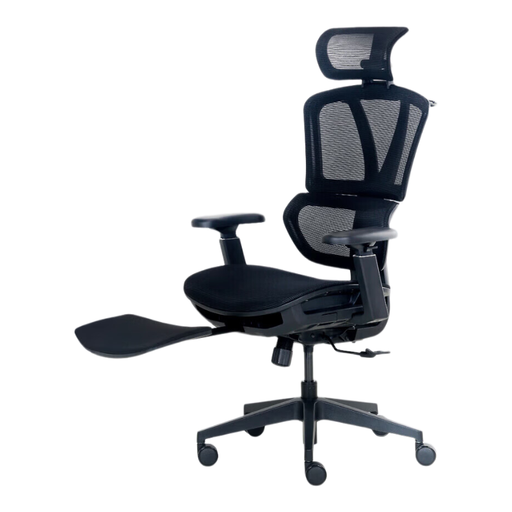
Why it stands out
The Z9 chair takes customisation to the next level. With its dual back support and retractable footrest, it sits at the crossroads of a premium office chair and a gaming chair, offering total comfort for both work and relaxation.
Key features
Who is it for?
Aimed at heavy users, whether they are gamers, developers, or professionals spending more than eight hours a day at their desk. A prime option for those seeking maximum comfort and advanced features.
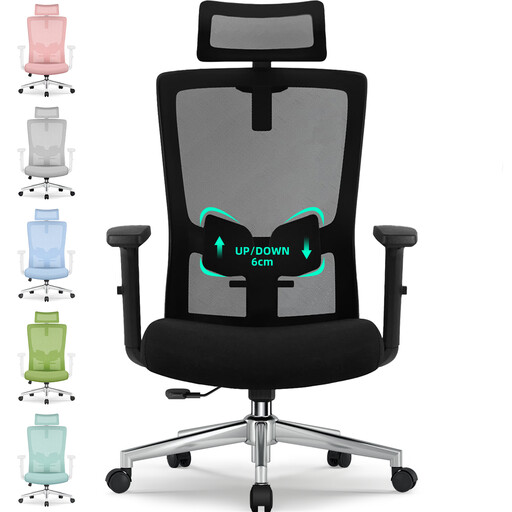
Why it stands out
This chair focuses on robustness and adaptability. Its certified components and wide range of adjustments make it a reliable and durable choice, capable of accommodating a wide variety of body types.
Key features
Who is it for?
This model is perfect for individuals looking for an ultra-adjustable and built-to-last ergonomic office chair. Its sturdiness makes it a wise choice for intensive professional use.
If these models haven't convinced you or if you have a specific idea in mind (a comfortable white chair, for example), feel free to explore our wider collection to find that perfect chair.
The main difference lies in the design philosophy. An ergonomic office chair primarily aims to maintain a healthy, neutral working posture, with often subtle adjustments and an understated design. The gaming chair, while sharing many ergonomic adjustments, adopts a bolder, racing-style aesthetic and pushes certain features further, such as a near-flat recline and the addition of removable head and lumbar pillows.
It all depends on the build quality and the intensity of your use. Entry-level models often show signs of wear after 2 or 3 years (sagging foam, creaking). In contrast, a well-made chair with certified components can easily last you 5 to 7 years, and even longer if you take good care of it.
It's simple: sit all the way back in your seat with your back straight. Then, adjust the height of the support so that it fits into the natural curve of your lower back (usually just above your beltline). You should feel firm but comfortable support, without any discomfort or unpleasant pressure points.