
Livraison le jour même ou le lendemain

Qualité garantie

Débloquez vos offres de bienvenue: Livraison GRATUITE | Jusqu'à -80 % | 30 jours d'essai gratuits à JoyPlus
Téléchargez l'application
Remote work and the long hours spent in front of our screens have become a part of daily life. This welcome flexibility, however, often brings its own set of problems: neck pain, back strain, eye fatigue... The culprit is clear: a poorly designed workstation.
There's no magic bullet here, but we offer a practical guide and a selection of accessories to help you build a healthier, more productive work environment. My role as a product expert at Joybuy? To guide you toward smart choices that enhance your workplace comfort.
Before you pull out your credit card, it's essential to keep a few fundamental principles in mind. Here are three key points to consider to make the right choices.
Every body is unique. Therefore, your equipment should adapt to you, not the other way around. For a comfortable office chair, look for models that offer seat height adjustment, lumbar support, and ideally, adjustable armrests. The same principle applies to an adjustable laptop stand: it's essential for positioning the screen at eye level and finally saying goodbye to neck strain.
A cluttered desk is a source of distraction and stress. Space-saving becomes a critical factor, especially when your desk area shares space with the living room. Consider clever accessories, like a desk phone holder that frees up your work surface, or a chair with flip-up armrests that can slide easily under the desktop. These are your allies for a more organised and calming environment.
The quality of materials determines the lifespan and comfort of your remote work equipment. An aluminium laptop stand, for example, combines lightness with sturdiness. For a chair, a breathable mesh back will make all the difference during long work sessions, while a steel base ensures rock-solid stability.
Now that the basics are covered, here is our selection of three smart products, each addressing a specific ergonomic or organisational challenge.
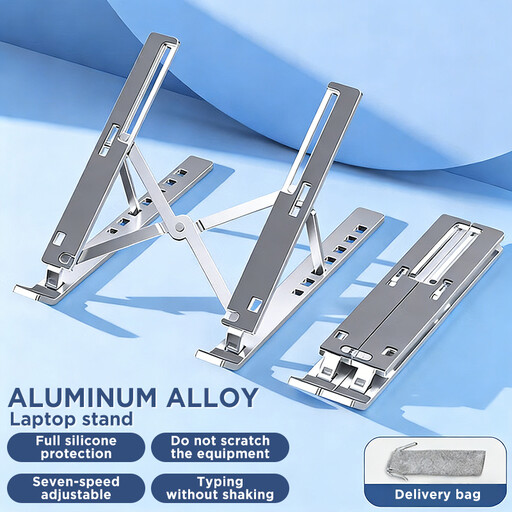
Why it stands out This stand stands out with its all-aluminium design, which provides excellent stability while helping to dissipate your computer's heat. Fully foldable, it slips into any bag, making it the perfect companion for those who switch between the office and home.
Benefits
Who is it for? For nomadic remote workers, students, and anyone who spends long hours on their laptop and wants to correct their posture without the bulk of an external monitor.
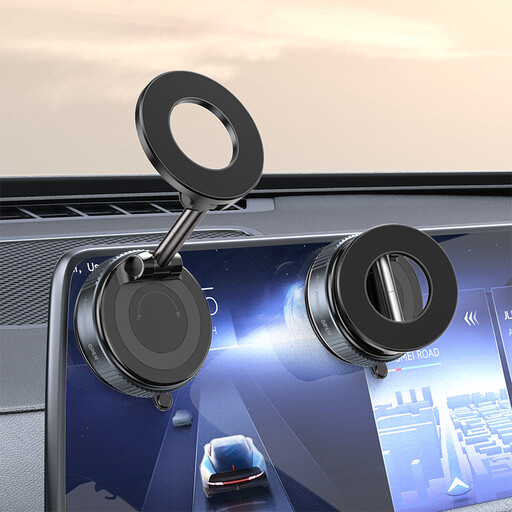
Why it stands out What makes this holder special? Its ingenious vacuum suction cup system. It attaches securely to any smooth surface (desk, glass, tile) and removes just as easily, without leaving a single mark. MagSafe compatible, its powerful magnet ensures a perfect hold for your smartphone.
Benefits
Who is it for? For anyone who wants to keep their smartphone in view, whether for a video call, glancing at a recipe, or simply freeing up desk space.
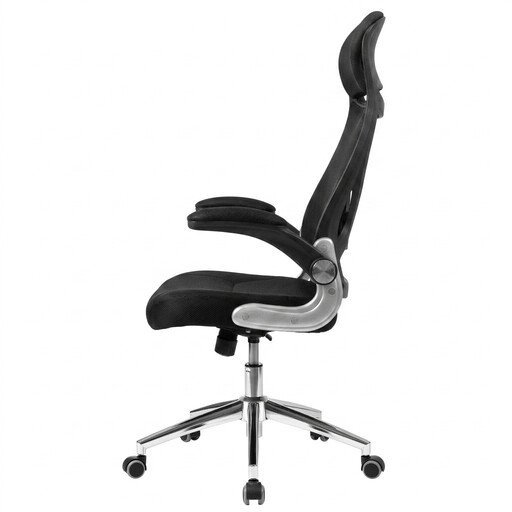
Why it stands out Its key feature? The flip-up armrests. This simple function changes everything: it allows the chair to slide completely under the desk. A real space-saver, ideal for small spaces. And of course, it doesn't forget the essentials, offering basic ergonomic adjustments for proper support.
Benefits
Who is it for? Ideal for remote work in a small space. It's for those looking for a comfortable office chair that is both functional and doesn't sacrifice essential ergonomic adjustments.
A good ergonomic office accessory only reaches its full potential with the right desk. If yours is too high, too low, or too small, it might be time to consider a more flexible solution.
For those who need flexibility, take a look at our selection of collapsible desks with storage. They provide an excellent foundation for building a workstation that is both ergonomic and tidy.
To start, three items are fundamental:
Here is a simple four-step method:
Absolutely, and it's even an essential. Placing your laptop directly on the desk forces you to bend your neck, creating enormous tension on your cervical spine and upper back. An adjustable laptop stand raises the screen to your eye level. The result: your head aligns with your spine, which drastically reduces the risk of pain.