
Livraison le jour même ou le lendemain

Qualité garantie

Débloquez vos offres de bienvenue: Livraison GRATUITE | Jusqu'à -80 % | 30 jours d'essai gratuits à JoyPlus
Téléchargez l'application
By the Joybuy Product Recommendation Officer, 2026-07-05
Long days working on a computer have become the norm for many of us. The downside? Strain that builds up in the wrist, arm, and even the shoulders. This is where the ergonomic mouse comes in: designed to fit the shape of your hand and encourage a natural posture, it's your best ally for relieving these aches and pains.
But with an overwhelming number of options on the market, how do you make the right choice? This guide breaks down the key criteria and presents our top picks to help you find the perfect mouse for your body and your needs.
To help you see clearly, let's review the three fundamental points that will guide your decision.
The design is the first thing that stands out.
How your mouse connects to your computer is a more strategic choice than it might seem.
Be aware that most ergonomic mice are designed for right-handed users. If you are left-handed, be sure to check if a dedicated version is available. Finally, some mice, especially ergonomic gaming models, come with advanced features: ultra-precise sensors (high DPI), programmable buttons, RGB lighting, and more. These are assets that will appeal to creatives and gamers looking for peak performance.
To illustrate these different profiles, here are three models that caught our attention.
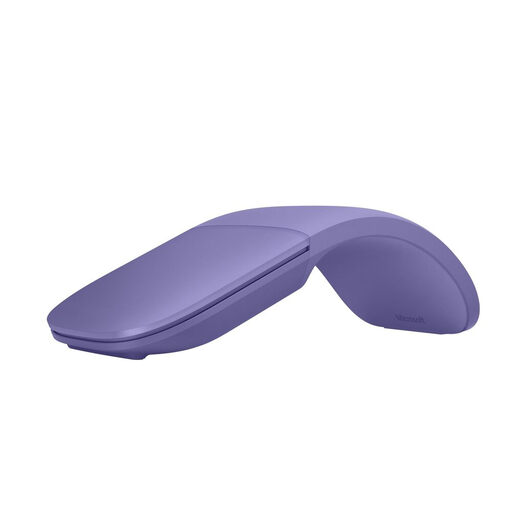
Why We Love It
The Microsoft Surface Arc is truly one-of-a-kind. Its concept is brilliant: this foldable mouse turns on by simply snapping it into an arched position and turns off when flattened. The result: it becomes ultra-thin and can be stored anywhere. Instead of a scroll wheel, it features a full touch-sensitive surface that handles both vertical and horizontal scrolling.
Pros
Who Is It For? This portable mouse is tailored for professionals on the go, students, and all fans of minimalist design. It's the perfect solution for mobile use, combining elegance and practicality.
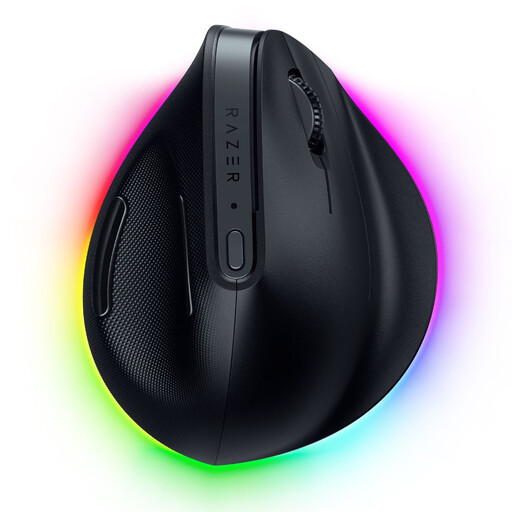
Why We Love It
This right-handed vertical mouse is a powerhouse of technology that makes no compromises on comfort. It combines cutting-edge ergonomics with top-tier performance: triple connectivity (wireless 2.4 GHz, Bluetooth, and wired USB-C), an ultra-precise optical sensor, and advanced features (including AI shortcuts) via the Razer Synapse software.
Pros
Who Is It For? It's aimed at professionals, creatives, and power users looking for an RSI-prevention mouse without compromising on performance. Its hybrid DNA, at the crossroads of productivity and gaming, will also appeal to gamers who care about their comfort.
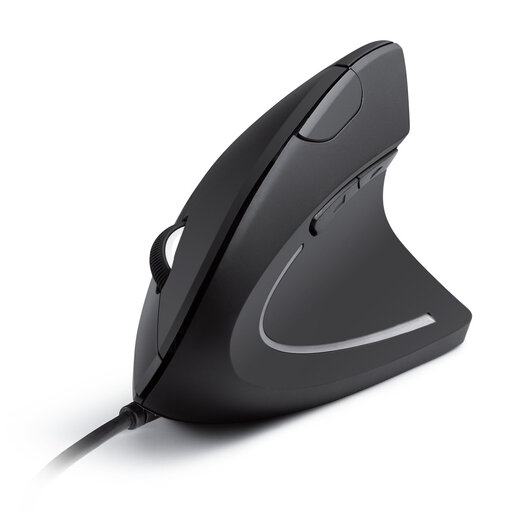
Why We Love It
The Anker vertical mouse is the ideal and affordable entry point into the world of ergonomics. It gets straight to the point: a vertical shape that promotes the "handshake" position, a foolproof wired connection, and convenient navigation buttons.
Pros
Who Is It For? This is the perfect model for office workers, students, or anyone who wants to test the benefits of a vertical mouse on a budget. Its wired connection is a guarantee of absolute reliability.
Our selection covers a variety of uses, but choosing a mouse is above all a personal matter. If these models don't check all the boxes, don't worry: there are a multitude of other mice with different shapes, sizes, and functions.
Feel free to explore our full catalog to find the perfect match.
Explore our full range of mice to find the model that suits your desk and your needs.
An ergonomic mouse fits the shape of your hand and promotes a more neutral posture for your entire arm and wrist. In practical terms, it helps reduce the strain and discomfort associated with long hours at the computer, thus playing a preventive role against repetitive strain injuries (RSI).
The vertical mouse represents the most significant change: it forces the "handshake" position to eliminate forearm twisting. The traditional ergonomic mouse, on the other hand, improves support for the palm and fingers while maintaining a more conventional horizontal grip. The choice really depends on your personal comfort and the level of postural correction you're looking for.
Absolutely. Many gaming mice are designed with advanced ergonomics to ensure comfort during long gaming sessions, featuring sculpted shapes and ideally placed buttons. The main difference is that their DNA is performance (speed, sensor precision), whereas a pure RSI-prevention mouse focuses 100% on postural comfort, sometimes at the expense of responsiveness.