
Livraison le jour même ou le lendemain

Qualité garantie

Débloquez vos offres de bienvenue: Livraison GRATUITE | Jusqu'à -80 % | 30 jours d'essai gratuits à JoyPlus
Téléchargez l'application
Aching wrist, numb hand, sore forearm? If these signs feel familiar after a long day at work, it's high time to reconsider the tool you use all day long: your mouse. An ergonomic mouse isn't a gimmick, but a genuine investment in your daily comfort and health.
The problem is, the market is flooded with models, each with more enticing promises than the last. As a product expert at Joybuy, my mission is to help you cut through the noise. Here's a breakdown of the pitfalls to avoid and the criteria that truly matter for making the right choice.
The discomfort of a standard mouse logically drives many users to seek an alternative. Unfortunately, some manufacturers ride this trend with marketing claims that can be misleading.
To make the right choice, focus on the features that truly matter for your use case.
This is THE number-one criterion. The shape of the mouse determines the posture of your hand and wrist.
The choice between wired and wireless depends primarily on your workspace and habits.
The good news is that many wireless models are now rechargeable mice via a USB-C port—a much more convenient and eco-friendly solution than disposable batteries.
Here are a few options that cater to different user profiles, based on the objective criteria we've just discussed.
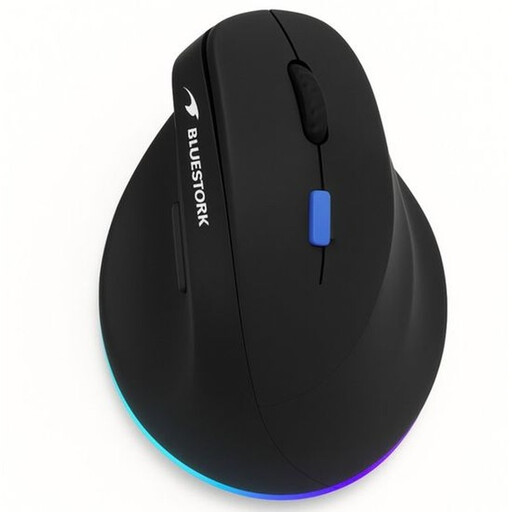
Why it's a great choice: Perfect for those who spend long days in front of a screen and feel fatigue setting in their wrist. Its dual wireless connectivity (2.4 GHz and Bluetooth) lets you switch between your work computer and personal tablet in an instant.
It doesn't just settle for a vague "ergo" label. Its vertical mouse design promotes a natural forearm posture, a true guarantee of long-term comfort.
Its rechargeable USB-C battery (goodbye, disposable batteries!) and adjustable sensitivity up to 4800 DPI ensure great versatility, from simple office work to precision tasks.
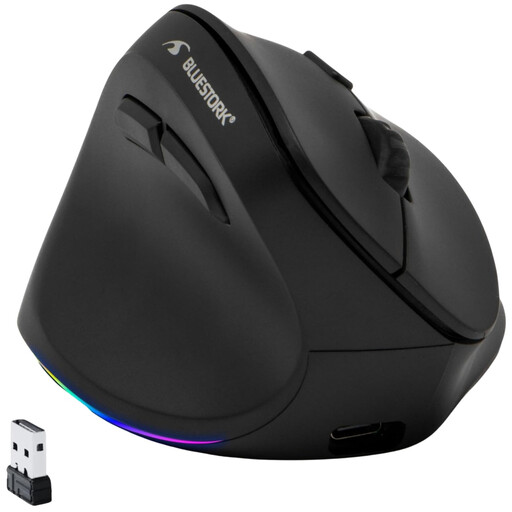
Why it's a great choice: Left-handed users are too often forgotten when it comes to ergonomics. This model is specifically dedicated to them, with a mirrored vertical design that finally offers the same level of comfort as right-handed models.
It doesn't fall into the trap of ambidextrous design, which is often just a clumsy compromise. This is a genuine left-handed mouse, designed from the ground up for a natural, strain-free grip.
Reliable 2.4 GHz wireless connectivity, a rechargeable USB-C battery, and a precise sensor up to 4800 DPI. All in a shell finally designed for them.
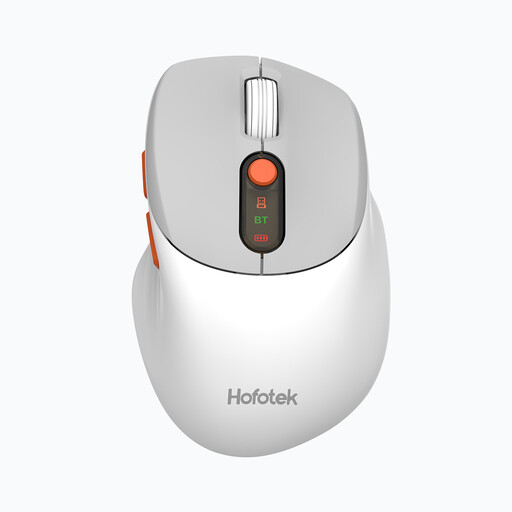
Why it's a great choice: For those who want to improve their comfort without breaking the bank. It offers a classic ergonomic shape, which is already much more comfortable than a basic mouse, along with highly appreciated modern features.
It doesn't bet everything on the DPI race. Its sensitivity (up to 4000 DPI) is more than sufficient for office work. It prefers to focus on tangible benefits: dual connectivity and silent clicks.
A silent mouse that's feather-light (62 g) and capable of connecting to 3 devices. Excellent value for everyday use.
But comfort doesn't stop with the mouse. A mouse pad with a gel wrist rest can radically improve your experience. It stabilises the wrist while providing an optimal tracking surface for the sensor. The Bluestork ergonomic mouse pad with gel cushion is an excellent addition to complete your setup.
We have selected a full range of products that meet our selection criteria and European safety standards.
Is a vertical mouse really useful? Yes, for the vast majority of users. By keeping the forearm in a neutral position, it helps reduce muscle strain and pressure on the wrist's nerves. A short adjustment period is often necessary, but the long-term benefits are universally praised by its users.
What is the lifespan of a wireless ergonomic mouse? It all depends on the quality of its components, especially the switches (for the "clicks") and the battery. A well-made model is designed to last for several years. For a rechargeable mouse, the battery capacity will naturally decrease over time, but it will remain functional for a very large number of charge cycles.
Do I need high sensitivity (DPI) for office work? Absolutely not. High DPI simply means the cursor travels further across the screen for the same hand movement. For office work, a sensitivity between 800 and 1600?DPI provides control that is both precise and comfortable. High DPI sensitivity is primarily a marketing gimmick or a feature reserved for FPS gamers and professional graphic designers.