
Livraison le jour même ou le lendemain

Qualité garantie

Débloquez vos offres de bienvenue: Livraison GRATUITE | Jusqu'à -80 % | 30 jours d'essai gratuits à JoyPlus
Téléchargez l'application
An ergonomic gaming chair should support you for hours of gaming, working from home, reading or relaxing, without becoming cumbersome or losing stability. However, a chair’s sporty appearance does not guarantee a good purchase. Seat width, the quality of its adjustments and its weight capacity often matter more than logos or colours.
Before comparing models, it is worth knowing the most common pitfalls.
A reclining gaming chair may offer a wide range of movement, but not every position will necessarily suit your needs. A highly reclined backrest is useful for watching a video or taking a break. For working at a keyboard, a more upright angle will generally be preferable.
Check the stated angles, whether there is a locking mechanism and how stable the chair is in each position. A backrest that reclines significantly must rest on a stable base and should never be used beyond the stated weight limit.
A gaming chair with a footrest can be comfortable during breaks, but this accessory adds a moving part that takes up space. Check its length, deployment mechanism and the space available beneath your desk.
The footrest must be fully extended and properly locked before use. It does not replace correct seat-height adjustment, particularly during a work session.
The term can refer to very different configurations. A gaming chair with lumbar support is not automatically suitable for every body shape. The shape of the backrest, seat depth, armrest adjustment and desk height remain crucial.
A gaming chair with a headrest may be better suited to users who switch between gaming and relaxing. In a warm room, an ergonomic mesh office chair will provide better air circulation.
The stated capacity should be compared with your weight, but also with how you intend to use the chair. For a 150 kg gaming chair, check that this figure applies to the complete chair rather than just one component. The base, gas lift, castors and fixings must be assembled according to the instructions.
The products featured here state a capacity of either 135 or 150 kg, depending on the model. Exceeding the stated limit is not recommended, even occasionally.
For prolonged use, prioritise the adjustments you will use every day:
A 360° swivel gaming chair makes it easier to move around your desk. Also remember to check the diameter of the base and the space required for the castors to move.
Fabric and mesh generally improve ventilation, while faux leather can be cleaned quickly with a damp cloth. On the other hand, synthetic upholstery can be more sensitive to heat, scratches and abrasive products.
Velvet, corduroy and padded fabrics provide a warmer feel, but require spot cleaning. In all cases, follow the manufacturer’s care instructions and regularly check the screws and moving mechanisms.
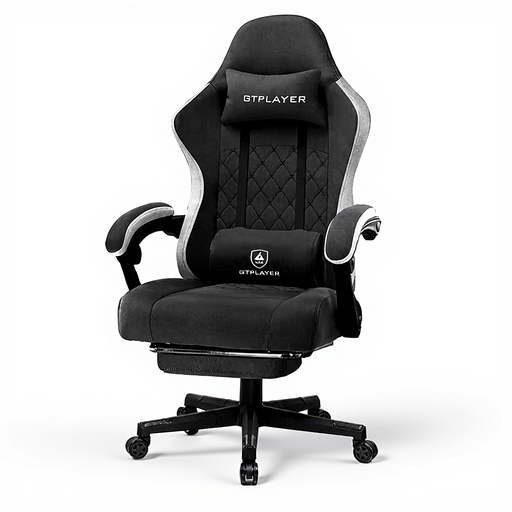
Why this choice suits this user profile : Its fabric design and wide range of adjustments make it a good first all-round chair, equally comfortable for gaming and working from home.
The fabric upholstery means you are not choosing based on appearance alone and will suit users who prefer a less smooth surface than faux leather.
Spring seat, high backrest, footrest and a stated capacity of 150 kg according to the product information.
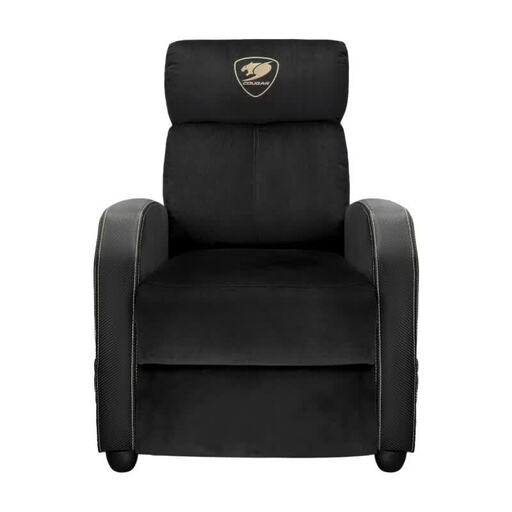
Why this choice suits this user profile : This sofa-style chair is aimed at gamers looking for a supportive seat and a genuine space for relaxing, separate from their workstation.
The three stated positions — 95°, 135° and 160° — help distinguish between working, taking a break and relaxing, rather than relying on a single recline angle.
Steel frame, velvet upholstery, folding footrest and a stated maximum load of 135 kg.
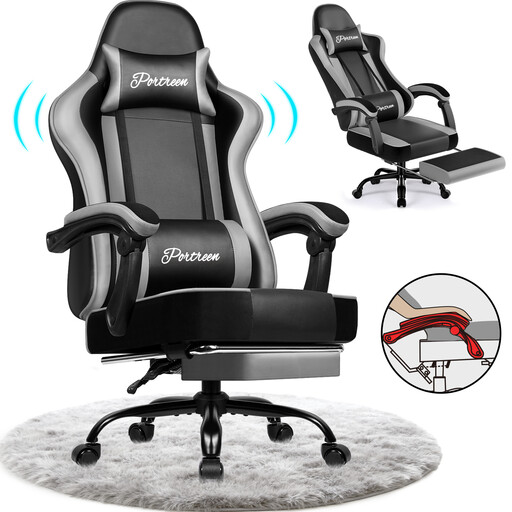
Why this choice suits this user profile : Its adjustments and stated capacity of 150 kg meet the needs of users who switch between gaming, working, reading and relaxing.
The product information specifies a recline range of 90° to 170°, 10 cm of height adjustment and a footrest that must be extended and then locked.
Reclining backrest, headrest, lumbar support, high-density foam and water-repellent faux-leather upholstery.
We have compiled a complete, real-time updated list of products that meet these demanding selection criteria as well as European safety standards.
After assembly, tighten every screw according to the instructions and check that the base is resting firmly on the floor. When working or gaming at a desk:
Even the best chair cannot replace taking breaks, changing position regularly and adjusting the height of your screen and desk.
Yes, provided it offers adjustable height, a sufficiently stable seat and armrests suited to your desk. For several hours of typing, also consider the breathability of the upholstery and whether the backrest can be kept in an upright position.
It depends on how often it is used, the weight it supports, the quality of the assembly and how well it is maintained. Regularly check the screws, base, castors and recline mechanism. Stop using the chair if any part is cracked, unstable or damaged.
A footrest can be useful for breaks, controller gaming and reading. It is less useful if the chair is primarily for professional use. Check that it folds away easily, provides a sufficiently wide surface and does not obstruct your legs beneath the desk.