Joybuy Insights

Ergonomic Gaming Chair Buying Guide: How to Choose the Right One

Spending hours in front of a screen, whether for gaming, work, or studying, puts a lot of strain on our bodies. A good chair is no longer a luxury, but a necessity to protect your back and ensure long-term comfort. However, the ergonomic gaming chair market is saturated with marketing promises and confusing technical jargon.

Before you invest, it's crucial to know how to avoid the most common pitfalls. Two problems consistently appear in reviews from disappointed users:

  1. The Low-Cost "Leather" Mirage: Many chairs feature a "PU leather" upholstery that looks premium in photos. In reality, entry-level models crack, peel, and fade after just one or two years, not to mention their lack of breathability during long sessions.
  2. Superficial Ergonomics: The term "ergonomic" is often overused, applied to chairs that offer only very limited adjustments. A true ergonomic office chair must adapt to your body, not the other way around. A simple, non-adjustable lumbar pillow just doesn't cut it.

This guide aims to give you clear benchmarks for making an informed choice, focusing on the features that truly make a difference day-to-day.

Beyond the Look: The Criteria That Really Matter

A flashy design doesn't guarantee comfort. To choose a gaming chair that will genuinely take care of your back, focus on these three fundamental points.

1. Upholstery: Breathable Fabric vs. Faux Leather, The Great Debate

The choice of material is decisive for long-term comfort.

  • Fabric: This is the top choice for intensive use. It's breathable, which prevents sweating during long gaming or remote work sessions in the summer. Quality fabrics are also very durable and offer a softer, warmer feel.
  • Faux Leather (PU): Easy to clean, it provides a more "premium" look. Be careful, though: its breathability is almost zero, which can quickly become unpleasant. Its durability varies enormously depending on the quality; low-end versions degrade at lightning speed.

2. True Ergonomics: What Adjustments Are Essential?

A truly ergonomic chair offers deep customisation. Here are the points to check for a good office chair that protects your back:

  • Lumbar Support: It must be adjustable in height and depth to perfectly match the natural curve of your back. A simple removable cushion is a stopgap solution, but an integrated mechanism will always be more precise.
  • Armrests: Aim for at least 3D armrests (adjustable in height, back-and-forth, and rotation) or, ideally, 4D (which add side-to-side adjustment). They are essential for relieving tension in the shoulders and neck.
  • Recline and Tilt: The backrest should be able to recline (up to 150° or more for breaks) and have a lockable tilt mechanism. This function is perfect for changing positions and boosting blood circulation.

3. The Frame and Base: The Skeleton of Your Chair

The longevity of your computer chair depends on its internal construction.

  • The Frame: Opt for a steel frame, which ensures rock-solid strength and stability, unlike low-end wood or plastic frames that can give way over time.
  • The Base: A 5-star base is the standard. Metal (aluminium or steel) models are much more robust than nylon ones. However, good reinforced nylon can be sufficient for light to medium builds.
  • The Gas Lift: This is what allows you to adjust the height. Class 4 gas lifts are a guarantee of safety and durability, capable of supporting heavier weights.

Recommended Options for Different User Profiles

Rather than looking for a one-size-fits-all model, it's wiser to find the one that matches your use case. Here is our selection for 2026.
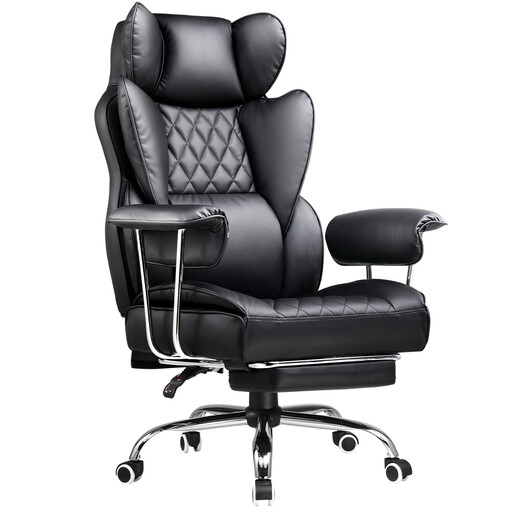
IDEAL FOR: THE VERSATILE USER (GAMING & REMOTE WORK)
GTPLAYER Gaming Chair, Executive Office Desk Chair with Footrest

GTPLAYER Gaming Chair, Executive Office Desk Chair with Footrest

Why we recommend it: This chair is a chameleon: it combines the understated aesthetic of an office chair with gaming features like a deep recline and a footrest. Ideal for those who share their space between work and play.

How It Avoids the Pitfall

It goes beyond the "ergonomic" label by offering concrete, useful features like a lumbar support and a footrest, which genuinely improve comfort for various activities.

Key Advantage

Versatility and absolute comfort thanks to the integrated footrest, perfect for unwinding after a long workday or between matches.
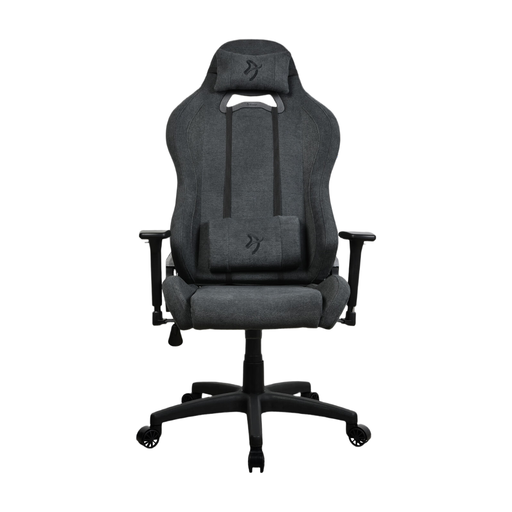
IDEAL FOR: MARATHON SESSIONS (COMFORT & DURABILITY)
Arozzi Torretta SoftFabric - Ergonomic Gaming or Office Chair

Arozzi Torretta SoftFabric - Ergonomic Gaming or Office Chair

Why we recommend it: Designed for long-term comfort, its soft and breathable fabric upholstery is its main asset. It's the sensible choice for anyone who spends hours at their desk, whether for gaming or working.

How It Avoids the Pitfall

It bypasses the low-end faux leather trap by betting everything on a quality fabric. No more issues with heat, discomfort, and premature wear. Its robust metal frame guarantees its longevity.

Key Advantage

Breathability and durability of the SoftFabric upholstery, combined with essential ergonomic adjustments (3D armrests, 165° recline).
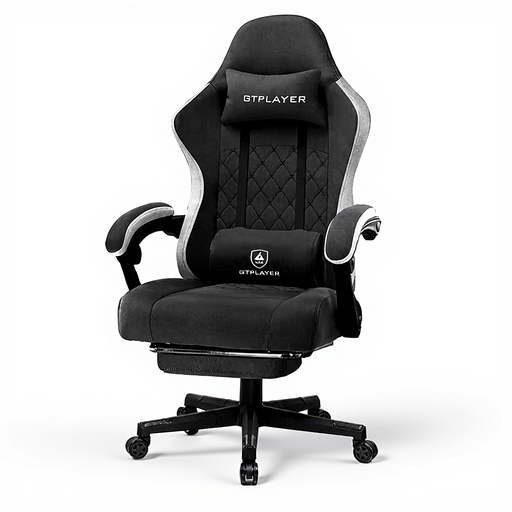
IDEAL FOR: THE FEATURE-FOCUSED GAMER
GTPLAYER Gaming Chair Ergonomic with Fabric Surface

GTPLAYER Ergonomic Gaming Chair with Fabric Surface

Why we recommend it: This model is a great middle-ground. It offers the breathable comfort of fabric, a spring seat for better support, and a footrest for total relaxation between games.

How It Avoids the Pitfall

By combining a fabric upholstery and a spring seat, it offers a tangible comfort boost over standard foams, while avoiding the drawbacks of faux leather.

Key Advantage

The winning combination of breathable fabric and a spring seat, complemented by a footrest for an optimal relaxation experience.

Looking for other fabric chairs that deliver?

We have selected the best models for you that meet our criteria for quality, comfort, and safety.

Frequently Asked Questions about Gaming Chairs

What is the lifespan of an ergonomic gaming chair?

It all depends on the quality of the materials and maintenance. A model with a steel frame, a class 4 gas lift, and quality fabric upholstery can easily last more than 5 years. Conversely, entry-level faux leather models often show signs of wear (cracking, etc.) after only 1 to 2 years. Regularly tightening the screws and proper cleaning will extend its lifespan.

Is a footrest on a gaming chair a gimmick or a real feature?

It depends on your usage. For intense gaming or work, it's rarely used. However, it becomes a real asset for moments of relaxation: watching a movie, following a stream, or simply lying back for a short break. If your chair also serves as your relaxation cocoon, it's an undeniable plus.

How do you properly adjust your chair to relieve back pain?

For an optimal posture, follow these steps:

  1. Height: While seated, adjust the height so your feet are flat on the floor and your knees are at a 90-degree angle.
  2. Depth: Leave a space of two to three fingers between the edge of the seat and the back of your knees.
  3. Lumbar Support: Adjust it to support the natural curve of your lower back without pushing you forward.
  4. Armrests: Adjust their height so your forearms rest naturally and your elbows form a 90-degree angle, with your shoulders relaxed.