
Livraison le jour même ou le lendemain

Qualité garantie

Débloquez vos offres de bienvenue: Livraison GRATUITE | Jusqu'à -80 % | 30 jours d'essai gratuits à JoyPlus
Téléchargez l'application
An ergonomic gaming chair needs to meet very real requirements: spending several hours in front of a screen, changing position regularly, working with limited space, and being able to game, work or watch a film in comfort. The sporty look of a gaming chair alone doesn't make it a good purchase.
Before comparing models, it's worth distinguishing between hard-to-verify promises and the details that will genuinely make a difference day to day.
A lumbar cushion, headrest or footrest can be useful, provided they suit your body shape and your setup. A fixed accessory can even become uncomfortable if the seat height or backrest angle isn't right for you.
In particular, check:
Faux leather, usually made from PU or PVC blended with PU, is easy to wipe clean with a cloth. In a warm room, however, it can retain more heat than fabric or a mesh back. A textile cover lets air circulate better, but needs more care when it comes to stains.
The right choice therefore depends on your room, whether you have pets, and how often you use the chair – not just on the look of the gaming chair.
A chair that looks sturdy can still be uncomfortable if the seat is too narrow or the backrest doesn't suit your height. The maximum weight stated by the manufacturer must be respected, but that doesn't guarantee optimal comfort for every body type.
Also remember to measure the space under your desk. A gaming chair with a footrest may need more room when reclined.
For working or gaming at a keyboard, a near-vertical backrest helps you maintain a stable position. For reading or watching a video, a more reclined angle can be welcome. The models featured here offer different ranges: the GTIMEX with footrest has a backrest adjustable from 90 to 170 degrees, while the GTPLAYER in faux leather offers a recline of 90 to 150 degrees.
An adjustable seat height of around 10 cm lets you align your forearms with the desk and keep your feet flat on the floor. This adjustment won't compensate for a desk that's too high or too low, but it does make it easier to adapt to different workstations.
An adjustable lumbar support lets you move the point of contact to better follow the curve of your lower back. The headrest should support your neck without pushing your head forward. As for the armrests, they should be adjusted so that your shoulders stay relaxed and your elbows stay close to your body.
The massage function offered on some lumbar cushions usually works via USB. This is a relaxation accessory, not a medical device: be wary of any claims that promise to treat or relieve pain.
A metal frame, a wide base and multi-directional castors all contribute to stability, but the quality of assembly is what really counts. Tighten the screws following the instructions, then check them regularly.
Some models mention BIFMA or SGS references in their product listing. These certifications or inspections should be verified in the documentation that matches the exact model in question. They don't replace the need to follow the usage instructions: a level surface, maximum weight, tilt mechanism and no modifications to the gas lift.
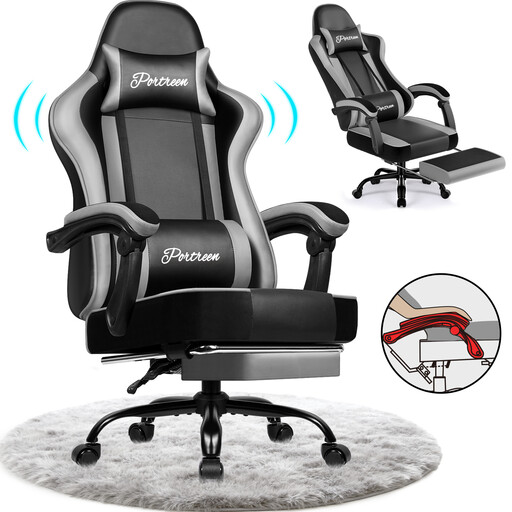
Why this choice suits this profile: This versatile chair is ideal as a first setup, whether for gaming, working or reading. It offers a height adjustment of 10 cm, a backrest that reclines from 90 to 170 degrees and a stated maximum weight capacity of 150 kg.
The adjustments are stated with concrete values and the footrest is retractable: it doesn't get in the way when you're working.
PU upholstery described as water-repellent, metal frame for the footrest, lumbar cushion and headrest included.
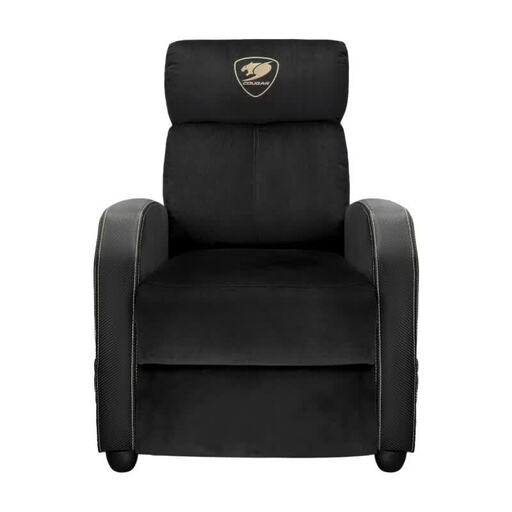
Why this choice suits this profile: This gaming sofa is aimed at those who want generous seating and a more living-room feel. Its backrest offers three positions: 95, 135 and 160 degrees.
The recline angles are pre-set and the stated maximum weight capacity is 135 kg. The product listing also details the precautions to take to prevent tipping.
Steel frame, velvet upholstery, foldable footrest and side pocket for storing accessories.
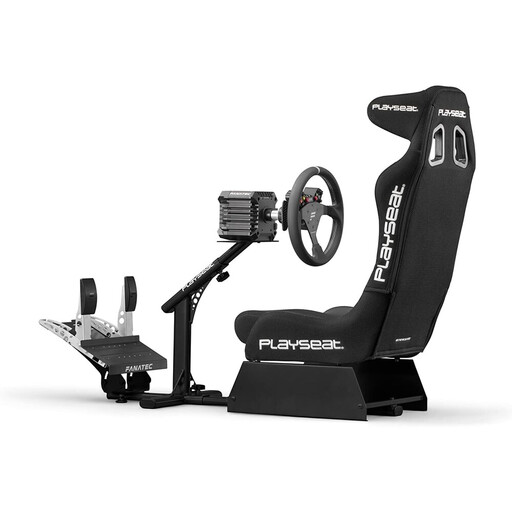
Why this choice suits this profile: This racing simulator seat is designed to accommodate a steering wheel and pedal set. It suits users from 120 to 220 cm tall and supports up to 120 kg.
This isn't a disguised office chair: the steering wheel and pedal mounts are integrated into a foldable metal frame.
Stated compatibility with Logitech, Thrustmaster, Fanatec, PC and several consoles, with foldable storage.
We've put together a full, real-time updated list of products that meet these demanding selection criteria and European safety standards.
Even an adjustable gaming chair needs to be set up properly. Adjust the height so that your feet are flat on the floor, position the screen directly in front of you, and bring the keyboard close enough to avoid straining your shoulders. Adjust the recline gradually rather than staying in a very laid-back position all the time.
For maintenance:
A well-maintained gaming chair will keep its adjustments and comfort for longer. Its lifespan, however, depends on how often it's used, the weight it supports, how much it's moved around, and the quality of its assembly.
Yes, provided it lets you adjust the height, recline and armrest position. For eight hours of work, also consider the seat depth, how breathable the upholstery is, and whether you can get close enough to your desk.
An adjustable lumbar support can help you fine-tune your sitting position. It is not a medical treatment and doesn't replace taking breaks or moving around, nor does it make up for a poorly configured workstation.
It's handy for reading, watching a video or relaxing between games. For keyboard and mouse gaming, the footrest is usually kept folded away to maintain an active, stable position.