
Livraison le jour même ou le lendemain

Qualité garantie

Débloquez vos offres de bienvenue: Livraison GRATUITE | Jusqu'à -80 % | 30 jours d'essai gratuits à JoyPlus
Téléchargez l'application
Spending hours in front of a screen, whether for gaming, work, or studying, puts a heavy strain on our bodies. Poor posture can quickly lead to back pain and persistent fatigue. An ergonomic gaming chair is therefore not a luxury, but a vital investment in your health. The problem? The market is saturated with models making alluring marketing promises that often hide a much less impressive reality.
Before you commit, it's crucial to know how to avoid the most common traps that lead to a purchase you'll bitterly regret:
This guide is here to help you see beyond the aesthetics and focus on the features that truly matter. The goal: to choose a gaming office chair that will be a reliable ally for years to come.
To make an informed choice, you need to know how to decode the spec sheet of a good gaming seat. Here are the three non-negotiable points to scrutinise.
A true ergonomic office chair should adapt to you, not the other way around. Insist on finding these key adjustments:
The upholstery has a direct impact on the comfort and lifespan of your chair.
The safety and longevity of your computer chair depend on a solid foundation.
Keeping these criteria in mind, we have found several models that meet different needs, always prioritising function and durability over mere marketing gimmicks.
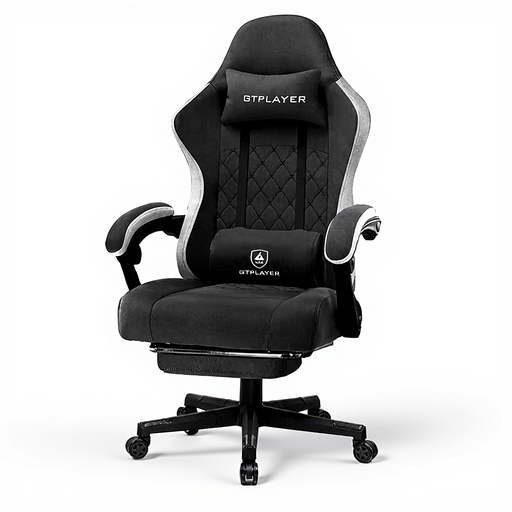
The ideal user: Perfect for those who switch between long gaming sessions and remote workdays. Its breathable fabric upholstery prevents heat-related discomfort, while the footrest offers welcome versatility for moments of relaxation.
This model sidesteps the pitfall of low-end PU leather by opting for a durable fabric. It offers tangible adjustments (recline, footrest) that justify its ergonomic label.
Breathable comfort: The fabric surface and spring seat cushion ensure airy comfort and support that won't sag. The 10 cm safety gas lift allows for reliable adjustment.
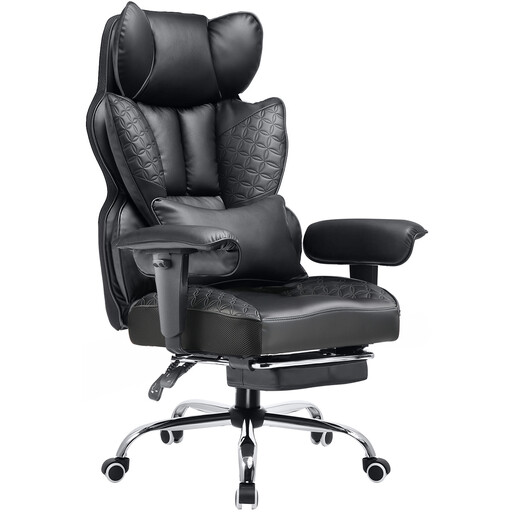
The ideal user: Designed for larger individuals or those who spend more than 8 hours a day in their chair. Its reinforced structure and wide seat offer rock-solid support and durability for both work and play.
This chair tackles the problem of fragile components head-on. Its "Heavy Duty" design ensures that the gas lift, base, and frame will withstand intensive use and a high weight capacity, where a standard model would quickly show its limits.
Robustness and space: Its "Big and Tall" design provides a wider seat and a taller backrest for maximum comfort. The high-quality PU leather upholstery and reclining footrest make it an excellent **comfortable office chair**.
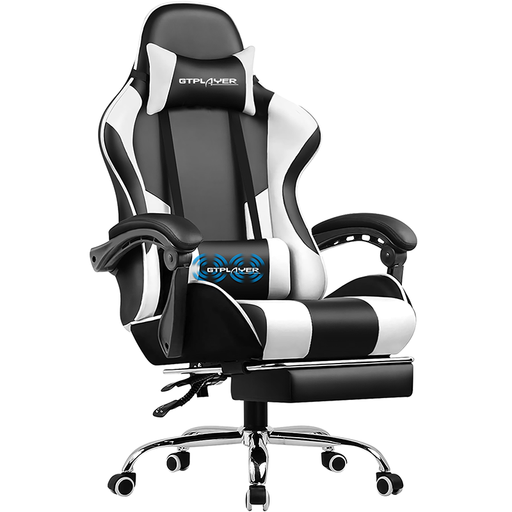
The ideal user: For those who want more than just a chair and are looking for features dedicated to relaxation. The massaging lumbar cushion and deep recline (up to 135 degrees) make it a true cocoon for unwinding after an intense session.
Rather than relying on an aggressive design, this chair integrates real-world features. The massage function isn't just a gimmick; it's a vibrating feature that helps relieve lumbar fatigue, providing tangible added value.
Relaxation features: The combination of a massaging lumbar cushion, retractable footrest, and deep recline makes it a champion of relaxation. Its sturdy metal frame ensures perfect stability, even in a nearly flat position.
We have compiled a comprehensive list of products that meet our demanding specifications for quality and safety.
Its longevity varies enormously depending on the quality of the materials and the intensity of your use. An entry-level model with a plastic base and thin PU leather will show signs of wear in 1 to 2 years. Conversely, a mid-range ergonomic gaming chair with a metal base, a Class 4 gas lift, and quality upholstery (thick fabric or PU) can easily last 5 years or more with minimal maintenance.
Both aim for comfort, but with different philosophies. A classic ergonomic office chair often prioritises a more understated design and fine-tuned adjustments for an active work posture. The gaming chair, on the other hand, is distinguished by its more enveloping, bucket-seat style support, a high backrest for the neck and shoulders, and relaxation-oriented features (deep recline, footrest). The best choice therefore depends on your usage and personal preference.
Proper adjustment is highly personal, but here are the basics to follow: