
Livraison le jour même ou le lendemain

Qualité garantie

Débloquez vos offres de bienvenue: Livraison GRATUITE | Jusqu'à -80 % | 30 jours d'essai gratuits à JoyPlus
Téléchargez l'application
Whether you're a dedicated gamer, a remote professional, or a student pulling all-nighters, long hours of sitting put a serious strain on your back. Far from being a luxury, a good chair is a true investment in your health and comfort. This guide is here to help you navigate the options and choose the perfect ergonomic gaming chair for you, with practical advice and a selection of tried-and-tested products.
To find the perfect fit, you need to focus on a few key criteria. Here are the points to check to ensure your future chair is perfectly suited to your body type and habits.
The principle of ergonomics is simple: the chair should adapt to you, not the other way around. A good reclining gaming chair allows you to change positions throughout the day, which is crucial. Aim for a backrest that can recline from 90° (work position) to at least 135° (relaxation position). The ability to adjust the seat height and armrests is just as essential for a healthy posture: your feet should be flat on the floor and your forearms should form a right angle with your desk.
To avoid ending up with an aching back, a gaming chair with lumbar support isn't an option—it's a necessity. Whether it's a removable pillow or a built-in mechanism, this support maintains the natural curve of your spine.
Also, remember to check the maximum weight capacity. A 150kg gaming chair (or higher) is a sign of a reinforced structure and durability, ensuring your safety even during intensive use. It's an excellent indicator of the chair's overall sturdiness.
Certain details can radically transform your experience. A gaming chair with a footrest (or office chair with a leg rest) is a real game-changer for relaxation. It allows you to elevate your legs during breaks, which promotes better blood circulation.
Materials also play a role. PU leather is highly valued for its easy maintenance and modern look. In terms of design, a subtle colour, like a grey gaming chair, will blend more easily into your office or bedroom, combining style with discretion.
After scouring spec sheets and user reviews, here is a model that particularly caught our eye.
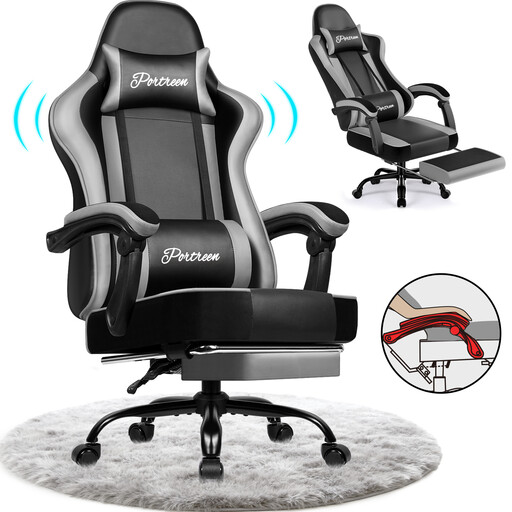
Why it stands out: This GTIMEX model stands out as an excellent all-rounder. It features high-density foam, similar to that used in mattresses, ensuring comfort that won't sag over time. Its PU leather upholstery is resistant to water, stains, and scratches—a real daily advantage. Finally, its frame is BIFMA and SGS certified, a guarantee of safety and longevity.
Pros:
Who is it for? It's designed for dedicated gamers and remote workers alike. Its versatility, integrated footrest, and sturdiness make it an excellent investment for anyone looking for an ergonomic office chair that can transform into a relaxation cocoon.
A good chair is the cornerstone of an ergonomic setup. But for total comfort, don't neglect the desk! A work surface at the right height, with enough space, is crucial for maintaining good posture and organising your gear.
To perfect your setup, take a look at our selection of desks: you'll find a variety of models, including extending desk options that will adapt to your space and needs.
Discover our selection of extending desks
While they share many features (adjustability, lumbar support), gaming chairs often have a more pronounced, racing-style bucket seat design. They typically offer a more generous backrest recline and relaxation-focused options, like a footrest. In contrast, a classic ergonomic office chair tends to favour a minimalist design and sometimes more granular adjustments, designed for a professional setting.
Absolutely! An office chair with a leg rest is a real bonus. During breaks or more relaxed gaming sessions, being able to elevate your legs relieves pressure on the lower back and improves blood circulation. It's the kind of comfort feature that quickly becomes indispensable once you've tried it.
For a perfect posture and to avoid back pain, follow these key steps: