
Livraison le jour même ou le lendemain

Qualité garantie

Débloquez vos offres de bienvenue: Livraison GRATUITE | Jusqu'à -80 % | 30 jours d'essai gratuits à JoyPlus
Téléchargez l'application
Whether you're working from home, deep in a gaming session, or creating your next project, spending hours glued to a screen puts a real strain on the body. Back pain, eye strain, wrist soreness… These everyday aches and pains aren't inevitable, but they undermine our well-being and productivity. A well-designed ergonomic desk setup is therefore not a luxury, but a genuine investment in your health and efficiency.
This guide provides our practical advice and a selection of products to help you build a workspace that adapts to you, not the other way around.
Before you buy, it's essential to understand what defines truly ergonomic gear. Here are the key points to guide you.
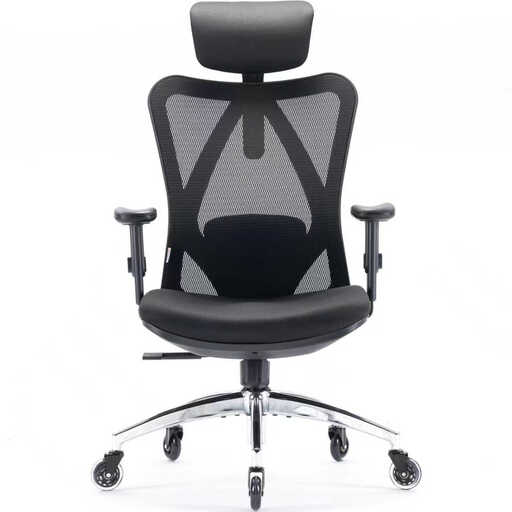
Choosing an ergonomic office chair is absolutely crucial. A good seat must provide active support and adapt to your movements. Prioritise models that offer a full range of adjustments?:
A comfortable office chair with a mesh back is often an excellent choice to ensure good air circulation during long days.
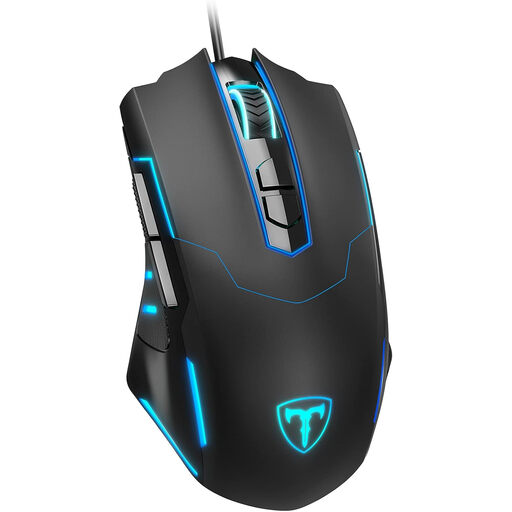
Your keyboard and mouse are a direct extension of your hands. A gaming mouse or a vertical model can significantly reduce tension in the wrist and forearm. Consider the sensitivity (measured in DPI), the number of programmable buttons, and especially its shape, which should match your grip style (palm, claw, or fingertip grip).
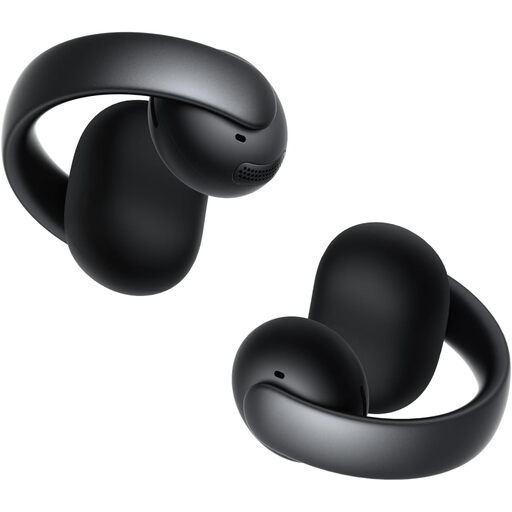
When it comes to audio, comfort is just as vital. Open-ear headphones are an excellent alternative to in-ear models. They simply rest on the ear without blocking the ear canal, which eliminates any feeling of pressure and allows you to remain aware of your surroundings—a significant safety advantage when working from home.
Comfort at work also depends on the overall organisation of your space. The golden rule: position your screen at eye level to keep your neck straight. Smart and stylish desk accessories, like a monitor stand or a wrist rest, will perfect your setup.
Here is our selection of products that tick all the boxes: comfort, performance, and durability. All designed for demanding users.
What makes it stand out
The Sihoo M18 chair is all about customisation. With its five adjustment points, it can be precisely tailored to support your back, neck (via the headrest), seat height, tilt, and armrests. Its premium mesh back ensures excellent ventilation, a real bonus during long workdays, especially in summer. Its W-shaped seat, filled with high-density foam, was designed to limit pressure points on the thighs and promote proper posture.
Pros?:
Who is it for?
What sets it apart
This wired mouse from ET is an excellent compromise between performance and ergonomics. Its high-precision optical sensor, adjustable from 1200 to 7200?DPI, ensures flawless fluidity and responsiveness, whether for gaming or advanced office tasks. Its seven programmable buttons allow you to create macros and shortcuts to boost your productivity. Its ergonomic design has been studied to fit most hands and reduce fatigue during marathon sessions.
Pros?:
Who is it for?
Why we love them
The Soundcore AeroClip earbuds by Anker redefine listening comfort. Their unique open-ear concept involves gently clipping them onto the ear, leaving the ear canal completely free. The result: no pressure, no discomfort, even after hours of listening. Directional audio technology channels sound towards your ears and minimises leakage, thus preserving the privacy of your conversations. The manufacturer promises crystal-clear calls thanks to four microphones and an AI algorithm that isolates your voice from background noise.
Pros?:
Who is it for?
Our selection focuses on the cornerstones of an ergonomic desk setup. Your needs may be different or more specific. To explore other product categories and discover our themed guides, browse our site!
Discover our selection of designer black tops and much more.
Investing in an ergonomic office chair is, above all, about taking care of your long-term health. A suitable chair encourages good posture, which drastically limits the risk of chronic back, neck, and shoulder pain. By improving your comfort at work, you also gain focus and productivity.
The initial adjustment is done in a few key steps?:
Absolutely not! An ergonomic desk setup is beneficial for anyone who spends long hours sitting in front of a screen. This includes students, gamers, content creators, and general computer enthusiasts. The goal remains the same: to protect your health and optimise your performance, regardless of the activity.