
Livraison le jour même ou le lendemain

Qualité garantie

Débloquez vos offres de bienvenue: Livraison GRATUITE | Jusqu'à -80 % | 30 jours d'essai gratuits à JoyPlus
Téléchargez l'application
Remote work is now a part of our daily lives, and it comes with its own set of challenges: back pain, a cluttered dining table, and fluctuating productivity. Creating a proper home office is no longer a luxury but a necessity for protecting your health and efficiency. Yet, with an overwhelming number of options available, it's easy to get lost.
At Joybuy, our mission is to help you find clarity. We've carefully reviewed today's leading models to bring you practical advice and a curated selection of products that solve real-world problems—all without the marketing fluff. This guide has one goal: to help you find the perfect ergonomic desk for your space and workflow.
Before you dive in, consider these three essential criteria to make the right choice.
First, and most importantly, get out your tape measure. A desk that's too large can overwhelm a room, while one that's too small will feel cramped and limit your comfort.
It's a fact: being glued to your chair all day is detrimental to your health. Alternating between sitting and standing is essential for your well-being. This is where a height-adjustable desk truly shines. These models, often called sit-stand desks, allow you to switch from a seated to a standing position in seconds.
A motorised electric desk offers unparalleled ease of use, especially with memory presets that save your preferred heights. It's a more than worthwhile investment for anyone who spends long hours in front of a screen.
A tidy desk leads to a clearer mind. A desk with drawers, shelves, or integrated cable management is a powerful ally in maintaining a pristine workspace. Before you decide, take stock of what you need to keep within arm's reach (documents, pens, external hard drives, etc.) to choose a suitable storage solution and prevent your computer desk from turning into a cluttered mess.
Here are a few models that stand out for their functionality and design, tailored for different types of home office setups.

Why we love it: This model successfully combines a large work surface with truly generous storage capacity. Its clever L-shaped design is reversible, allowing you to install the storage unit on either the left or right side to fit your room's layout.
Key Features:
Who is it for? Ideal for professionals and students who need a large, multi-functional workspace and are looking for an all-in-one desk and storage solution.
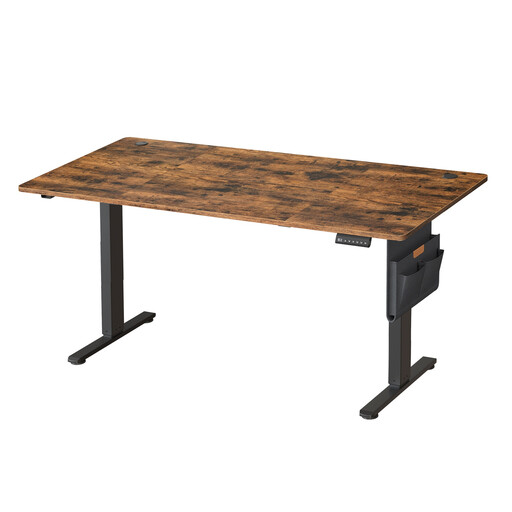
Why we love it: This sit-stand desk goes big with its massive 180 x 80 cm desktop, paired with a smooth and silent electric mechanism. It's designed for those who refuse to compromise on either space or ergonomics.
Key Features:
Who is it for? Professionals with demanding remote work schedules, creatives, gamers, or anyone who needs a very large, dynamic, and adaptable work surface.
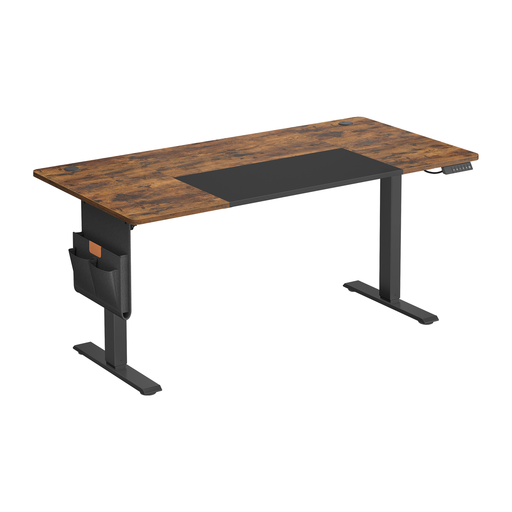
Why we love it: It packs all the great features of its larger sibling into a slightly more compact (160 x 70 cm) format. This makes it easier to fit into a medium-sized room without sacrificing the benefits of an electric desk.
Key Features:
Who is it for? For those who want all the benefits of a height-adjustable desk in a versatile size, perfect for most home offices or student rooms.
Our selection focuses on workspaces for adults, but setting up a functional desk area is a concern for the whole family. If you're also looking to create a suitable space for younger ones to encourage them to draw or do their homework in a comfortable setting, other options are available.
? Discover our range of desks for toddlers
When sitting, the golden rule is simple: your elbows should form a 90-degree angle when your forearms are resting on the desk, and your feet should be flat on the floor. When standing, the same 90-degree elbow angle rule applies. A height-adjustable desk is the perfect solution for finding and switching between your ideal heights, as every body is different.
For anyone who spends several hours a day at their desk, the answer is a resounding yes. Changing your posture helps reduce fatigue, relieves pressure on the spine, and can even improve concentration. The electric motor makes the transition so effortless that you'll be more likely to use it regularly, unlike manual crank-operated models, which are often more cumbersome.
Start by decluttering. Use storage solutions like drawers or shelves for anything not in daily use. Tame the cable jungle with cable grommets or ties. Keep only the essentials on your desktop: your computer, a monitor, your keyboard/mouse, and a notebook. A desk with drawers or integrated storage modules will make this task much easier.