
Livraison le jour même ou le lendemain

Qualité garantie

Débloquez vos offres de bienvenue: Livraison GRATUITE | Jusqu'à -80 % | 30 jours d'essai gratuits à JoyPlus
Téléchargez l'application
Whether you're working from home, studying, gaming, or setting up a home office, an electric height-adjustable standing desk makes it easy to switch between sitting and standing positions. However, product specs often list features that can be tricky to compare. An impressive maximum height, a motor advertised as quiet, or a high weight capacity aren't enough on their own to tell you whether a model will actually suit your needs.
Here are the key criteria to consider, so you can avoid a poor purchase and choose a height-adjustable desk that works with your space, your equipment, and how you use it.
A desk can be electrically adjustable without suiting every body type. Check its minimum and maximum height, but also consider the thickness of the desktop and the height of your chair. A range of 72 to 118 cm, for example, works well for many sit-stand setups. Your comfort will also depend on your height, your chair, and the position of your screen.
A figure like "70 kg" usually refers to the maximum load stated by the manufacturer. On its own, it tells you nothing about the desk's stability when the desktop is raised. You also need to look at the frame, the legs, how the weight is distributed, and the available surface area. A heavy monitor placed at the edge of the desk puts very different strain on it than a laptop positioned in the centre.
An electric desk requires careful assembly and a nearby power socket. The cables for your monitor, charger, and peripherals need enough slack to move freely as the desk rises and lowers. Hooks or cable management channels can help reduce clutter, but they don't replace a tidy installation on a perfectly stable floor.
A 120 x 60 cm electric adjustable desk is a good fit for smaller spaces, bedrooms, and many home office setups. It can accommodate a laptop, a monitor, a keyboard, and a few documents. For two monitors or a bulky desktop tower, a 160 x 70 cm desktop offers more width and depth.
Also measure the space you have available, especially the distance to a wall, window, or low piece of furniture. The frame and cables need to be able to move freely without rubbing or getting caught.
A desk with height memory lets you save several of your preferred positions. Two presets may be enough for switching between a seated and a standing work position. Four memory settings are more practical if several people use the desk, or if you alternate between work, study, and gaming.
A digital display makes precise adjustments easier. Just make sure the control panel is easy to reach, and that the product page clearly states how many memory settings are available.
For a 70 kg sit-stand desk, treat the stated load as a maximum limit from the spec sheet, not an invitation to fill the entire desktop. Place heavy equipment towards the centre and avoid hanging loads that the manufacturer hasn't designed for.
The products shown below carry CE certification and, for some models, compliance with European standards. The CE mark is a declaration of conformity with applicable requirements; it doesn't on its own guarantee performance, stability, or comfort. Take the time to read the assembly instructions and electrical safety notes too.

Why this suits this profile: Its compact size is ideal for a first home office setup, a student bedroom, or a home workspace in a tight spot.
The dimensions, the 72 to 118 cm height range, and the stated maximum load of 70 kg are all clearly listed. This makes it easier to compare against your space and equipment.
120 × 60 cm desktop, digital display, two height memory settings, two hooks, and a frame stated as CE certified.
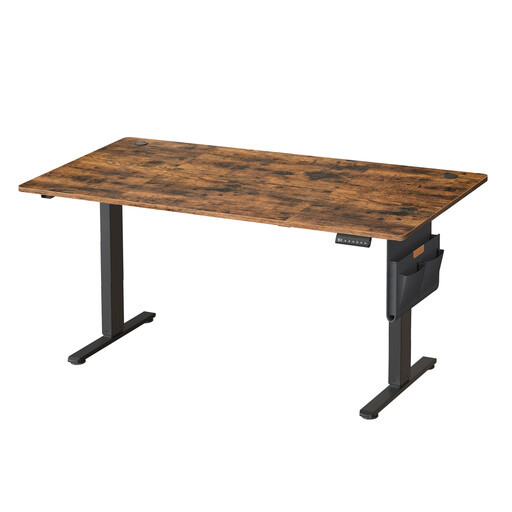
Why this suits this profile: Its generous surface area is perfect for users who want to set up multiple monitors, documents, and accessories without the desktop turning into a battlefield.
The spec sheet clearly states the maximum static load of 70 kg, the 160 × 70 cm dimensions, and the inclusion of overheating protection for continuous adjustments.
Four height memory settings, a 72 to 120 cm adjustment range, a storage pocket, a hook, and cable management channels.

Why this suits this profile: This version fits into a workspace or gaming area that favours a compact desktop with a warmer walnut finish.
The stated features are concrete: digital display, two programmable positions, a 120 × 60 cm desktop, and a maximum load of 70 kg.
A format suited to both an electric computer desk and an adjustable gaming desk, with two hooks and a frame stated as compliant with CE marking and European standards.
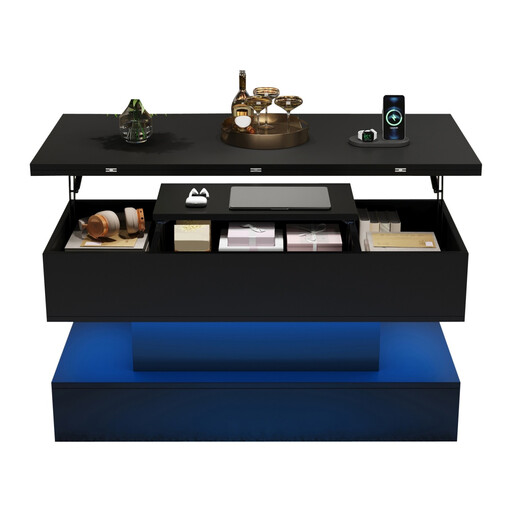
Why this suits this profile: This solution is aimed at living rooms and mixed-use spaces where you want to occasionally raise a surface to use a laptop or carry out everyday activities.
Its purpose is clearly different from a dedicated electric sit-stand desk: it's a rise-up table equipped with mains, USB, and USB-C sockets, to choose for occasional use.
100 × 50 cm format, hydraulic lifting mechanism, LED lighting, and integrated charging ports according to the product page.
Before the first time you raise the desk, assemble it following the instructions and check every connection. Place it on a stable floor, avoiding thick rugs that could interfere with the legs. Keep liquids away from the electrical components.
To work comfortably, position the monitor directly in front of you and adjust its height so your shoulders stay relaxed. Standing doesn't mean you can skip changing your posture regularly or arranging the desk to suit your activity.
There's no one-size-fits-all height. Compare your usual seated position with the height you need to keep your forearms level when using the keyboard. A range of 72–118 cm or 72–120 cm offers a useful adjustment span, which you should consider alongside your height, your chair, and your screen.
The motor mainly runs during the few seconds it takes to raise or lower the desktop. Actual power consumption therefore depends mostly on how often you adjust it and on the model you choose. For an accurate estimate, check the technical specifications or measure the consumption with a wattmeter.
This depends on the quality of the assembly, the load it supports, how often you move it, and how well you maintain it. Stick to the stated weight limit, avoid prolonged continuous adjustments, and tighten the fixings regularly. Cleaning with a slightly damp soft cloth also helps preserve the desktop and frame.