
Same-day & Next-day Delivery

Quality Guaranteed

Unlock Your Welcome Offers: FREE Delivery | Up to 80% OFF | Free 30-day JoyPlus trial
Download the APP
An electric standing desk can transform your home-working, study or gaming setup. However, some purchases disappoint after just a few weeks: the desktop is too narrow for two monitors, the motor is awkward to use or cables hang down as soon as the desk rises.
Before comparing prices, it is better to distinguish genuinely useful features from marketing claims that are harder to verify. Here are the criteria to consider, along with a selection suited to different needs.
A 120 × 60 cm desk may be suitable for a laptop, one monitor and a few accessories. With two monitors, speakers or a large mouse mat, however, 60 cm of depth can quickly feel restrictive.
For a shared home office desk or a multi-monitor setup, a width of 140 or 160 cm gives you more freedom. Also check that the stated dimensions refer to the usable desktop area, rather than the overall footprint of the frame.
A desk may seem perfectly stable when seated, then start vibrating more once raised. Frame rigidity, leg design and weight distribution all play a key role here.
Product specifications sometimes state a maximum static load, but this figure alone is not enough to predict how comfortable the desk will be to use. Instead, distribute monitors and heavy equipment across the desktop, while keeping a margin below the stated load capacity.
An electric motor requires a nearby socket. Without cable management, wires can pull on connectors or interfere with movement. Also allow enough space around the desk so that the desktop does not hit a wall or piece of furniture while being adjusted.
Models with cable grommets, a hook or a storage pocket make organisation easier, but they do not replace a well-planned installation.
A height-adjustable desk should allow you to work both sitting and standing without raising your shoulders or bending your wrists. The ideal height depends on your height, your chair and the thickness of the desktop.
When adjusting the seated position:
When standing, the desktop should allow you to keep your shoulders relaxed. A stated range of 72 to 120 cm suits many users, but you should check that it is appropriate for your own body shape.
For an ergonomic electric desk, examine the frame material, the number of columns and the stated static load capacity. The models featured here combine steel with a particleboard or MDF panel.
Avoid concentrating all the weight at one end. A desktop computer, two monitors and a monitor arm can unbalance the desk, even when the total load remains reasonable.
A desk with height memory lets you save several positions and return to them at the press of a button. This is particularly useful when several people share the workstation or when you regularly switch between sitting and standing.
A USB-C port can make it easier to charge a compatible device, but it does not replace a sufficiently powerful charger. Also check for obstacle detection, overheating protection and the instructions relating to the power supply.

Why this choice suits this profile : Its compact size is ideal for a bedroom, studio flat or home-working and study area. Its stated adjustment range is from 72.1 to 120.1 cm.
The four height memory settings save you from readjusting the desk every time you change position. The cable grommets, pocket and hook help keep the desktop clutter-free.
120.1 × 60.1 cm format, four height memory settings, stated static load capacity of up to 70 kg and a motor described as quiet.
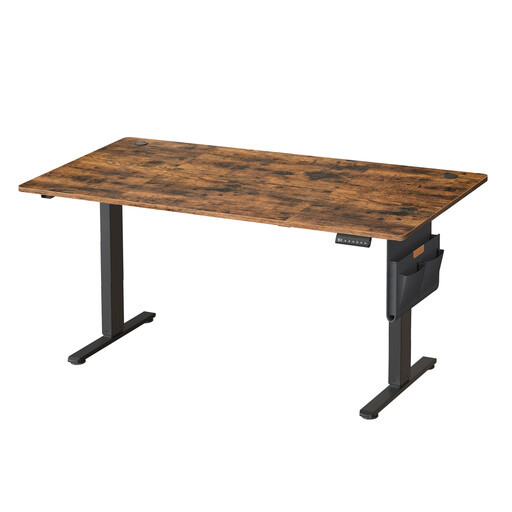
Why this choice suits this profile : Its 160 × 70 cm surface provides plenty of room for a professional setup, several monitors or bulky computer equipment.
The 70 cm depth prevents the desktop from feeling cramped when you are using several peripherals. The steel frame and cable management are suited to the demands of a well-equipped workstation.
160 × 70 cm dimensions, four storable positions, adjustment from 72 to 120 cm and a stated static load capacity of 70 kg.

Why this choice suits this profile : Users who frequently switch between sitting and standing can save their preferred settings. The USB-C port and storage accessories are practical for everyday computer use.
The cable grommet, pocket and hooks save you from having to add all the organisational accessories yourself. The specifications also mention overheating protection.
140 × 60 cm desktop, four memory settings, USB-C port, adjustment from 72 to 120 cm and a stated static load capacity of up to 70 kg.
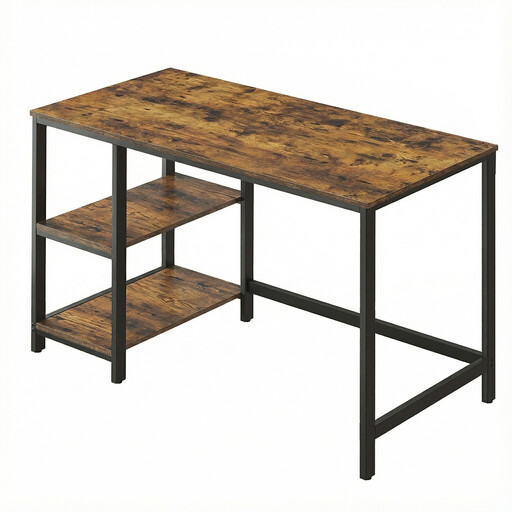
Why this choice suits this profile : This fixed desk is for those who prioritise an industrial brown-and-black style, side storage and simple installation without a motor.
The adjustable feet compensate for minor unevenness in the floor. The two removable shelves can be fitted on either the left or right.
120 × 60 cm surface, steel and particleboard construction, stated load capacity of up to 50 kg and adjustable shelves.
We have put together a complete, real-time-updated list of products that meet these demanding selection criteria and European safety standards.
Install the desk on as level a floor as possible and leave sufficient clearance around the desktop. Before raising it for the first time, check that the cables for the monitor, computer and extension lead are long enough.
To protect the electric mechanism:
The product specifications for several models mention an 18-minute interruption after two minutes of continuous adjustment. Bear this in mind if you change the desk height frequently.
The motor only runs for a few seconds each time you adjust the desk. Consumption therefore depends mainly on how often you move it and on the model. To estimate it, check the power rating stated by the manufacturer and avoid leaving the power supply switched on when the desk is not in use.
A 120 cm wide desk can accommodate two compact monitors, but available space will remain limited. A 140 × 60 cm format is better suited to a versatile setup. With wide monitors, a desktop computer and several accessories, the 160 × 70 cm option provides more viewing distance and storage space on the desktop.
Its lifespan depends on the quality of the assembly, compliance with the maximum load and how frequently it is adjusted. Check the tightness of the screws regularly, avoid uneven loads and never force the desktop when an obstacle is detected.