
Livraison le jour même ou le lendemain

Qualité garantie

Débloquez vos offres de bienvenue: Livraison GRATUITE | Jusqu'à -80 % | 30 jours d'essai gratuits à JoyPlus
Téléchargez l'application
As remote work becomes the norm, our homes have transformed into offices. The problem? Sitting for hours on end takes a toll on comfort and focus. To solve this, one solution is rapidly gaining popularity: the electric standing desk.
Alternating between sitting and standing is key to staying dynamic and focused. But with an overwhelming number of options, how do you make the right choice? Our guide is here to help you cut through the noise, breaking down the essential criteria and recommending top models for your home office—all without the marketing jargon.
Purchasing an ergonomic desk is an investment in your well-being. Here are the key points to check to ensure your choice meets your needs.
First step: take out your measuring tape and assess your available space. A height-adjustable desk needs to move up and down freely without hitting a shelf or a picture frame on the wall. Next, consider the desktop size. One or two monitors? A laptop, files, a graphics tablet? For a comfortable setup, aim for a large workspace that is at least 60 cm deep and 120 cm wide.
The motor is the heart of your electric standing desk. A quality model should provide smooth and quiet adjustments (under 50 dB) so it won't disrupt your focus or disturb others.
Certain features provide a real everyday advantage:
A wobbly desk is a deal-breaker. It must remain perfectly stable, even at its highest position. A sturdy steel frame is an excellent guarantee of durability. For the desktop, particle board offers a good balance of strength and lightness.
Style matters, too. The industrial-style desk, with its combination of a wood-look top and a black metal frame, fits seamlessly into modern interiors, adding a touch that is both minimalist and warm.
We have selected three models that cater to different needs and spaces.
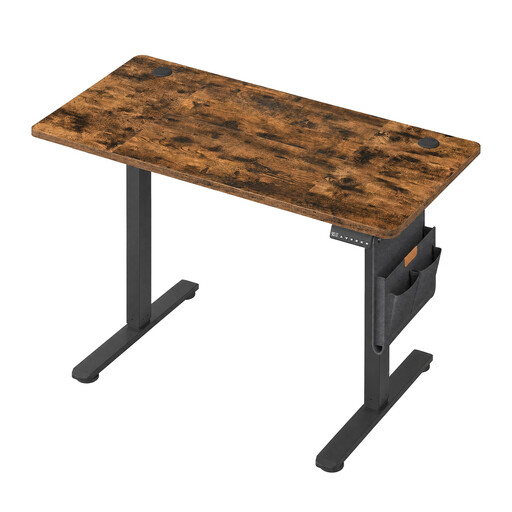
Why it stands out: This model is an excellent entry point into the world of adjustable desks. With its compact dimensions (120.1 x 60.1 cm), it fits easily into smaller spaces without compromising on essential features.
Key features:
Who is it for? For students, apartment-based remote workers, and anyone looking for their first functional and well-equipped electric standing desk without sacrificing living space.
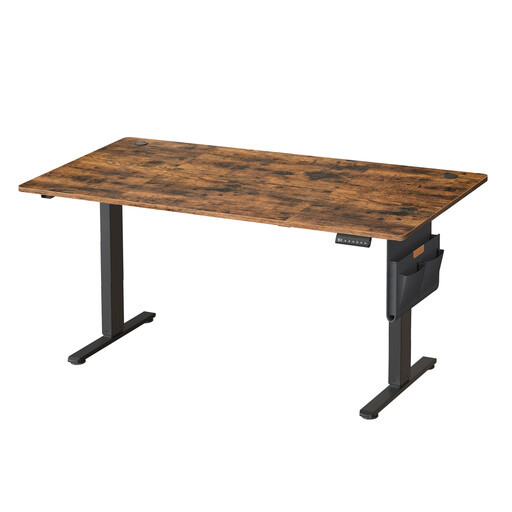
Why it stands out: This XL version (160.1 x 70.1 cm) builds on the strengths of its smaller sibling, adding a much more generous desktop. A true large workspace designed for productivity.
Key features:
Who is it for? For professionals who juggle multiple screens, creatives (graphic designers, developers) in need of space, and anyone who wants maximum comfort for their home office.
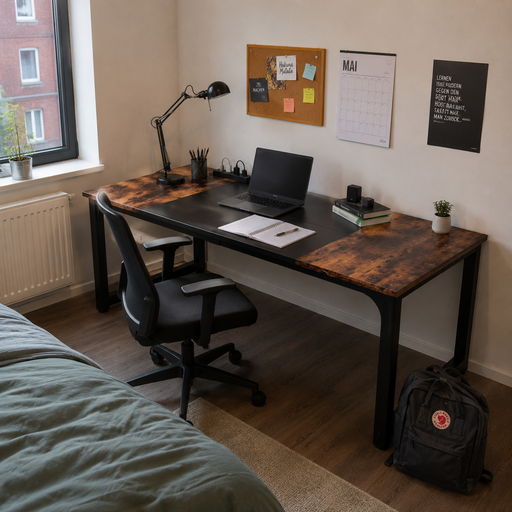
Why it stands out: This is in a different category. This model is an alternative for those who prioritise space and sturdiness above all. It is not height-adjustable, but its XXL dimensions (180 x 80 cm) and exceptional load capacity make it a relevant choice for specific uses.
Key features:
Who is it for? Perfect as an auxiliary meeting table, for architects, artists, or users with very heavy equipment (workstations, printers). It's also the choice for those who love the industrial style and are looking for a large, fixed workspace that's built to last.
The models in our selection feature a rustic and industrial look. If you like this style but are looking for different dimensions or configurations, many other options are available.
? Discover our complete collection of rustic-style desks and tables to find the piece that will perfectly complement your decor.
The perfect height depends on your own height. When seated, your elbows should form a right angle (90°) with your forearms parallel to the floor. The same principle applies when standing. That's the beauty of position memory presets: once you've saved your two ideal heights, you can return to them with a single press.
No, modern models are designed to be discreet. The motor noise during adjustment is typically under 50 decibels, which is equivalent to a quiet conversation or the hushed atmosphere of a library. This allows you to change positions without disturbing anyone or losing your train of thought.
Cable management is a crucial point. First, ensure the cables for your devices (monitor, computer, chargers) are long enough to accommodate the desk's movement. Then, use cable trays, sleeves, or ties to bundle the wires and run them neatly along the frame. Models like the ones from Ochama make this easier by integrating cable grommets directly into the desktop.