
Livraison le jour même ou le lendemain

Qualité garantie

Débloquez vos offres de bienvenue: Livraison GRATUITE | Jusqu'à -80 % | 30 jours d'essai gratuits à JoyPlus
Téléchargez l'application
The rise of remote work has transformed our homes into genuine productivity hubs. In this quest for a healthier, more comfortable workstation, the electric standing desk has quickly emerged as a key ally. The principle? To alternate between sitting and standing throughout the day to combat the harmful effects of prolonged sitting.
However, with the market now saturated with options, it's easy to make a mistake and regret your purchase. Some models, which look great on paper, reveal their weaknesses after just a few weeks of use. To help you see clearly and invest with confidence, we've broken down the most common pitfalls and the selection criteria that truly matter.
Before you pull out your credit card, watch out for these three weak points, which are often cleverly hidden behind slick marketing.
The appeal of an electric desk is the ability to adjust its height effortlessly. Now, imagine having to endure a shrill grinding or a disruptive whirring sound with every transition, especially during a video conference or when quiet is essential. For a motorised desk dedicated to remote work, silence isn't a luxury—it's a prerequisite. What's more, a poor-quality motor isn't just noisy: it's also often the first component to fail.
Many desks appear stable in their lowest position. The real test comes once the desktop is raised to its maximum height. A desk that wobbles or shakes at the slightest touch isn't just annoying; it's a direct threat to your computer, monitors, and coffee mug. This instability most often stems from a thin steel frame or a design that lacks rigidity. For a large standing desk intended to hold multiple monitors, stability is simply non-negotiable.
To justify a high price, some manufacturers don't hesitate to overload their models with gadgets (like underpowered wireless chargers or mediocre-quality speakers). This marketing strategy distracts from the truly fundamental aspects. In day-to-day use, what makes the difference is the reliability of an ergonomic desk with memory presets, efficient cable management thanks to well-placed cable grommets, or a load capacity that is genuinely sufficient for your equipment.
To ensure you're making a sound investment, focus on these key technical specifications that will make all the difference in the long run.
The frame is the backbone of any good adjustable desk. Opt for a sturdy steel structure that guarantees rock-solid rigidity, even at its highest position. Carefully check the maximum load capacity specified by the manufacturer. A value of 70 kg (approx. 154 lbs) or more is an excellent indicator of durability, especially if you plan to install a heavy setup (multiple monitors, PC tower, etc.) on a large desktop like a 180x80 height-adjustable desk.
A good motor system should be smooth, fast, and discreet. The best-performing models operate without jerking and have a noise level below 50 dB (equivalent to a quiet conversation). Also, check for an anti-collision system. This essential safety feature detects obstacles (like your chair or a low cabinet) during ascent or descent and instantly stops the movement to prevent accidents.
The height memory function is a real convenience for daily use. It allows you to save your preferred sitting and standing positions and return to them with a single press. Aim for models that offer at least 3 or 4 presets. Don't overlook the details that make life easier: the presence of cable grommets for a consistently tidy desk, a hook for your headphones or bag, and perhaps a USB-C port integrated into the control panel for easy device charging. These thoughtful touches, often incorporated into a clean, industrial-style design, transform a simple piece of furniture into a perfectly optimised workstation.
To put this advice into practice, here is a selection of models that suit different user profiles, all chosen according to the quality and relevance criteria we've just detailed.
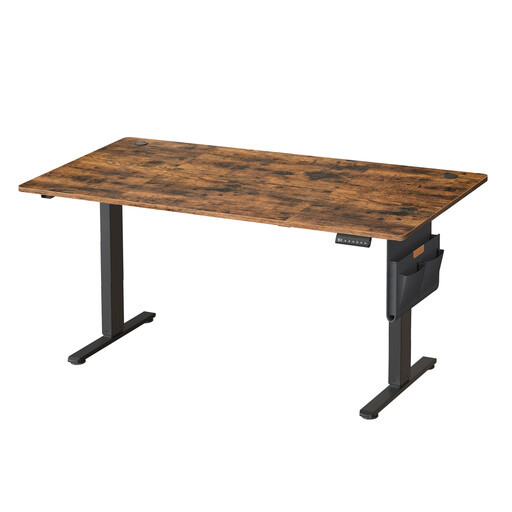
Why we chose it: It's the ideal compromise for anyone seeking a comfortable workspace without sacrificing too much room. Perfect for a setup with one or two monitors, it fits easily into a dedicated office or a corner workspace.
Its motor provides smooth and discreet transitions without any noise disturbance. Its sturdy steel frame ensures excellent stability, even at maximum height, to protect your equipment.
Its 4 memory presets for switching from sitting to standing in an instant, and its side storage pocket for keeping your desk tidy.
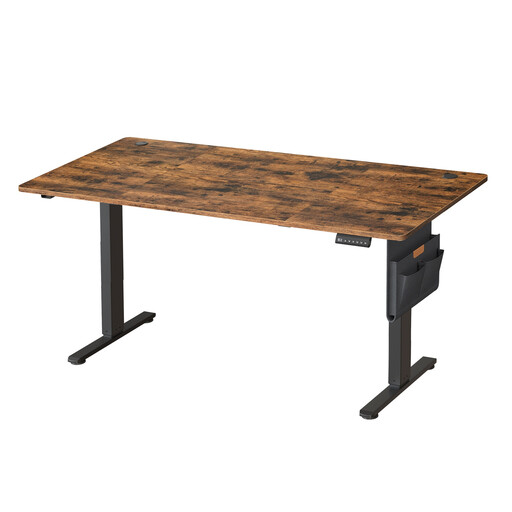
Why we chose it: It was designed for demanding users who need a large standing desk. Its extra-large 180 x 80 cm surface easily accommodates multiple monitors, a graphics tablet, and all your peripherals, while still leaving a comfortable and open workspace.
This model gets straight to the essentials: a very large desktop, a reliable motor, and genuinely useful features like the USB-C port. No superfluous gadgets—just what you need for a no-compromise workstation.
Its XXL 180 x 80 cm desktop and its fast-charging USB-C port built into the control panel, which is incredibly practical for daily use.
We have selected a full range of products that meet our quality criteria and current safety standards.
The motor's longevity depends on its quality and how often you use it. A well-made motor is typically tested to withstand thousands of cycles (up/down movements). Most models also include overheat protection: if you adjust the height continuously for more than 2 minutes, the system will automatically pause to preserve the mechanism.
Yes, provided you choose a model with a sufficiently thick steel frame and an appropriate load capacity. For a multi-monitor setup, aim for a desk that can support at least 70 kg (approx. 154 lbs). The presence of adjustable feet is also a plus, as they can compensate for minor floor irregularities and ensure perfect stability.
Cable management is essential for both safety and aesthetics. Look for models equipped with cable grommets built into the desktop. You can supplement this with cable trays or sleeves attached under the desk to hide the power supplies for your monitors and computer. Just remember to leave enough slack so the cables can follow the desk's movement without being pulled out.