
Livraison le jour même ou le lendemain

Qualité garantie

Débloquez vos offres de bienvenue: Livraison GRATUITE | Jusqu'à -80 % | 30 jours d'essai gratuits à JoyPlus
Téléchargez l'application
With the widespread adoption of remote work, our homes have transformed into offices, raising new questions about ergonomics and well-being. The electric standing desk has emerged as the centrepiece of this new setup, promising to combat a sedentary lifestyle. But be warned: not all models are created equal. Before you invest, it's crucial to know the common pitfalls to avoid so that a promising purchase doesn't turn into a costly regret.
This guide will help you navigate the options and focus on the criteria that truly matter, cutting through the marketing hype.
The market is flooded with options, but certain often-overlooked details can quickly ruin the experience. Here are the most common flaws?:
To ensure you're making a sound investment, focus on a few technical specifications that don't lie.
The foundation of any good motorised desk for remote work is its frame. Opt for a sturdy steel frame that ensures excellent rigidity, even at its highest position. Check the maximum load capacity?; a capacity of 70?kg or more is a good indicator of solidity for a standard office setup (computer, multiple monitors, documents).
The motor is the engine of the desk. While single-motor models may suffice for light use, dual-motor desks offer a faster, quieter transition and better load distribution. This is a mark of longevity for the entire mechanism.
The work surface must be suited to your needs. A 160x70?cm desktop provides a comfortable space for a dual-monitor setup while still leaving a clear working area. Ensure the desktop material (often particle board) is dense and scratch-resistant.
It's the details that make the difference: integrated cable grommets or hooks for hanging headphones or a bag help keep an adjustable workstation clean and functional.
A desk with height memory presets allows you to save your preferred sitting and standing positions. A single button press is all it takes to alternate. Aim for models that offer at least 3 or 4 memory presets. Some desks also include an anti-collision system?: the desktop stops its movement if it encounters an obstacle, protecting both the motor and whatever is underneath.
Here are a few products that meet different needs for creating a home office that is as functional as it is ergonomic.
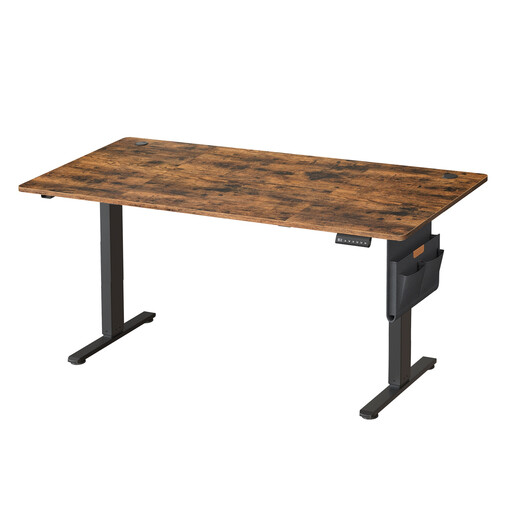
Why we recommend it : Perfect for remote workers looking for a reliable and spacious primary workstation. Its generous dimensions allow for a multi-monitor setup while preserving space for other activities.
Its sturdy steel frame and 70 kg maximum load capacity ensure excellent stability. The motor is designed for quiet adjustment, and the 4 memory presets provide reliable daily use.
Spacious 160x70 cm desktop, 4 memory presets, and practical accessories included (storage pouch, hook).
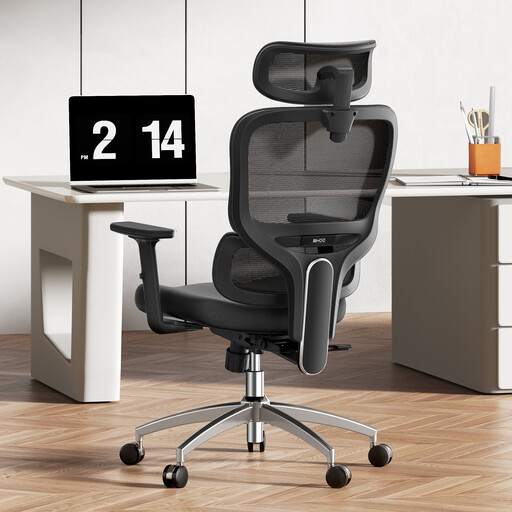
Why we recommend it : A standing desk doesn't eliminate the need for an excellent chair. This model is the perfect complement for periods of seated work, offering ideal support to prevent back pain.
Alternating between sitting and standing is the key to well-being. This chair ensures a healthy posture while seated thanks to its multiple adjustments, creating a truly ergonomic workstation.
Dynamic 3D lumbar support, numerous adjustment points (headrest, armrests, height), and a breathable mesh back for optimal comfort.
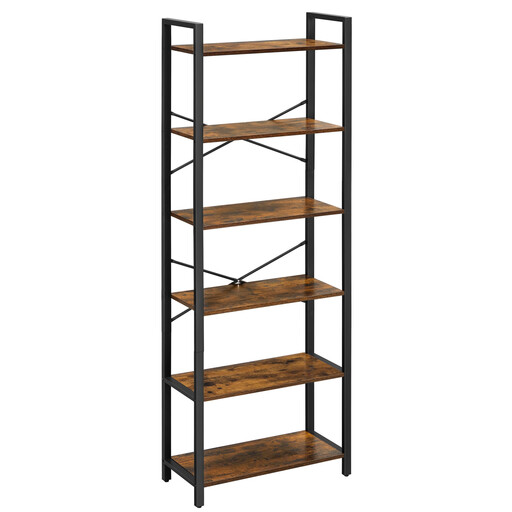
Why we recommend it : For those who want to set up a complete and organised office nook, even in a small space. This vertical bookshelf maximises storage without taking up valuable floor space.
It helps free up the desktop by providing dedicated storage for books, files, and supplies. Ideal for a more productive and serene work environment.
Vertical design for maximum space-saving, stable structure with X-bracing and an anti-tip kit, total load capacity of 60 kg.
We have curated a full range of products that meet our strict selection criteria and current safety standards.
The longevity of an electric ergonomic desk primarily depends on the quality of its motor and frame. A model with a robust motor and a thick steel frame, used within its maximum load capacity, can operate smoothly for many years. Be sure to check the manufacturer's information on the number of guaranteed up/down cycles.
Most standing desks are designed for self-assembly. Manufacturers provide detailed instructions and clearly labelled parts. Assembly generally takes between 30 minutes and an hour. It's often easier with two people, especially for handling and flipping the desktop once the base is attached.
The load capacity varies greatly from one model to another, ranging from 50?kg for lighter models to over 100?kg for heavy-duty ones. It is essential to check the maximum load specified by the manufacturer and compare it to your equipment (weight of the computer, monitors, stands, etc.) to ensure stability and safety. A capacity of 70?kg is a good starting point for typical use.