
Livraison le jour même ou le lendemain

Qualité garantie

Débloquez vos offres de bienvenue: Livraison GRATUITE | Jusqu'à -80 % | 30 jours d'essai gratuits à JoyPlus
Téléchargez l'application
Working from home, studying or gaming for hours in front of a screen demands a workstation that can adapt to your needs. An electric height-adjustable sit-stand desk lets you switch from sitting to standing with a motor controlled from a control panel. But from one model to the next, the dimensions, features and usage limits can vary significantly.
Before buying an electric height-adjustable desk, it’s best to avoid three common mistakes: choosing purely on looks, confusing maximum weight capacity with real stability, or underestimating the space needed when the desktop moves up and down.
A height-adjustable desk must suit your chair, your height and your habits. A range between 72 and 118 cm or between 72 and 120 cm works well for many uses, but take the time to check the exact figures. A desktop that’s too high or too low can quickly make typing uncomfortable.
If several people in the household use the desk, a wider range will offer more flexibility. Also compare the desktop dimensions with your room: a 120 x 60 cm desk will easily fit into a small space, while a 160 x 70 cm model will need more room to manoeuvre.
A capacity of 70 kg generally refers to the stated maximum static load. This includes the desktop, monitors, computer, accessories and anything else you place on it. That doesn’t mean the desk will stay perfectly stable if a heavy load is concentrated on one side.
For a sit-stand desk intended for remote work or gaming, spread your equipment across the whole surface and make sure the floor is level. Adjustable feet can compensate for minor unevenness in a floor.
A memory function is only truly useful if it lets you save and easily recall your preferred heights. Similarly, a desk with a USB-C port doesn’t necessarily act as a powerful charger: check the description and technical specifications before plugging a device into it.
Cable management, hooks and storage pockets also deserve your attention. They stop cables from dangling while the desktop moves and help keep your workspace tidy.
For a setup with a laptop and an external monitor, a depth of 60 cm may be enough if everything stays compact. A 120 x 60 cm desktop offers plenty of room for a computer, a monitor, a keyboard and a few documents. If you use two monitors, a desktop tower or several gaming accessories, a width of 160 cm and a depth of 70 cm will give you more breathing space.
Also measure the gap between the desktop and the wall. The models in this selection should not be pushed against a wall during adjustment, to reduce the risk of scratches or collisions.
A sit-stand desk with memory lets you quickly return to a saved height. Some models offer two presets, others four. A digital display makes adjustment easier, especially when several people share the desk.
The information available for several references indicates smooth and quiet operation. However, it’s still best to remove any objects that could interfere with the mechanism and to set the anti-collision system correctly.
These desks are designed for indoor use. Electrical components must be kept away from liquids. On some models, an overheat protection system activates after two minutes of continuous movement and then requires an 18-minute wait before you can use the adjustment again.
When assembling, follow the instructions carefully and check all connections before switching on for the first time. For maintenance, use a soft, slightly damp cloth, without abrasive products or excess water.
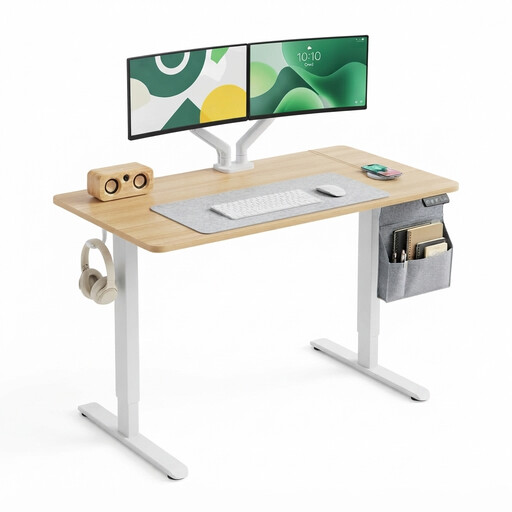
Why this model suits them: Its compact size fits a bedroom, studio or home office corner. Its height range of 72 to 118 cm adapts well to daily tasks, study and screen-based work.
The dimensions and maximum load of 70 kg are clearly stated. The digital panel and two memory presets prevent guesswork adjustments.
120 x 60 cm desktop, electric adjustment from 72 to 118 cm, two presets, two hooks and a steel frame.
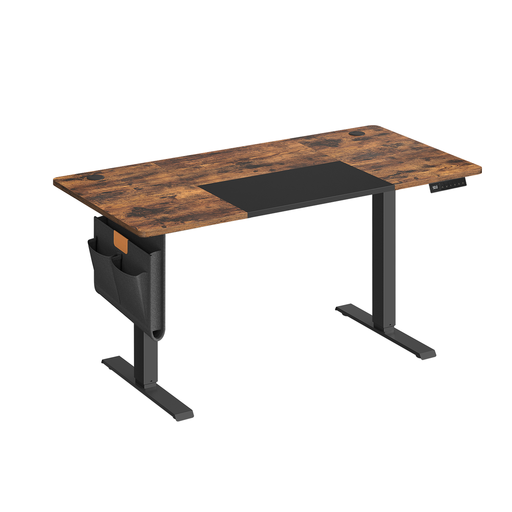
Why this model suits them: Its mid-sized surface gives you more room for an external monitor, a laptop and a few accessories, without taking up as much space as a large desk.
The four storable heights make it easy to switch between different setups. The stated static load of 70 kg helps you plan your equipment sensibly.
Adjustment from 72 to 120 cm, four memory presets, USB-C port, cable management, storage pocket and hooks.
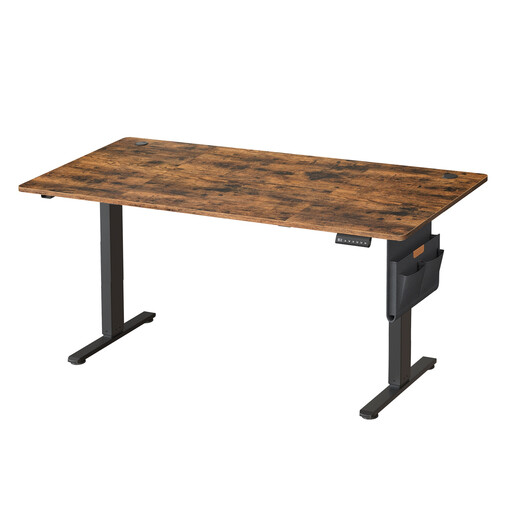
Why this model suits them: Its large desktop is ideal for setups with multiple monitors, gaming peripherals or a substantial amount of work documents.
The 160 x 70 cm surface stops you feeling cramped, a common issue with compact desks. Its static capacity of 70 kg does mean you need to distribute the load evenly.
Dimensions of 160 x 70 cm, four storable heights, adjustment from 72 to 120 cm, cable routing and side storage.
We’ve put together a full, real-time updated list of products that meet these demanding criteria as well as European safety standards.
Start by adjusting the desktop so that your forearms are horizontal when you use the keyboard, with your shoulders relaxed. When standing, position the monitor at a height that lets you look straight ahead. If the model has a memory function, then save one or more positions.
The duration depends on the motor and the manufacturer’s recommendations. Some models activate an overheat protection system after two minutes of continuous movement, then require an 18-minute wait. So avoid repeatedly raising and lowering it without a break.
The motor only runs while you’re adjusting the height. So consumption depends on how often you move it and the model you choose. To avoid unnecessary strain, save your usual heights and unplug the adapter if the desk won’t be used for a long period.