
Livraison le jour même ou le lendemain

Qualité garantie

Débloquez vos offres de bienvenue: Livraison GRATUITE | Jusqu'à -80 % | 30 jours d'essai gratuits à JoyPlus
Téléchargez l'application
For remote working, studying or gaming, an electric sit-stand height-adjustable desk lets you switch from sitting to standing without having to rearrange all your equipment. But a nice photo and a few promises of comfort aren't enough to make the right choice.
Behind some of the features that are pushed to the fore lie very real limitations: a desktop that's too narrow, a motor that struggles with a heavy load, or controls without a memory function. Here are the points to check before you buy, followed by a selection suited to several uses in the UK.
A desk measuring 120 × 60 cm can accommodate a laptop, a monitor and a keyboard. However, the depth quickly becomes tight with two screens, speakers or gaming accessories. For a more loaded setup, a desktop of 160 × 70 cm offers more depth and a more comfortable working surface.
Also think about the placement of the legs, the control box and the cable management grommets. A spec sheet may boast a generous width without specifying the actual usable surface area underneath the desktop.
Stability depends on the frame, the design of the feet and how the weight is distributed. An electric adjustable desk may feel perfectly stable in its lowest position, then become more prone to movement once raised.
The maximum static load should account for your monitor, monitor arm, computer, books and accessories. A capacity of 70 kg doesn't mean you should install 70 kg permanently: keeping a margin reduces the strain on the mechanism.
A control panel with several programmable heights makes changing positions throughout the day much simpler. Two presets may be enough for basic single-user use, while four memories offer more flexibility for multiple users or different setups.
Obstacle detection and the clearance needed between the desk and the wall also deserve your attention. Check the manual: some models activate overheat protection after several movements in quick succession and impose a waiting period before they can be used again.
A height-adjustable desk should suit your body shape as well as your chair. The models featured here cover ranges of 72 to 118 cm or 72 to 120 cm. Before choosing, measure the height of your armrests and check the position of your elbows.
The goal is simple: keep your shoulders relaxed and your forearms at a comfortable height, without presenting this setup as a medical device. For a sit-stand desk, also plan for a mat or a clear area so you don't bump into furniture during adjustment.
For a desk with cable management, look out for cable grommets, hooks and built-in storage. A USB-C port can be handy for charging a device, but check the product spec for compatible devices and the power output before relying on it for primary charging.
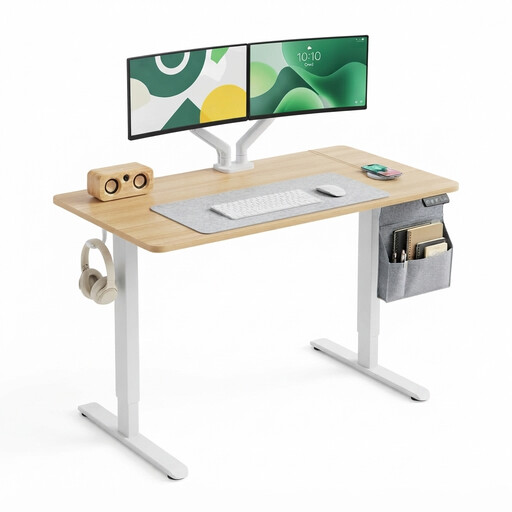
Why this choice suits this profile: Its compact size fits easily into a bedroom, study nook or first home office space. The digital control panel is simple to use.
The spec lists a range of 72 to 118 cm, two programmable heights and a stated static load of 70 kg. Concrete data to compare, rather than just a promise of comfort.
Desktop 120 × 60 cm, digital display, two presets, two hooks and CE certification stated on the spec sheet.
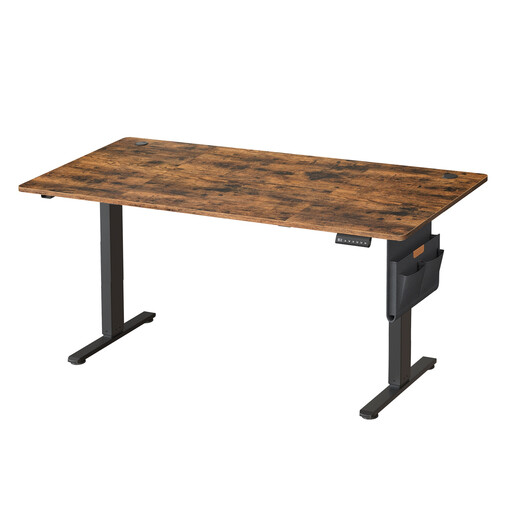
Why this choice suits this profile: Its generous surface area suits setups with multiple monitors, documents and plenty of accessories, without cutting into your workspace.
The dimensions, 70 kg static load and adjustment range of 72 to 120 cm are clearly stated. The anti-collision function and instructions about clearance from the wall are also specified.
Desktop 160 × 70 cm, four programmable heights, storage pocket, hook and integrated cable grommets.
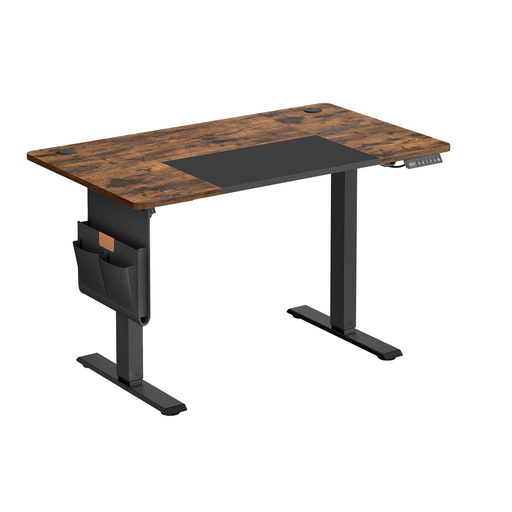
Why this choice suits this profile: This home office desk packs in practical features for daily use: storage, hooks, cable management and a USB-C port.
The spec states a maximum load of 70 kg, an adjustment range of 72 to 120 cm and overheat protection after two minutes of continuous movement.
120 × 60 cm size, memory function, break reminder, USB-C port, storage bag and three hooks.
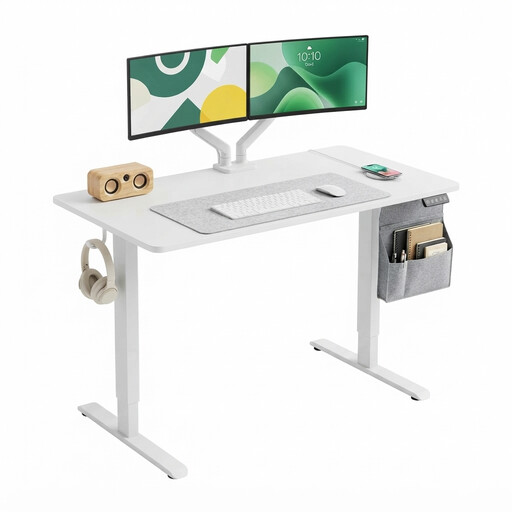
Why this choice suits this profile: Its light finish and sensible footprint blend easily into a living room, bedroom or shared workspace.
The spec shows the adjustment range, supported load and the two available memories. You can therefore check its compatibility with your chair and equipment.
Desktop 120 × 60 cm, adjustment from 72 to 118 cm, digital display, two hooks and CE certification stated.
We've put together a comprehensive, real-time updated selection of products that meet these exacting criteria, as well as European safety requirements.
Before plugging in the desk, assemble it on a level floor and check every connection. Leave enough space between the desktop and the wall to avoid scratches and bumps during adjustment. Do not place any liquids near the adapter or control panel.
To preserve the mechanism over time:
Start in a seated position, with your feet flat on the floor and your elbows close to a right angle. When standing, adjust the desktop so that your shoulders stay relaxed. Then save the two or four available heights, depending on the model. Before each movement, remove any objects that could obstruct the desk's travel.
It depends on the quality of the motor, the load it supports, how often you adjust it and whether you follow the usage instructions. It would be unreliable to state the same lifespan for all models. A properly assembled frame, a reasonable load and movements that aren't repeated continuously all help to limit wear and tear.
Consumption varies depending on the motor, the duration of movements and the standby power draw of the control panel. Adjustment usually only takes a few seconds, but only the technical spec or a measurement on your specific model will give you the exact figure. To estimate it, note the electrical power during movement, multiply it by the duration of use, then add the standby consumption if it's stated.