
Livraison le jour même ou le lendemain

Qualité garantie

Débloquez vos offres de bienvenue: Livraison GRATUITE | Jusqu'à -80 % | 30 jours d'essai gratuits à JoyPlus
Téléchargez l'application
An electric sit-stand desk can transform your home office, study or gaming space. But a modern look and a few features labelled "ergonomic" aren't enough to guarantee the right choice. Before comparing models, it's worth examining their dimensions, height range, stability and the practical constraints of how you'll use them.
Some desks claim to be versatile, yet their minimum or maximum height actually limits the positions you can use. A height-adjustable desk should let you keep your forearms roughly horizontal, your shoulders relaxed and your feet flat on the floor.
The advertised range isn't everything: also factor in the thickness of the desktop, the height of your ergonomic office chair and whether you use a footrest.
The maximum load usually refers to the static weight the frame can support. This includes your monitor, computer, speakers, books, lamp and various accessories. A desk rated for 70 kg shouldn't be loaded to the limit without leaving a safety margin, especially if you use two monitors or a desktop PC.
Also check whether the frame remains stable when the desktop is at its highest position. A sufficiently rigid frame will minimise monitor vibration while you type or game.
An electric desk needs a power cable and can accommodate several peripherals. Without cable management, hooks or storage space, the wires may tug on your devices as the desktop rises. Good cable management also makes cleaning easier and keeps your workspace looking tidy.
For a standing desk intended for remote work, a surface of 120 × 60 cm is usually enough for a laptop, a monitor, a keyboard and a few documents. If you use two monitors, a tower PC or lots of gaming accessories, a width of 160 cm will give you more freedom.
The 72–118 cm range offered by some models covers many uses, both sitting and standing. However, measure the height of your chair and the space available under the desktop before ordering. The floor must be clear enough for the mechanism to operate without hitting furniture or catching a cable.
A desk with height memory lets you save several positions. Two presets may be enough to switch between sitting and standing. Some models offer four and even include a reminder to take breaks.
Before each adjustment, remove any objects from the desk and check that no cables could get trapped. Read the instructions carefully: some models have overheating protection after several consecutive movements and require a waiting period before they can be used again.
Choose a steel or metal frame, well-balanced legs and a desktop suited to daily use. CE markings and compliance with European standards are regulatory points to check on the product page. They don't replace the need to follow the assembly and usage instructions.
Particle board desktops are easy to maintain but don't cope well with excessive moisture. A soft, slightly damp cloth is usually sufficient. Assembly is often required: clear a workspace and check that every screw is tight before first use.

Why this suits this profile: Its compact size fits easily into a bedroom, study corner or first home office. The digital control lets you switch positions without having to adjust the desk manually.
The product page specifies a range of 72 to 118 cm, a static capacity of 70 kg and two height memories, rather than just a vague promise of adjustability.
120 × 60 cm desktop, digital display, two hooks and a frame stated to be CE certified.
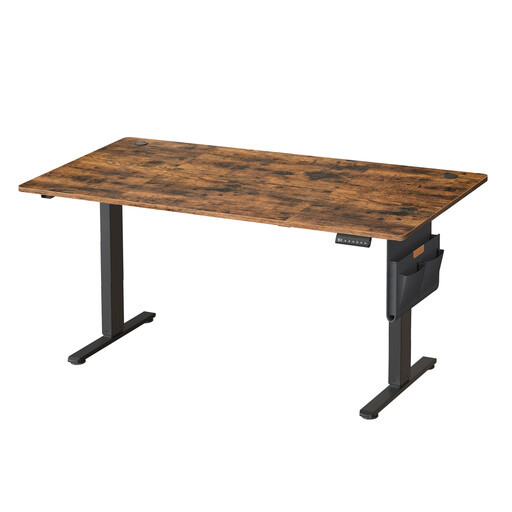
Why this suits this profile: Its large surface area is ideal for those who work with multiple monitors, documents or substantial computer equipment in their home office.
Its dimensions are clearly stated, as is its maximum static load of 70 kg. The product page also mentions cable management and a storage system.
Four programmable heights, 160 × 70 cm desktop, storage pocket, hook and a motor described as quiet.
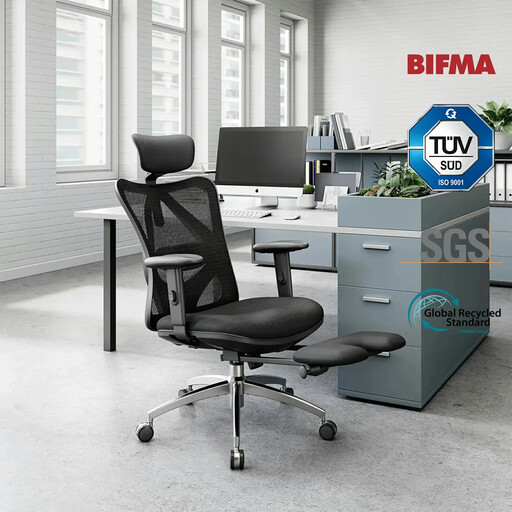
Why this suits this profile: This chair can support long work, reading or gaming sessions thanks to its adjustable backrest, headrest, seat, armrests and footrest.
The various adjustments are detailed on the product page, along with the recommended maximum load of 150 kg and assembly instructions.
High breathable mesh backrest, adjustable armrests, lumbar support, headrest and adjustable footrest.
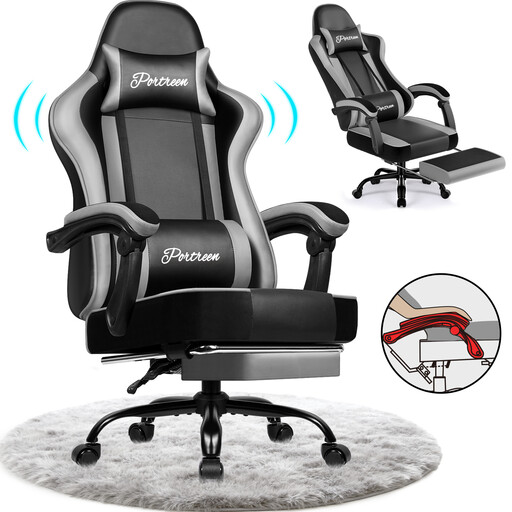
Why this suits this profile: Its reclining backrest and footrest let you move from gaming to reading to relaxing without changing your spot.
The 90 to 170 degree recline range, 10 cm height adjustment and stated load capacity of 150 kg are all listed separately.
Telescopic footrest, faux leather upholstery, lumbar support and headrest, with assembly stated to take 10 to 15 minutes.
We've put together a comprehensive, real-time updated selection of products that meet these strict criteria and European safety requirements.
Set up the desk on a level floor, leaving enough space behind and underneath the desktop. Before saving a position, adjust the height taking your chair and monitor into account. The top of your monitor should be roughly at eye level, without forcing you to tilt your head constantly.
With an ergonomic electric desk, alternate between positions rather than standing continuously. A suitable chair is still useful, even with a standing desk for remote work. Clean the desktop with a soft cloth and regularly check the screws, connections and cables.
There's no one-size-fits-all height. Start by adjusting the desk so that your elbows are in a comfortable position when you use the keyboard. Measure your sitting posture, then your standing posture, and compare these values with the adjustment range stated by the manufacturer.
The power consumption depends on the motor's wattage, how often you adjust it and your electricity tariff. The motor only runs while the desktop is moving up or down, so the impact on your bill mainly depends on how many adjustments you make each day. Check the technical specifications when they list the power or consumption of the desk.
Yes, as long as you check its depth, maximum load and the space available for your monitor, keyboard and accessories. For an adjustable gaming desk, also plan for effective cable management. For an adjustable study desk, choose a surface that's easy to clean and height memories that are simple to use.