
Livraison le jour même ou le lendemain

Qualité garantie

Débloquez vos offres de bienvenue: Livraison GRATUITE | Jusqu'à -80 % | 30 jours d'essai gratuits à JoyPlus
Téléchargez l'application
An electric sit-stand desk lets you switch from sitting to standing without moving your screen or interrupting what you are doing. This is particularly useful when working from home, studying, gaming or working in a shared professional space. However, a modern-looking height-adjustable desk is not automatically a good purchase.
Before placing your order, three pitfalls come up time and again: a desktop that is too narrow, a misunderstood load capacity and a motor described as quiet without any technical details to back this up. Here are the criteria to examine when comparing the models available in France.
A traditional standing desk may be fixed-height or require manual adjustment. If you plan to switch regularly between sitting and standing, make sure it has an electric motor, a control panel and a clearly stated height range.
A range of 72 to 118 or 120 cm suits many uses. However, the ideal height depends on your height, your chair and the position of your arms. When sitting, your knees should remain in a comfortable position. When standing, your forearms should be able to rest on the desktop without forcing you to raise your shoulders.
A 120 × 60 cm desktop can accommodate a laptop, a monitor, a keyboard and a few accessories. It is a suitable size for a bedroom, a small office or a home where every square centimetre matters.
For two monitors, a desktop computer, a lamp and documents, a depth of 70 cm gives you more viewing distance. A 160 × 70 cm desktop also gives you more freedom to organise cables and keep part of the desk clear. Models measuring 180 × 80 cm are even more spacious, but their footprint and weight must be compatible with the room.
A maximum load of 70 kg does not guarantee that the desk will remain perfectly stable in every configuration. You also need to consider how the weight is distributed, the height of the desktop, the number of monitors and whether the floor is level.
For an ergonomic electric desk, check for a metal frame, sufficiently wide feet and an obstacle detection system. The stated capacity generally refers to a static load: it must not be exceeded, particularly while the desktop is moving.
A desk with height memory lets you save two or four positions, depending on the model. There is no need to keep guessing to find the right height each time you change position. Some desks also offer a break reminder, which should be viewed as a practical aid rather than a medical promise.
Check how many positions can be saved, how easy the digital display is to read and how simple the controls are to use. In a household where several people use the same desk, multiple memory profiles can prove useful.
A motor capable of making smooth adjustments helps to limit jolts and vibrations while the desk is rising or lowering. The product information should also specify the precautions for use: the space to leave near the wall, protection from liquids and a temporary stop after prolonged operation.
Some of the models featured below state that they have overheating protection after two minutes of continuous adjustment, followed by a waiting period before they can be used again. This is worth bearing in mind if you adjust the desktop height frequently.
A desk with a USB-C port can make it easier to charge a phone or compatible accessory, but it does not necessarily replace a mains charger. Check the power output and the supported devices in the technical specifications.
Cable management, hooks, a storage pouch and cable grommets help to keep the desktop tidy. For an adjustable gaming desk, also make sure there is enough room for your mat, keyboard, mouse and monitor cables.
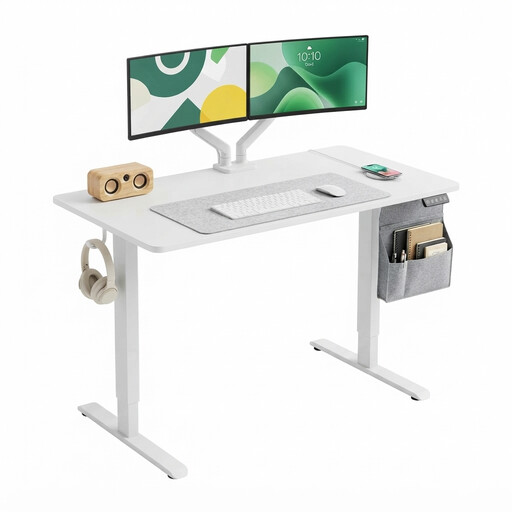
Why this choice suits this profile : Its 120 x 60 cm desktop is ideal as a first desk for working from home or studying, with simple digital controls.
The height is stated as 72 to 118 cm and the maximum load is 70 kg, making it easier to compare with fixed-height models.
Two memory positions, digital display, storage hooks and a frame stated to be CE-certified and compliant with European standards.

Why this choice suits this profile : Its 160 x 70 cm desktop is designed for setups with multiple monitors, numerous accessories and documents.
The specifications state a range of 72 to 120 cm, a maximum static load of 70 kg and the limitations associated with overheating protection.
Height memory, USB-C port, cable management, storage pouch and three hooks included.

Why this choice suits this profile : This mid-sized format offers a good balance between gaming space and footprint, with four height memory settings.
The specifications mention a maximum static load of 70 kg, an obstacle detection system and overheating protection.
Four memory settings, USB-C port, cable grommets, pouch and accessory hook.
Before assembling the desk, measure the available space, taking the desktop’s vertical travel into account. Do not push the desk right up against a wall if the product information warns of a risk of rubbing during adjustment. Cables must have enough slack to move with the desk without pulling on the sockets.
Set up the desk on a level floor, regularly retighten the fixings and clean the desktop with a soft, slightly damp cloth. Electrical components must be kept away from liquids. Always observe the maximum load and the manufacturer’s instructions.
A depth of 60 cm is enough for a laptop or a monitor with its keyboard. For two monitors, a desktop computer or extended use, 70 cm provides more viewing distance and room for accessories.
Consumption depends on the motor’s power and how often you adjust the desk. The motor only runs while the desk is rising or lowering, not for the entire time you are working. Check the technical specifications or manual for the model’s precise electrical characteristics.
Its lifespan depends on the weight it supports, how often it is adjusted, the quality of assembly and maintenance. To protect the mechanism, do not exceed the stated load, remove obstacles before each movement and observe the breaks required by the thermal protection system.