
Livraison le jour même ou le lendemain

Qualité garantie

Débloquez vos offres de bienvenue: Livraison GRATUITE | Jusqu'à -80 % | 30 jours d'essai gratuits à JoyPlus
Téléchargez l'application
Working from home, studying, or spending long hours gaming in front of a screen: choosing the right furniture shouldn't be left to chance. An electric height-adjustable desk lets you alternate between sitting and standing positions, but not all models are created equal. A short adjustment range, a narrow desktop, poorly thought-out cable management, or a motor that overheats quickly can turn an appealing purchase into a daily source of frustration.
That's why it's worth examining the technical specifications carefully. Here are the criteria to check before choosing an electric sit-stand desk, along with a selection suited to different needs.
A maximum height of 120 cm isn't enough to judge a desk's comfort. You need to look at the full range — for example 72 to 120 cm — and check the stability of the desktop when it's raised. The desk should also suit your height and the height of your chair.
Measure the height of your elbows when sitting and then when standing. Your keyboard should be at a level that allows your shoulders to stay relaxed. These are general guidelines and don't replace medical advice.
The weight of the desktop, monitors, monitor arm, computer and accessories adds up quickly. A maximum load of 70 or 80 kg is usually a static value stated by the manufacturer: it doesn't mean the desk can be loaded to the maximum during every movement.
Stability also depends on the steel frame, the width of the legs, the type of flooring and how your equipment is distributed. A height-adjustable gaming desk may need extra margin if you use multiple monitors or if your PC tower sits on the desktop.
Height memory makes frequent changes easier, but two programmable positions don't meet the same need as four. As for anti-collision protection, it needs to be set up correctly and doesn't replace keeping a clear space around the desk.
A well-organised surface is often more useful than a simply modern design. A desk with cable management, storage pockets, hooks or a USB-C port can reduce visible clutter and simplify everyday setup.
For a versatile home office desk, the 120 × 60 cm size generally offers enough space for a laptop, a monitor, a keyboard and some documents. However, check the available depth in your room, especially if the desk needs to be placed near a wall.
The models featured here mainly offer a height range between 72 and 118 or 120 cm. Compare this range with your height and that of your chair. The stated maximum load varies from 70 to 80 kg depending on the model.
The stated noise level is a good point of comparison. Some desks claim operation below 50 dB, which can be welcome in a bedroom, shared space or quiet home office environment. The actual noise you hear depends on the load, the floor and the quality of assembly.
Follow the manufacturer's instructions. On some models, two minutes of continuous operation can trigger overheating protection, requiring a delay before further use. This is worth considering if you plan to change the height very regularly.
A desk with height memory lets you save several positions and avoids repetitive adjustments. Two memory settings may be enough for simple personal use. Four positions become practical for a couple, different activities or various accessories.
Obstacle detection, sometimes called anti-collision protection in the specifications, must be set up according to the instructions. Before each movement, check that cables, drawers, walls and objects under the desktop won't obstruct its travel.
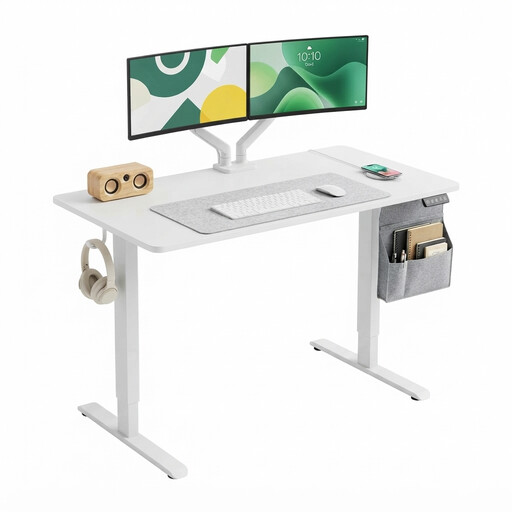
Why this choice suits this profile: its classic size is ideal for home working, studying and a first sit-stand setup. The digital control displays the height and lets you save two memory positions.
The 72 to 118 cm range and digital display prevent you from setting the height by guesswork. The two included hooks also help keep the desktop clutter-free.
Stated load capacity of 70 kg, 120 × 60 cm desktop, two memory settings and CE certification mentioned on the product page.
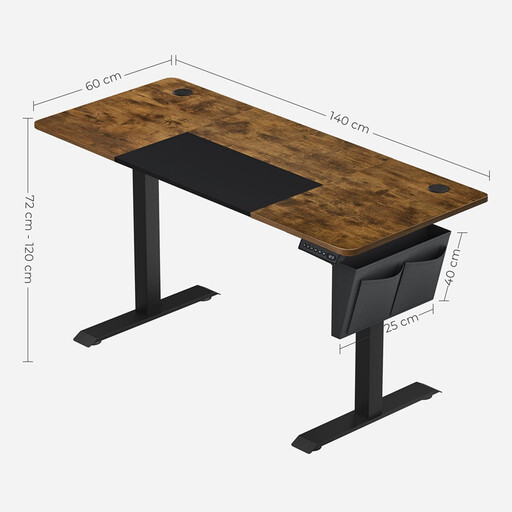
Why this choice suits this profile: its 140 cm desktop offers plenty of space for a dual-monitor setup and lots of accessories. The four memory settings adapt to different activities and users.
Obstacle detection and the steel frame address the main points to check before buying. The two power sockets and storage accessories also make cable management easier.
Adjustment from 72 to 120 cm, stated static load of 80 kg, noise level indicated below 50 dB and four memory buttons.
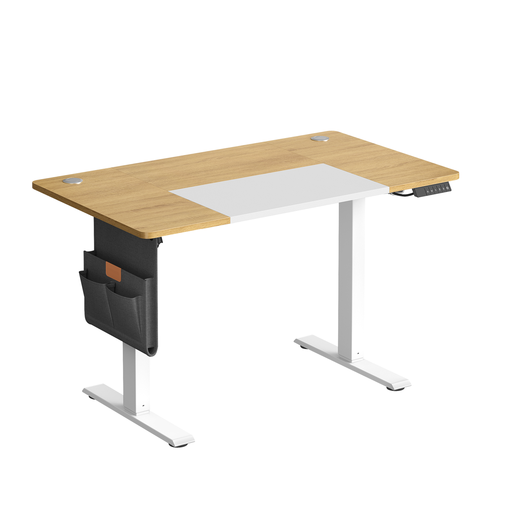
Why this choice suits this profile: the USB-C port, organisers and hooks are aimed at users who want to connect and store several devices in a compact space.
Cable management and the memory function prevent the desktop from turning into a messy area. The product page also reminds you not to exceed 70 kg and to leave clear space around the desk.
120 × 60 cm size, adjustment from 72 to 120 cm, height memory, USB-C port and stated static load of 70 kg.
We've put together a complete, real-time updated selection of products that meet these demanding criteria and European safety standards.
Start by measuring the height of your elbows when sitting, then when standing. Compare these measurements with the range stated by the manufacturer. An adjustable model from 72 to 120 cm suits many uses, but the truly comfortable position depends on your height, your chair and your peripherals.
The noise level varies depending on the motor, the load, the floor and the quality of assembly. Some product pages state operation below 50 dB. This value lets you compare models, but doesn't guarantee the same level in every setup.
The motor only runs for the few seconds needed for adjustment. Power consumption depends on its wattage and how often you change the height. To estimate the real cost, check the power rating on the product page or in the instruction manual, then compare it with your electricity tariff.