
Livraison le jour même ou le lendemain

Qualité garantie

Débloquez vos offres de bienvenue: Livraison GRATUITE | Jusqu'à -80 % | 30 jours d'essai gratuits à JoyPlus
Téléchargez l'application
Are piles of notebooks stacking up on your desk?? Does finding a specific piece of information in your handwritten notes feel like an uphill battle?? Whether you're a professional juggling back-to-back meetings, a student deep in exam prep, or a creative bursting with ideas, managing paper notes eventually shows its limits and slows down your productivity.
This is where the digital notebook comes in: the promise of a unified workspace to centralize, organize, and find all your information in a flash. But between a specialized E Ink tablet and a more versatile traditional tablet, the choice can quickly become a headache. This guide is here to clear the path, walk you through the essential criteria, and present our selection of the best devices to help you find the perfect ally for your workflow.
Before taking the plunge, let's review the key points that will make all the difference in your daily use.
This is the number one criterion.
A smart notebook is more than just its screen. The software is just as crucial. Look for features that will truly boost your productivity?:
For those on the go, battery life and weight are non-negotiable criteria. E Ink tablets, being very energy-efficient, often last several weeks on a single charge while being true featherweights. Conversely, more power-hungry LCD tablets require almost daily charging with heavy use.
Let's get to the specifics with our selection, designed for different profiles and budgets.

Why it stands out?: The iFLYTEK AINOTE 2 is a note-taking powerhouse, positioning itself as a true reMarkable alternative. It's designed for those who want the feel of paper with the power of AI. Its E Ink screen and record-breaking thinness make it a work companion that is as discreet as it is effective.
Key features?:
Who is it for?? Professionals, consultants, and journalists who have back-to-back meetings and need an ultra-reliable transcription tool. It's also an excellent choice for writers looking for a distraction-free writing bubble.
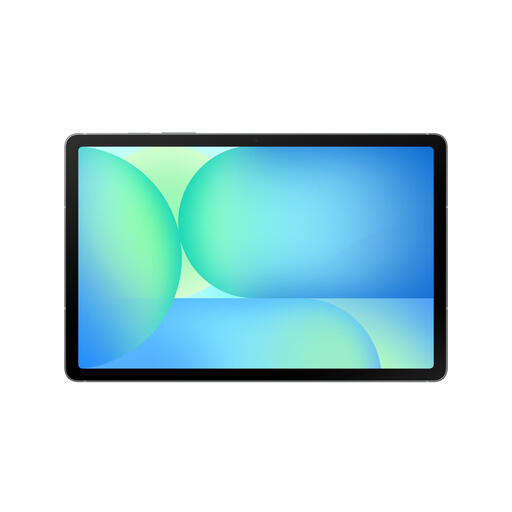
Why it stands out?: The Galaxy Tab S10 FE is the ultimate versatile tablet, designed for students and professionals who refuse to choose between productivity and entertainment. Bundled with its S Pen and a complete app ecosystem (Goodnotes, Noteshelf), it transforms into a formidable digital notepad.
Key features?:
Who is it for?? Students and young professionals looking for an all-in-one device that can juggle classes, meetings, and downtime. Fans of the Samsung ecosystem and the flexibility of Android will find it a perfect match.
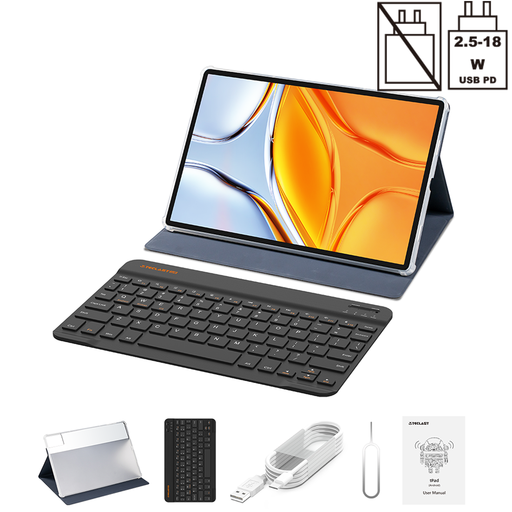
Why it stands out?: The TECLAST T70 plays in the big leagues with its huge 14-inch screen, all at an unbeatable price. Bundled with a case and keyboard, it forms a complete package for those who want a vast digital workspace without breaking the bank.
Key features?:
Who is it for?? Students or professionals on a tight budget who prioritize a large display area for working on documents, creating diagrams, or managing multiple windows. A pragmatic option, ideal for a fixed workstation or as a second screen.
Our selection covers the most common use cases, but the tablet market is vast. If none of these models check all your boxes, don't worry?: there are plenty of other options out there.
? Discover our full range of Android tablets to find the model that's right for you.
A digital notebook is most often a specialized device with an E Ink screen, designed primarily for writing and reading. Its goal?: to limit distractions for maximum focus. A traditional tablet (LCD/OLED) is a multimedia Swiss Army knife. It can be used for note-taking with a stylus and dedicated apps, but it also opens the door to millions of applications, games, and streaming services.
The experience is stunningly realistic. The slightly textured surface of the screen and the low latency of modern styluses create a friction that perfectly mimics the feeling of a pencil on paper. It's an incomparable feeling compared to gliding on a standard glass screen, which many users find much more natural and pleasant over long periods.
Absolutely. Most high-performance models include an optical character recognition (OCR) feature. This technology analyzes your handwriting and converts it into digital text that you can then copy, edit, or use for searches. Of course, the accuracy of the result will depend on the legibility of your handwriting and the performance of the software.
Article written by the Joybuy Product Recommendation Service.