
Livraison le jour même ou le lendemain

Qualité garantie

Débloquez vos offres de bienvenue: Livraison GRATUITE | Jusqu'à -80 % | 30 jours d'essai gratuits à JoyPlus
Téléchargez l'application
The freedom of remote work is fantastic. But it comes with its own set of logistical headaches?: the battery that dies at the worst possible moment, the laptop screen too small to be productive, or the bag that refuses to hold both your computer and your lunch. To stay efficient in any situation, whether you're on a train, in a café, or at a coworking space, building a coherent and high-performance nomad remote work kit is crucial.
That's why we've selected gear designed for mobility, capable of transforming any location into a true portable workstation. The goal?: to help you balance productivity and autonomy, without ever weighing you down.
Before you grab the first accessory you see, let's define the three pillars of a great complete remote work setup.
The hunt for a power outlet is an anxiety every nomad worker knows. To put an end to it, a high-capacity portable laptop power bank is a more than wise investment. Two criteria to watch closely are: capacity, in milliampere-hours (mAh), which determines the number of recharges, and power output in watts (W), which must be sufficient for your laptop, not just your smartphone.
Spending your day on a 13 or 15-inch screen can quickly become an ordeal and tank your productivity. A portable monitor for your PC is the ideal solution to regain the comfort of a dual-screen setup, just like at the office. Simply check its compatibility with your machine's ports (USB-C or HDMI) and opt for thin, lightweight models for hassle-free transport.
Your digital nomad gear deserves foolproof protection. A well-designed backpack is much more than just a container?; it's a centrepiece of your mobile office. Look for a model with a padded laptop compartment, dedicated pockets for cables and accessories, and a robust overall design. Some bonuses, like an external USB charging port, can make a real difference in your daily routine.
Let's get down to business with three complementary products that will form the basis of a remarkably effective mobile productivity kit.

Why it stands out: This backpack ticks two essential boxes for the nomad worker?: carrying gear safely and keeping meals at the right temperature. Its all-in-one design means you no longer have to juggle a laptop bag and a lunch cooler.
Advantages:
For whom? Ideal for professionals and students who are on the move daily and want to pack their lunch, or for frequent travellers looking for a versatile laptop backpack that includes a convenient charging solution.
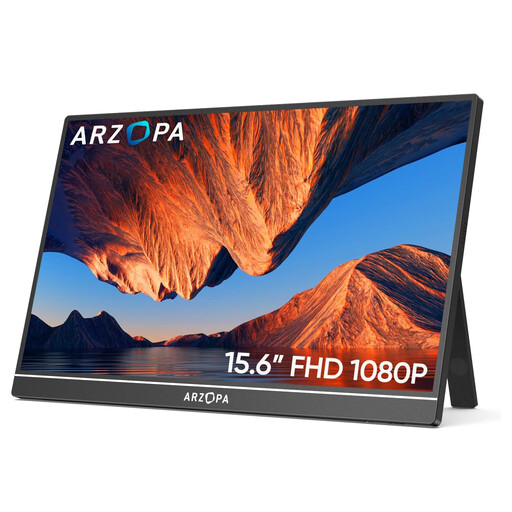
Why it stands out: This portable monitor is a simple and remarkably effective solution for expanding your screen real estate. Its thin and lightweight design makes it an ideal travel companion, while its modern connectivity ensures near-universal compatibility and instant setup.
Advantages:
For whom? Perfect for professionals who juggle spreadsheets, developers, creatives, or anyone who needs a mobile productivity pack to display multiple windows at once and boost their efficiency.
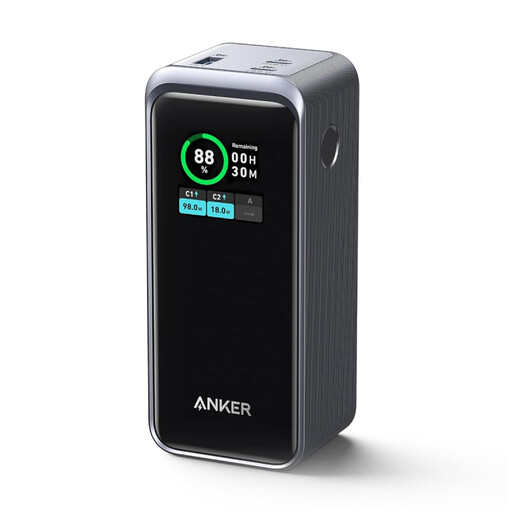
Why it stands out: This power bank packs a punch with its total output of 200W, capable of rapidly charging not only your mobile devices but also the most power-hungry laptops. The game-changing extra?: its digital display to see all the stats at a glance.
Advantages:
For whom? A must-have for power users who rely on multiple devices and for whom running out of battery is not an option. It's the cornerstone of any nomad remote work kit that aims to be truly self-sufficient.
While these accessories complete your arsenal, the heart of your mobile office is, of course, your computer. To discover a range of models designed for mobility, check out our selection of laptops with USB ports.
The most reliable solution is to use a high-power external battery, or power bank. Make sure its output in watts (W) is at least equal to that of your original charger. Models like the Anker Prime 200W are specifically designed for this purpose, with USB-C Power Delivery (PD) ports capable of delivering up to 100W.
The winning trio for a digital nomad generally consists of three items?:
Yes, the vast majority of recent laptops allow it. The key is to check your machine's connectivity. If you have a USB-C port that supports DisplayPort Alt Mode or an HDMI port, connecting it is a breeze. Monitors like the ARZOPA A1 even come with all the necessary cables (USB-C to USB-C and mini-HDMI to HDMI) for immediate setup.