Remote work and home study are now an integral part of our daily lives. Yet, many of us are still making do with the corner of a kitchen table or an uncomfortable chair, to the detriment of our focus and well-being. Setting up a proper workspace is no longer a luxury, but a necessity to stay productive and take care of yourself.
As a Product Expert at Joybuy, my mission is to help you navigate the jungle of office furniture. In this guide, I'm sharing my tips and top picks to help you create a desk and office chair set that is functional, comfortable, and within your budget.
Tips for Choosing Your Office Furniture
Before you make a purchase, let's review the key criteria for making a choice you won't regret.
1. Prioritise Ergonomics for Your Comfort
Sitting for hours on end puts a strain on the body. Therefore, equipment that provides proper support is essential. An ergonomic office chair isn't a gimmick; it's your best ally. Look for models that offer multiple adjustment points:
- Seat Height: Your feet should rest flat on the floor with your knees bent at a 90-degree angle.
- Lumbar Support: A good office chair with adjustable lumbar support is crucial for maintaining the natural curve of your spine.
- Adjustable Armrests: These relieve tension in the shoulders and neck.
- Reclining Backrest and Headrest: Ideal for varying your posture and taking a proper break.
2. Assess Your Space and Style Needs
The size of your computer desk depends on your equipment and the space you have available. Do you need room for one or two monitors? Integrated storage for your files?
- For small spaces: A compact desk (80-100 cm wide) will be a perfect fit.
- For multi-monitor setups: Aim for a desktop at least 120 cm wide.
Style matters, too! An industrial-style desk, with its blend of wood and metal, will easily fit into a modern decor. Meanwhile, a more minimalist design will be perfect for a bedroom or living room.
3. Consider Durability and Ease of Assembly
Good home office equipment is an investment. Take a look at the materials: a steel frame and a thick particleboard top are often synonymous with stability and longevity. Finally, don't underestimate the ease of assembly. Clear instructions and well-labelled parts will save you a lot of headaches when assembling your remote work setup stress-free.
Our Top Picks for Building Your Workspace
Rather than forcing you into pre-made bundles, we've selected desks and chairs that you can mix and match to suit your tastes and needs. Here are our recommendations for 2026.
The Desks: The Foundation of Your Productivity
Ochama Computer Desk, 80 x 50 cm, Black

- Why it stands out: Its minimalist design and compact dimensions make it the ideal candidate for small apartments, student rooms, or for setting up a discreet office nook in a living area.
- Pros:
- Quick Assembly: Its clear instructions and numbered parts ensure assembly in a flash.
- Guaranteed Stability: The reinforced steel frame and adjustable feet ensure excellent stability, even on uneven floors.
- Versatility: Ideal for work, study, or an occasional gaming session.
- Who is it for?: The student or occasional remote worker looking for a simple, functional, and space-saving solution.
Ochama Desk, 120 x 60 cm, Industrial Style
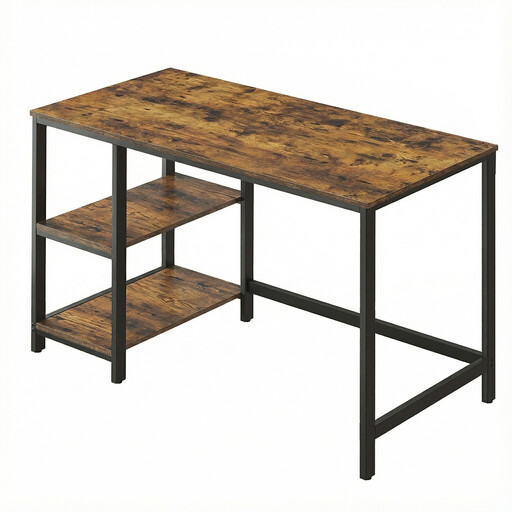
- Why it stands out: With its large desktop and modular storage shelves, this desk perfectly blends industrial style with practicality.
- Pros:
- Comfortable Workspace: The 120 x 60 cm desktop easily accommodates two monitors and all your accessories.
- Flexible Storage: The two shelves can be assembled on the left or right. The middle shelf is even removable to make room for a computer tower.
- Sturdy Construction: The combination of a steel frame and thick particleboard can support a static load of up to 50 kg.
- Who is it for?: The regular remote professional, creative, or gamer who needs a large and organised workspace.
The Chairs: The Key to a Healthy Posture
SIHOO M18 Ergonomic Office Chair, Black
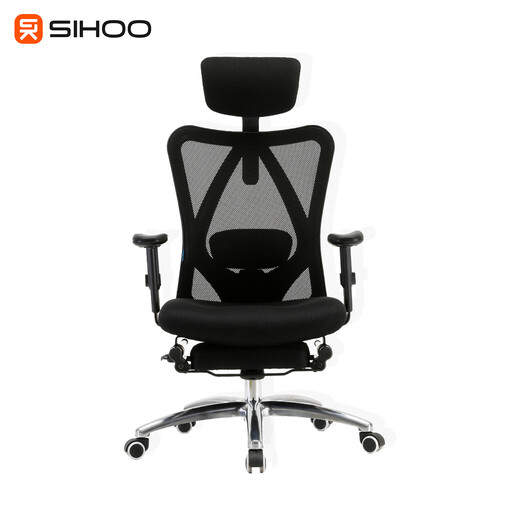
- Why it stands out: This model offers a full range of ergonomic adjustments, making it a true ally for tackling long workdays.
- Pros:
- Multiple Adjustments: Headrest, lumbar support, seat height, tilt, armrests... everything adjusts for tailored comfort.
- Breathable Mesh Back: It promotes air circulation to keep you cool, even in the middle of summer.
- Certified Quality: The chair is BIFMA certified (an industry standard for safety and durability) and supports up to 150 kg.
- Who is it for?: Anyone who spends more than 4 hours a day at their desk and wants to put an end to back and neck pain.
SIHOO M102C Ergonomic Office Chair, White and Grey
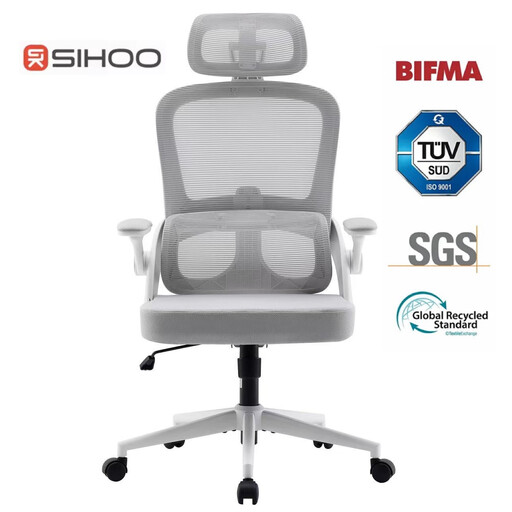
- Why it stands out: Its modern design and flip-up armrests make it a choice that is as stylish as it is smart for multi-functional spaces.
- Pros:
- Flip-up Armrests: They allow you to easily slide the chair under the desk for significant space saving.
- Adjustable Lumbar Support: The lumbar support can be adjusted vertically by 6 cm for targeted support.
- Wide and Comfortable Seat: Designed to accommodate different body types, it supports a weight of up to 136 kg.
- Who is it for?: Those looking for an ergonomic chair with a sleek design, who also appreciate being able to store it easily to free up space.
Looking for Other Options?
Choosing your desk and office chair set is a very personal decision. If our selection doesn't tick all your boxes (style, dimensions, features), feel free to explore our full catalogue.
? Discover Our Full Range of Computer & Office Desks
Frequently Asked Questions (FAQ)
1. What is the ideal height for an office desk and chair? The ideal height is one that allows you to maintain a neutral posture. For the chair, your feet should be flat on the floor with your knees at a 90° angle. For the desk, your elbows should form a 90° angle when your forearms are resting on the desktop. Since most desks have a standard height of 75 cm, it's mainly the chair's adjustability that will make the difference.
2. How do I choose the right computer desk for remote work? Consider three key points: size (large enough for your monitors and accessories), storage (shelves or drawers depending on your needs), and stability (a solid frame and adjustable feet). Finally, make sure it fits harmoniously into your room without cluttering it.
3. Is an office chair with lumbar support essential? For occasional use, it's not mandatory. However, if you spend several hours a day sitting, good lumbar support becomes essential. It helps maintain the natural curve of your lower back, thereby reducing fatigue and the risk of chronic pain. A model with adjustable support is a real plus for tailored comfort.


