
Livraison le jour même ou le lendemain

Qualité garantie

Débloquez vos offres de bienvenue: Livraison GRATUITE | Jusqu'à -80 % | 30 jours d'essai gratuits à JoyPlus
Téléchargez l'application
Whether for remote work, studying, or gaming sessions, choosing a desk is a far more important decision than it might seem. The wrong model can quickly become a source of daily discomfort and a complete waste of money. Faced with an overwhelming number of options, it's easy to fall into the most common traps. This guide breaks down the essential criteria to help you find the desk that truly fits your needs and your space.
Before you start shopping, it's best to know the most common disappointments so you can avoid them.
To avoid falling into these traps, here are the technical points to check.
The sturdiness and lifespan of your desk depend on two key elements: the frame and the desktop.
Measure your room, but more importantly, think about your daily use.
The ideal desk is one that adapts to you, not the other way around.
To put theory into practice, here are a few options tailored to specific needs.
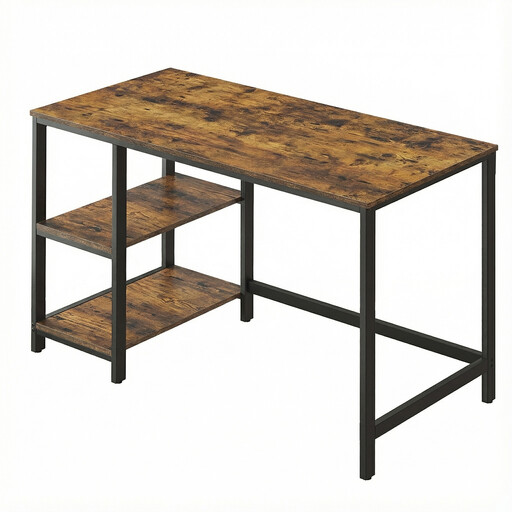
Why we recommend it : This desk offers an excellent balance of footprint, features, and price. Its 120 x 60 cm surface is generous enough for a monitor and a laptop—the ideal setup for most remote workers or students.
Its steel frame and adjustable feet ensure good stability. The clear instructions and labelled parts ensure a hassle-free assembly.
The 2 storage shelves are removable and can be installed on the left or right, a real bonus for customising your setup and organising your space.
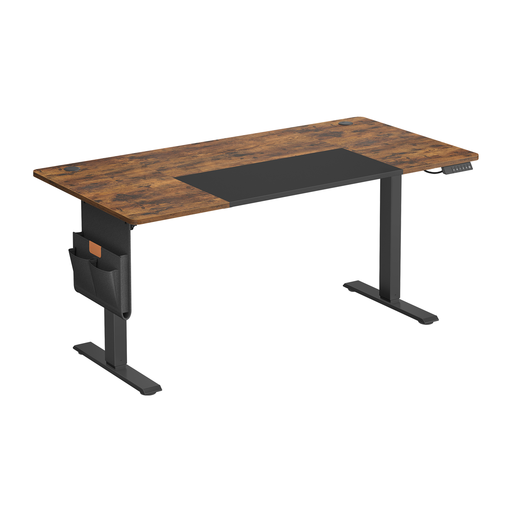
Why we recommend it : For those who work long days from home, this sit-stand desk is perfect for alternating postures. Its large 160 cm desktop provides a particularly comfortable workspace, even with multiple monitors and accessories.
The stable steel frame and quiet motor alleviate concerns about instability and noise often associated with electric desks. Features like cable grommets and an organiser help maintain a perfectly optimised workspace.
The memory function allows you to save your preferred heights to switch from sitting to standing with a single press. The integrated USB-C port is a handy little extra for daily use.
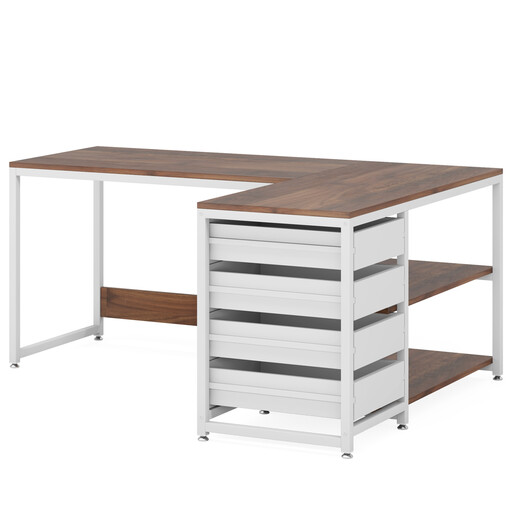
Why we recommend it : Ideal for those who need a lot of space, whether for computer equipment, files, or creative activities. Its L-shape makes perfect use of a room corner while offering a very generous work surface.
This desk is the perfect answer to the "poorly assessed workspace" pitfall, combining a large surface with multiple storage options (4 drawers, 2 shelves). The metal frame and adjustable feet ensure the stability of this substantial structure.
Its reversible design allows the drawer unit to be assembled on the left or right, offering welcome modularity to fit any room layout.
Explore our complete selection of desks, all approved by our editors based on these same quality and safety criteria.
The simplest solution is also the most effective: choose a model equipped with adjustable feet. These small, usually screw-in pads allow you to adjust the height of each leg independently to compensate for floor imperfections and guarantee rock-solid stability.
Its longevity depends primarily on the quality of the materials. A thick particleboard desktop paired with a solid steel frame can last for many years with minimal maintenance. Avoid overloading it beyond the manufacturer's recommended weight limit and protect the surface from liquids to prevent stains and swelling.
Most recent models are now designed for home assembly. Manufacturers provide illustrated instructions and numbered parts to simplify the process. However, due to the weight of the motor and frame, it is highly recommended to have a second person help you handle the heaviest components safely.