
Livraison le jour même ou le lendemain

Qualité garantie

Débloquez vos offres de bienvenue: Livraison GRATUITE | Jusqu'à -80 % | 30 jours d'essai gratuits à JoyPlus
Téléchargez l'application
Whether for a remote work setup or for equipping professional offices, every great workspace is built around a core component: the desk. But with an overwhelming number of options available, finding the model that checks all the boxes—space, ergonomics, budget—can quickly become a headache.
This guide is here to shed some light and help you choose the desk that will meet all your needs by combining comfort, practicality, and style.
Before you dive in, take the time to define your needs based on three key areas.
It's no secret that sitting for hours on end has harmful consequences for your back and posture. A height-adjustable desk, also known as a sit-stand desk, is the ideal solution for easily alternating positions throughout the day. This flexibility encourages movement and makes the workday much more dynamic. Several points to check: the adjustment range, the type of mechanism (manual or electric), and the presence of position memory presets, which are very convenient for saving your preferred heights.
The layout of your room is obviously a key factor.
In any case, be sure to measure the available space before you decide, and don't forget to leave enough clearance for your office chair!
A tidy desk means a clear mind. And that means better focus. A desk with integrated storage (drawers, shelves, cabinets) is the easiest solution for keeping your documents and supplies within reach without sacrificing your work surface. If you prefer a more minimalist model, consider pairing it with external storage solutions to maintain a clean and functional space.
To help you make your choice, here are three models that cater to very different needs.

What sets it apart
This model first impresses with its very generous 160?x?80?cm desktop, and then with its particularly sturdy design. Its reinforced steel structure ensures rock-solid stability, with an advertised load capacity of up to 400?kg. Its clean, industrial-style design integrates easily into many interiors, whether as an XXL computer desk or even as a meeting table.
Key features
Who is it for? For professionals, creatives, or students who need a very large desk to spread out their projects, juggle multiple screens, and are primarily looking for a durable and perfectly stable piece of furniture.
What sets it apart
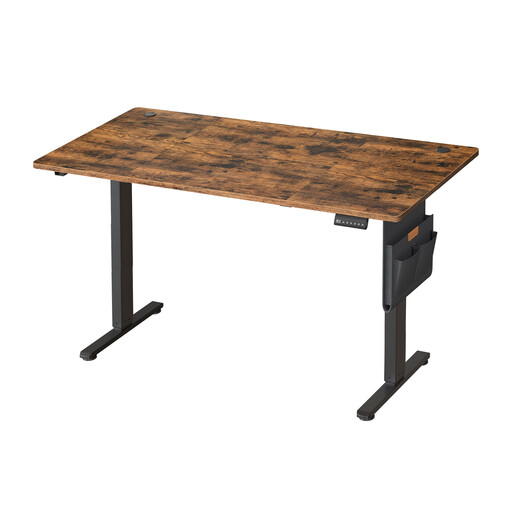
This height-adjustable desk is designed for anyone who makes ergonomics a priority. Its electric motor ensures smooth and quiet height adjustment (from 72 to 120?cm). It includes thoughtful features like position memory presets to save your preferred heights and a fast-charging USB-C port directly on the control panel. A nice touch: cable grommets and a fabric storage hammock are included for impeccable cable management.
Key features
Who is it for? For remote workers and anyone who spends long hours in front of their screen and wants to take care of their back by easily alternating between sitting and standing positions.
What sets it apart
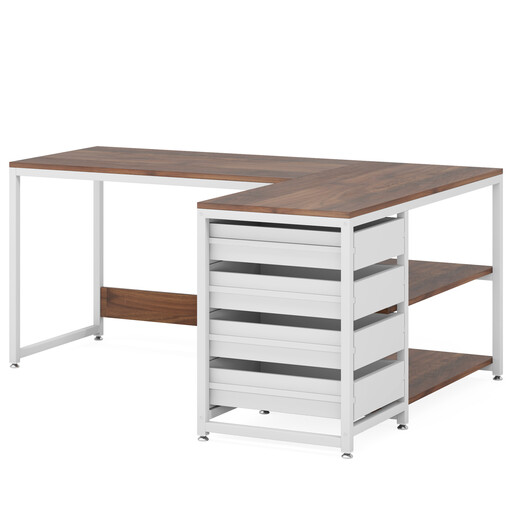
This L-shaped desk is the ultimate all-in-one solution, combining a large work surface with ample storage. Its main advantage? Modularity. The storage unit, with its 4 drawers and 2 shelves, can be assembled on either the left or right side to perfectly fit your room. It's the smart choice for optimising a dead corner while keeping your belongings organised and within reach.
Key features
Who is it for? For those who want to make the most of a corner and are looking for a solution with integrated storage for an always-immaculate home office setup.
Your storage needs can change. If your space is limited or you simply want to complement your setup, modular and mobile storage solutions are available.
For smart and compact extra storage, take a look at our selection of folding office shelves.
A depth of 60 to 80?cm is ideal. 60?cm is sufficient for a laptop, but aim for 80?cm to be comfortable with an external monitor. This will help you maintain a good eye-to-screen distance and give you enough space for your keyboard and documents.
A good home office setup is based on three pillars: ergonomics (a good chair, a screen at eye level), proper lighting (prioritise natural light, supplemented by a desk lamp), and impeccable organisation. Consider organisers, cable management solutions, and a desk with storage to keep your desktop consistently clear.
The main benefit of a sit-stand desk is to combat a sedentary lifestyle. Alternating positions throughout the day helps reduce fatigue, improve posture, and even boost concentration. It's an excellent investment for your day-to-day and long-term well-being.