
Livraison le jour même ou le lendemain

Qualité garantie

Débloquez vos offres de bienvenue: Livraison GRATUITE | Jusqu'à -80 % | 30 jours d'essai gratuits à JoyPlus
Téléchargez l'application
Are you looking to upgrade a gaming PC, a creative workstation or a streaming setup? A 32 GB DDR5 RAM kit running at 6000 MHz offers an excellent balance for gaming, keeping multiple applications open and working with demanding software. In practice, this description usually refers to a 2 × 16 GB kit capable of reaching 6000 MT/s, often listed in catalogues as DDR5 6000 MHz memory.
But a high frequency alone doesn't guarantee a trouble-free installation. Motherboard compatibility, latency, heatsink height and overclocking profile are all points to check before placing your order.
A kit sold as DDR5 6000 MHz often starts at a lower standard frequency, defined by its SPD or JEDEC profile. To achieve the advertised performance, you usually need to enable AMD EXPO on a Ryzen platform or Intel XMP 3.0 on an Intel platform, directly in the motherboard's UEFI.
Without this activation, the memory may remain at 4800 MT/s, or another standard value. This behaviour isn't necessarily a sign of a problem – it simply explains why the performance stated on the box isn't always available from the first boot.
A DDR5 stick cannot be installed in a DDR4 slot. So check the following points:
A 2 × 16 GB kit should generally be installed in the slots recommended by the manufacturer, often A2 and B2, to take advantage of dual-channel operation.
Kits equipped with RGB RAM often come with a fairly bulky heatsink. At a height of 42 to 44 mm, they can interfere with a large tower cooler or a radiator mounted above the memory slots.
Conversely, a low-profile model like the Crucial Pro DDR5, listed at 32 mm, fits more easily into a compact case. Measure the available space before choosing a kit with an elaborate shroud or a wide light diffuser.
A 2 × 16 GB DDR5 RAM kit is suitable for many uses:
For very heavy projects, complex 3D animation or professional use involving many applications open simultaneously, a higher capacity may be more appropriate. In that case, take a look at our selection of high-capacity DDR5 memory.
The CL notation, short for CAS Latency, refers to the delay between a request and the availability of certain data. At the same frequency, a DDR5 CL30 theoretically shows a lower delay than a DDR5 CL36 or DDR5 CL38. However, you need to consider the full set of timings, as well as the motherboard and processor.
For gaming DDR5 RAM, CL30 may appeal to users looking for particularly tight timings. CL36 or CL38 kits remain perfectly consistent when price, design or mechanical compatibility take priority. Always compare the complete timings, for example 30-36-36 or 38-38-38-76, rather than focusing solely on the CL number.
Fast profiles typically run at around 1.35 V, compared to 1.1 V for the standard JEDEC setting. The motherboard must be able to apply this profile correctly, and the processor must support it.
The presence of an integrated PMIC and on-die ECC are standard features of DDR5. These components help manage power delivery and the internal operation of the chips, but they don't turn consumer memory into true server-grade ECC memory.
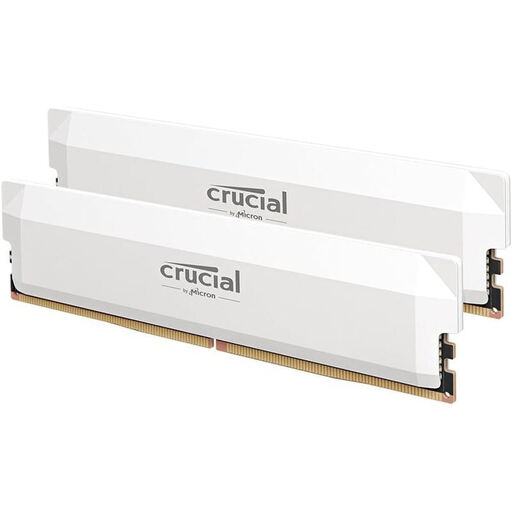
Why this choice suits this profile: its reduced height of 32 mm makes installation easy in a standard setup, with no RGB lighting to push up the cost or complicate integration.
Its limited height reduces the risk of conflict with a large tower cooler. The standard 1.1 V profile remains available if EXPO or XMP is not enabled.
32 GB in 2 × 16 GB, 6000 MT/s, CL36-38-38-80 timings and Intel XMP 3.0 / AMD EXPO compatibility.
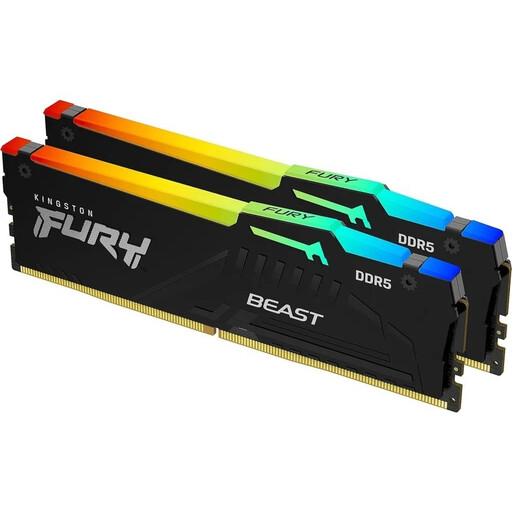
Why this choice suits this profile: this kit combines CL30 latency, two optimisation profiles and customisable lighting for a build that's both powerful and polished.
The Intel XMP 3.0 and AMD EXPO profiles prevent the kit from being limited to a single platform. Its height of 42.23 mm should, however, be checked against your cooling system.
6000 MT/s, CL30-36-36 timings, synchronisable RGB lighting and black heatsink.
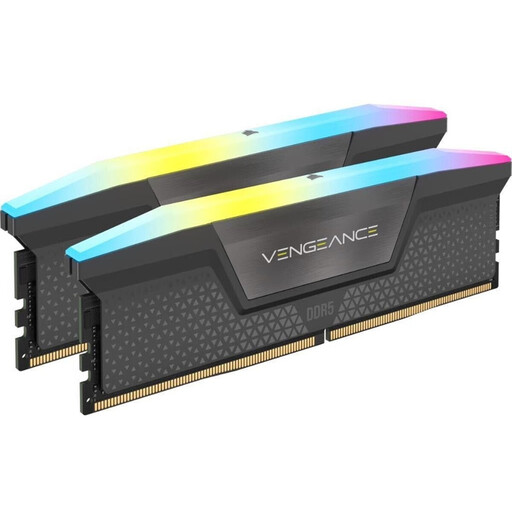
Why this choice suits this profile: its multi-zone lighting and iCUE control are particularly aimed at streaming PCs or setups showcased on a desk.
The XMP and EXPO profiles let you choose the right setting for both major platforms. The 44 mm height should, however, be checked against your cooling system.
32 GB, 6000 MHz, CL38-38-38-76, anodised aluminium heatsink and software-controllable RGB lighting.
Before handling anything, switch off the PC completely, unplug it, then discharge static electricity by touching an earthed metal surface. Insert the modules without forcing, aligning the notch and using the slots indicated in your motherboard manual.
After booting, open the UEFI and enable the profile that matches your platform. If the system becomes unstable, revert to the standard profile or check whether a BIOS update is available. Good case ventilation is still recommended, especially with an operating voltage of 1.35 V.
We've put together a comprehensive, real-time selection of products that meet these demanding criteria and European safety standards.
Yes, in most cases. The kit first boots with its standard SPD profile. Enable Intel XMP 3.0 on an Intel motherboard or AMD EXPO on an AMD platform, then save the settings in the UEFI.
For the majority of games, streaming and everyday multitasking, 32 GB provides a comfortable buffer. Creators working on very large video or 3D projects may want to consider more memory, depending on their software's recommendations.
The lifespan depends on the quality of the installation, ventilation, applied voltage and intensity of use. Stick to the parameters specified by the manufacturer, avoid excessive voltages and check system stability after enabling a fast profile.