
Livraison le jour même ou le lendemain

Qualité garantie

Débloquez vos offres de bienvenue: Livraison GRATUITE | Jusqu'à -80 % | 30 jours d'essai gratuits à JoyPlus
Téléchargez l'application
A dashcam for your car can record a journey, document an accident or provide useful evidence after an act of vandalism. But not all dashcams are created equal. A front-facing camera alone won't capture what's happening behind you, parking surveillance may require specific wiring, and a high resolution doesn't guarantee clear footage at night on its own.
Before buying a dashcam for your car, it's worth separating genuinely useful features from marketing claims that are harder to verify.
A 4K dashcam captures more detail than a 1080p model. However, the final result also depends on the sensor, the lens aperture, the compression and the lighting conditions. A very sharp image in broad daylight can quickly lose clarity when faced with headlights, in the rain or on a poorly lit street.
When comparing two models, look for a clearly identified sensor, plus HDR or WDR functionality and a sufficiently wide aperture, such as F1.8 or F1.75. These features won't work miracles, but they tell you far more than the simple mention of 'ultra HD'.
24-hour parking mode is often presented as a built-in feature. In reality, many models require a hardwire kit sold separately. Without this dedicated power supply, the camera will generally only record when the vehicle is switched on.
Before placing your order, check the kit's compatibility with your car, the battery discharge protection system and the type of surveillance offered: impact detection, motion detection or time-lapse recording.
A dashcam records continuously. Thanks to loop recording, older unprotected videos are automatically overwritten when the card is full. In the event of a collision, the G-sensor can lock the relevant footage. However, a card that is too slow, worn out or incompatible can cause recording errors.
Choose a microSD card designed for video, typically Class 10 and U3 for 2K or 4K models. Also remember to check the maximum capacity supported by the camera.
A 1080p front camera can be perfectly adequate for everyday use. 2K offers more detail for reading number plates and signs, while 4K is worthwhile for long journeys, motorway driving and users who want to keep highly defined footage.
The field of view also deserves your attention. A lens of 140° to 150° covers a wide area without necessarily causing excessive distortion. For a front and rear dashcam setup, check the resolution and angle of each camera separately: the rear module is often less defined than the one fitted at the front.
A GPS dashcam can record your location, speed and route, depending on the model's settings. This data helps you better place an event, but it should be stored and shared with discretion.
Built-in Wi-Fi usually lets you view or download a video from an app without removing the memory card. A dashcam with an app is handy for quickly checking footage of an incident. Bear in mind, though: the dashcam's Wi-Fi does not replace a mobile internet connection. Remote access may require a separate 4G module.
Installing the camera behind the rear-view mirror minimises visual obstruction. Check the length of the rear cable if you have a family car, SUV or van, as well as the mounting system supplied. Models equipped with a supercapacitor are often better suited to temperature variations, but it is still essential to follow the conditions stated in the manual.
In the UK, install the camera so that it does not reduce your field of vision. Recordings must also be used in accordance with the rules on privacy and data protection, particularly when people or number plates appear in the image.
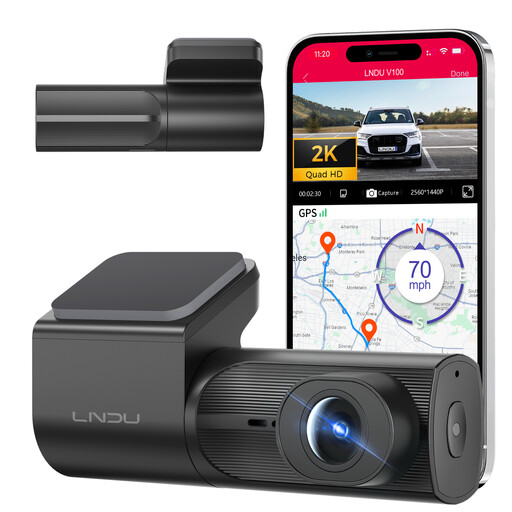
Why this choice suits this profile: It combines a 2K front camera, Wi-Fi, an app and loop recording in a discreet format – ideal for a first purchase.
The product page clearly states that 24-hour parking mode requires a separate hardwire kit. This helps you avoid mistaking a listed feature for an accessory that's actually included.
2K resolution, F1.8 lens, Wi-Fi, G-sensor and LNDU app.
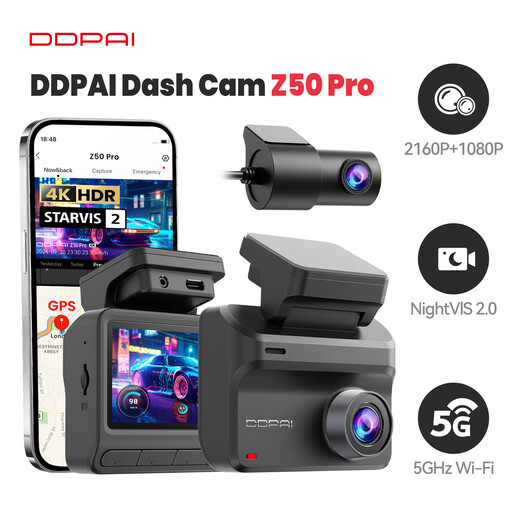
Why this choice suits this profile: Its 4K front and 1080p rear setup is aimed at drivers who want extensive coverage and advanced video management.
48-hour surveillance and 4G connectivity are listed as dependent on separate accessories. This makes the true budget much easier to assess.
3-inch screen, built-in GPS, 5 GHz Wi-Fi, 143° front angle and support for microSD cards up to 512 GB.
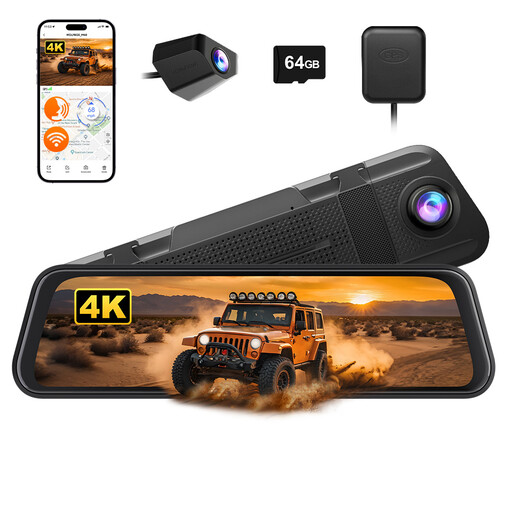
Why this choice suits this profile: Its mirror-screen format can work well for cars, SUVs, vans and campervans that need a clearer rear view.
The product page states that the device attaches to or replaces the original rear-view mirror, and that the rear camera cable must be routed to the screen.
10-inch touchscreen, 4K front camera, 1080p rear camera, GPS, Wi-Fi and 64 GB microSD card included.
We've selected a comprehensive and regularly updated range of products that meet these demanding criteria, while also taking European safety regulations into account.
Fix the camera behind the rear-view mirror, plug it into the 12 V socket and conceal the cable along the trim, without interfering with the controls or airbags. For a rear camera, measure the cable route before you buy. A hardwire kit may be essential for using parking mode.
The recording duration depends on the memory card capacity, the chosen resolution and the length of the clips. Loop recording automatically frees up space by deleting unlocked files. However, videos protected by the G-sensor should be checked and deleted regularly to avoid filling up the storage.
On top of the camera's price, you may need a suitable microSD card, a hardwire kit for parking mode and, depending on the model, a 4G module. Also check whether a memory card is included: some models come with 32 or 64 GB, while others sell it separately.