
Livraison le jour même ou le lendemain

Qualité garantie

Débloquez vos offres de bienvenue: Livraison GRATUITE | Jusqu'à -80 % | 30 jours d'essai gratuits à JoyPlus
Téléchargez l'application
A dashcam for your car can record your journeys, document an accident or monitor your vehicle while it’s parked. But a packed spec sheet doesn’t always guarantee a pleasant day-to-day experience. Before buying a dashcam, it’s worth checking which features are genuinely useful, which accessories are essential, and any potential limitations of the model.
A 4K dashcam boasts more pixels on paper. However, sharpness also depends on the sensor, the lens, the compression and the lighting conditions. A poorly configured 4K camera can produce a less readable image than a properly installed 2K model. Always check the resolution of each camera, not just the front module.
The frame rate also matters. At 60 frames per second, fast movements produce less blur. However, this frame rate isn’t always available when all cameras are running simultaneously.
24-hour parking mode generally doesn’t work with the standard cigarette lighter charger. You’ll often need to add a hardwire kit connected to the fuse box. The installation must be compatible with your vehicle and carried out properly to minimise the risk of draining the battery.
Depending on the model, several modes may be available: impact detection, motion detection or time-lapse recording. However, their operating conditions vary from one camera to another. Take the time to read the product listing before comparing prices.
A camera typically records in a loop. When the memory card is full, unprotected files are gradually overwritten. A microSD card that’s too slow, worn out or incompatible can cause recording interruptions. For high-resolution models, choose a U3, Class 10 card with a capacity that meets the manufacturer’s recommendations.
Built-in Wi-Fi is mostly used to connect the camera to an app and transfer videos nearby. It doesn’t mean the camera has internet access or remote monitoring capability. A 4G connection and a dedicated module may be required.
For everyday use, a 2K front camera generally offers a good balance between detail and storage space. 4K can be justified for long journeys or when reading number plates and signs at a distance is a priority, provided there’s sufficient lighting.
A wide-angle lens covers more lanes, but too wide an angle can distort the edges of the image. A value between 120° and 170° should be assessed based on the mounting position and the shape of your windscreen.
To choose a car camera with night vision, look at the lens aperture, the presence of HDR or WDR, and which module is affected. An infrared camera is mainly useful for filming the cabin in the dark. It doesn’t necessarily guarantee a perfectly detailed image on a poorly lit road.
Remember to check the cable routing to the rear, its length and the location of side airbags.
A Wi-Fi dashcam with GPS can embed the location, speed or route into the video data, depending on the model. Wi-Fi makes it easier to view footage from an app, without having to remove the memory card.
The G-sensor should be able to lock footage after a sudden deceleration. This feature is handy, but it can also protect too many files when you’re driving on a rough road. An adjustable sensitivity setting helps avoid unnecessarily filling up the emergency folder.
In the UK, install the camera so that it doesn’t reduce the driver’s field of vision. For private use, also familiarise yourself with the rules regarding recording, storing and sharing images of people or number plates.
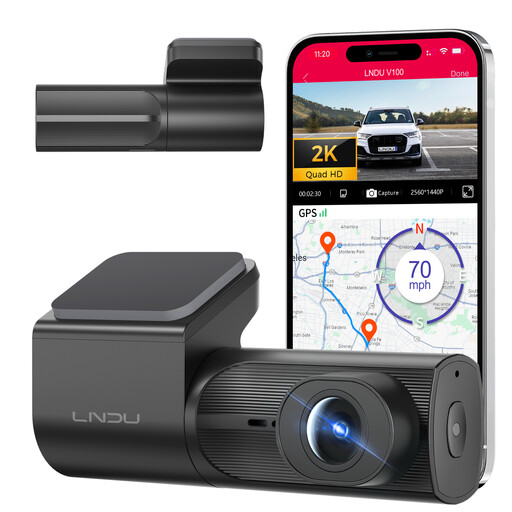
Why this choice suits this profile: A compact front camera for daily journeys, with Wi-Fi and a mobile app to view files from your phone.
The listing clearly states that parking mode requires a separate hardwire kit. This helps you avoid confusing a listed feature with an accessory that’s actually included.
2K recording, F1.8 lens, G-sensor, night vision and support for a microSD card up to 256 GB.
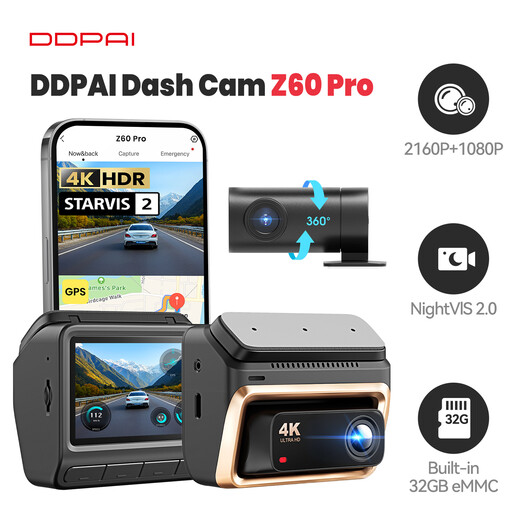
Why this choice suits this profile: This model is aimed at drivers looking for a front and rear camera with GPS, a screen and fast video transfer.
The listing clearly distinguishes the 4K front camera from the 1080p rear camera and states that 24-hour parking mode requires a separate kit.
Sony STARVIS 2 IMX678 front sensor, HDR, 5 GHz Wi-Fi, built-in GPS and 32 GB internal eMMC memory.
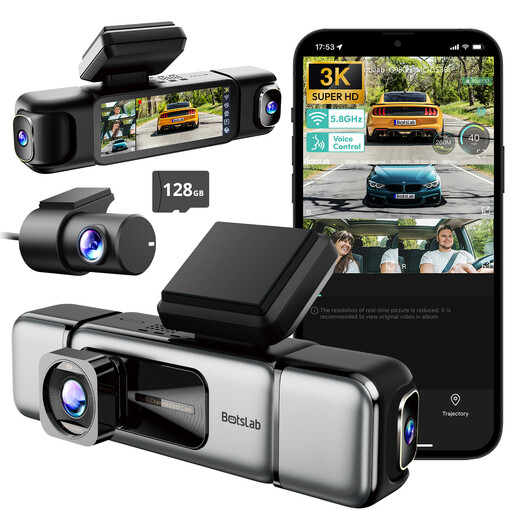
Why this choice suits this profile: A four-channel car surveillance camera covering the front, rear and sides, with particular attention to the cabin.
The description details the viewing angles for each of the four cameras and states that parking functions require a hardwire kit.
3K front camera, two 120° side cameras, 150° rear camera, built-in GPS, 5.8 GHz Wi-Fi and a 128 GB card included.
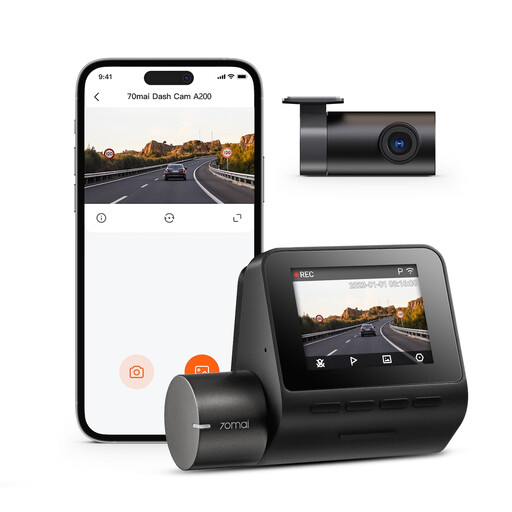
Why this choice suits this profile: The front and rear system is ideal for drivers who want a simple installation, a built-in screen and an app to manage footage.
The listing clearly states that the microSD card is not included. This allows you to budget for that cost before installation.
Two 1080p cameras, front recording up to 60 frames per second in single-camera mode, HDR, Wi-Fi and a 2-inch IPS screen.
We’ve put together a comprehensive, real-time updated selection of products that meet these demanding criteria and European safety regulations.
Place the camera behind or near the rear-view mirror, in an area that doesn’t reduce visibility. Clean the windscreen before attaching the mount, then conceal the cable along the trim, making sure not to interfere with the airbags. Test the viewing angle and check the date before you set off.
The recording duration depends on the card capacity, the chosen resolution and loop recording. A high-capacity card allows you to keep more files, but protected footage can eventually take up all the space. Regularly format the card from the camera following the manufacturer’s recommendations, and replace it as soon as it becomes unstable.
On top of the camera price, you may need to factor in a microSD card, a hardwire kit for parking mode, professional installation and, for some models, a 4G module. Local Wi-Fi generally doesn’t require a subscription. Check all these elements before comparing the prices shown.