
Livraison le jour même ou le lendemain

Qualité garantie

Débloquez vos offres de bienvenue: Livraison GRATUITE | Jusqu'à -80 % | 30 jours d'essai gratuits à JoyPlus
Téléchargez l'application
A dashcam car can provide invaluable video evidence after a collision, a failure to give way, or an act of vandalism. But not all onboard cameras meet the same needs. High resolution alone isn't enough if the image lacks sharpness, if the memory card fills up too quickly, or if the parking mode requires an accessory sold separately.
Here are the criteria to consider before buying, along with a selection tailored to different types of motorists in the UK.
A 4K dashcam can produce a highly detailed image, but the result also depends on the sensor, the lens aperture, the video compression and the lighting conditions. Before you decide, look in particular at:
A properly configured 2K camera can therefore be perfectly adequate for everyday use. 4K becomes particularly useful when you need to capture more detail from the recordings.
The mention dashcam with 24-hour parking mode doesn't necessarily mean the camera can monitor your car straight out of the box. This mode often requires a dashcam hardwire kit, sold separately. This provides a constant power supply and can include protection against excessive battery drain.
Before ordering, check:
The kit designed for the Z60, Z60 Pro, MINI2X, Z50 Pro and N2 models, for example, must be chosen according to the specific dashcam model. Its specification also mentions compatibility with the Z90 series.
A dashcam with a memory card included is usable straight away, but the capacity and write speed of that card remain crucial. For 2K or 4K recordings, choose a microSD U3, class 10 when this specification is recommended by the manufacturer.
Also remember to check whether the price includes:
For urban use, a 2K camera with an angle between 120° and 140° provides a solid foundation. A 4K setup can offer more detail at the front, particularly on signs and nearby vehicles. If you want to film the interior, sides and rear, a three or four-channel solution will be more suitable.
The night vision dashcam should, however, be evaluated with a degree of caution. A night mode, a sensitive sensor and HDR processing generally improve the clarity of dark scenes. But no camera can eliminate all the difficulties caused by headlights, reflections or poorly lit roads.
A GPS dashcam can record your location, speed and route, depending on the features offered by the model. This information can make it easier to review a journey, but check the deactivation options if you prefer to limit the data recorded.
Wi-Fi is mainly used to connect the camera to your smartphone without having to remove the memory card. A car camera with an app typically allows you to view, download and share footage. This Wi-Fi connection doesn't necessarily mean the camera has internet access or a remote monitoring function – that often requires a separate 4G module.
For prolonged use, a model equipped with a supercapacitor can be a good choice in vehicles exposed to large temperature variations. In any case, install the camera without reducing your field of vision and run the cables neatly along the headliner or trim.
In the UK, the camera must not become a source of distraction. Avoid using the app while driving and familiarise yourself with the rules regarding recording in public spaces, storing videos and respecting privacy.
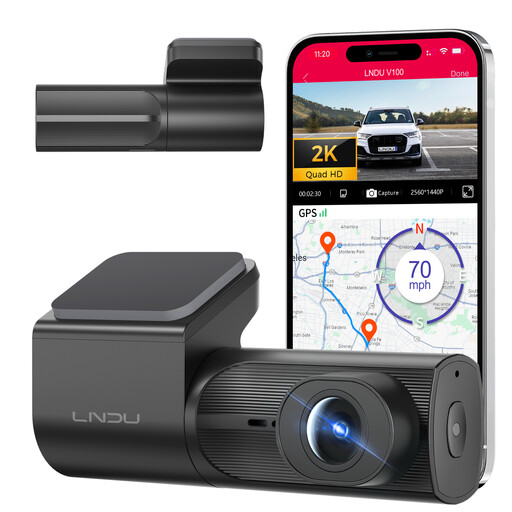
Why this choice suits this profile: Its 2K resolution, built-in Wi-Fi and app make everyday use simple, while the lack of a screen keeps the windscreen clutter-free.
The specification clearly states that parking mode requires a separate kit. So you won't mistake an advertised feature for a complete installation.
2K recording, Wi-Fi, app, G-sensor, night vision and loop recording.
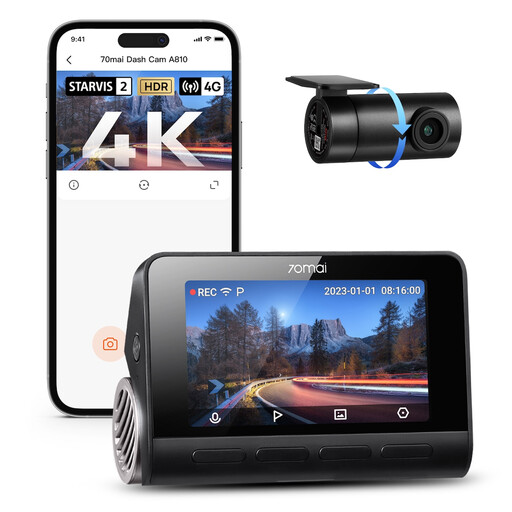
Why this choice suits this profile: This system combines a 4K front camera, a 1080P rear camera, built-in GPS and connected features for drivers who want a complete setup.
The specification clearly distinguishes between the requirements for the hardwire kit for parking mode and those for the 4G functions.
4K front camera, 1080P rear, GPS, HDR, app, English voice control and motion detection depending on configuration.
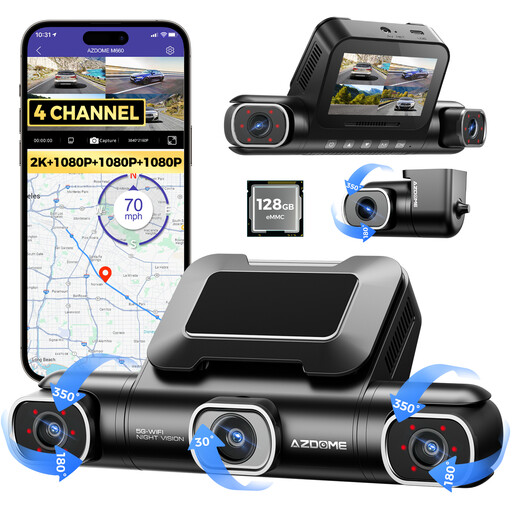
Why this choice suits this profile: Its four channels cover the front, rear and sides. A relevant setup for vehicles parked in busy areas or for professional use.
The specification states that 128GB of eMMC storage is built in, so you don't need to buy a separate memory card straight away.
Four-channel recording, 3-inch IPS screen, GPS, 5G Wi-Fi, infrared night vision and multiple parking modes.
Position the camera behind the rear-view mirror where possible, without reducing the driver's field of vision. Clean the windscreen before attaching the mount and allow enough cable length to avoid any tension.
After installation:
For extended parking, the hardwire kit must be compatible with the camera. The KAWA Dash Cam OBD Power Cable, for example, offers an OBD to Type-C connection and three levels of low-voltage protection. However, it must be used with a compatible model.
Using a camera in a vehicle is permitted, but the footage must be used in accordance with privacy laws and data protection regulations. Avoid publishing videos that identify individuals or number plates without taking the necessary precautions.
When plugged into the 12V socket, it generally operates while the vehicle is powered on. Continuous parking mode requires a hardwire kit and can put a strain on the battery. Low-voltage protection is therefore one of the things to check before installation.
It depends on the card's capacity, its write speed, the temperature and the volume of recording. A microSD card designed for continuous video, typically U3 class 10 as recommended by the manufacturer, should be formatted regularly and replaced as soon as errors or corrupted files appear.