The world of mechanical keyboards is booming. Moving far beyond mass-produced models, one category is catching the eye of enthusiasts, developers, and discerning gamers: the custom mechanical keyboard. These peripherals don't just offer a superior typing experience; they take customisation to a whole new level, allowing you to create a tool that is uniquely yours in both form and function.
Switches, layouts, gasket mount... Faced with this technical jargon, it's easy to feel lost. This guide is here to demystify the topic, break down the key points, and introduce a selection of models for every type of user, whether you're looking to build your first keyboard or find the centrepiece for your setup.
How to Choose Your Custom Mechanical Keyboard?
Before we dive into our favourite models, let's review the essential criteria that will guide your decision.
1. Layout: A Matter of Space and Functionality
The keyboard's size, or layout, directly impacts your workspace and ergonomics. The most popular layouts in the custom scene are:
- 75% Layout: An excellent compromise that keeps the function keys (F1-F12) and arrow keys in a very compact arrangement. It frees up mouse space without sacrificing essential keys.
- 65% / 60% Layouts: Even more compact, these layouts remove the function row entirely. They appeal to minimalists and FPS gamers who want maximum room for their mouse.
2. Internal Structure: The Heart of the Typing Feel
The internal mounting style is crucial: it largely determines the sound and the feeling under your fingers.
- Gasket Mount: This technique has become the gold standard. Silicone or poron gaskets are placed between the keyboard plate and the case. The result is a softer typing feel, a more muted sound, and a significant reduction in vibrations. A gasket mount keyboard delivers a highly sought-after acoustic and tactile experience.
- Other Mounts (Leaf Spring, etc.): Other more advanced designs, like the Leaf Spring mount, push flexibility even further for a unique, almost bouncy, typing feel.
3. Customisation Potential: Hot-Swappable and VIA
The real magic of a custom keyboard lies in its modularity.
- The Hot-Swappable Feature: A hot-swappable keyboard allows you to change switches without any soldering. This lets you endlessly experiment with different types of switches (linear, tactile, clicky) to find the perfect combination of sound and feel.
- VIA/QMK Compatibility: A VIA-compatible keyboard opens the door to nearly infinite software customisation. This open-source software allows you to remap any key, create complex macros, and configure function layers, all through a simple, real-time graphical interface.
Our Mechanical Keyboard Recommendations
To move from theory to practice, here are three models that perfectly illustrate the richness of the market, each with its own strengths.
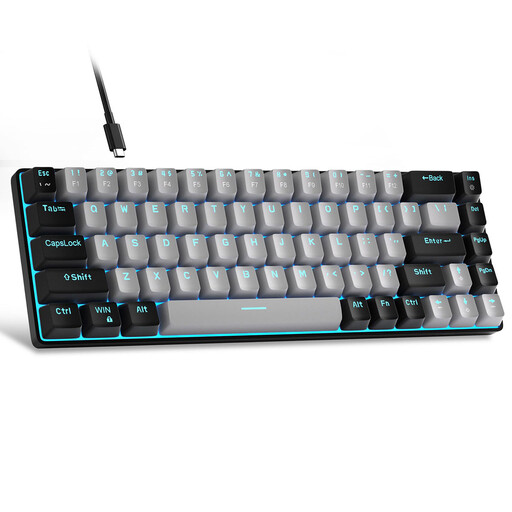
MageGee MK-Box 60%: The Compact Entry-Level Choice
Why It Stands Out
The MageGee MK-Box is an excellent gateway into the world of mechanical keyboards. Its ultra-compact 60% layout frees up maximum desk space, making it a prime choice for minimalist setups or FPS gamers. Its wired USB-C connection ensures flawless responsiveness.
-
Highlights:
- Very compact layout (68 keys) for optimal space saving.
- Blue switches for crisp tactile feedback and a distinct "clicky" sound.
- Detachable USB-C cable for easy portability.
- Blue LED backlighting with multiple lighting modes.
-
Who Is It For?
- Those taking their first steps and looking for a simple, effective model.
- Those who are short on desk space.
- Note: The pronounced noise of blue switches is not ideal for an open-plan office.
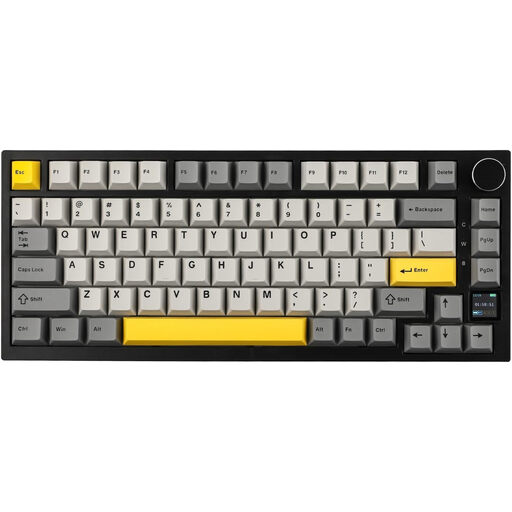
Ajazz AK820 Pro 75%: The Tech-Packed All-Rounder
Why It Stands Out
The Ajazz AK820 Pro has everything to please tech lovers. It packs modern features into a very popular 75% mechanical keyboard layout. Its TFT screen is a real asset, displaying useful information like the connection mode, time, or battery life, and can even display custom GIFs. Its gasket mount structure and multiple layers of sound-dampening foam give it a particularly refined acoustic profile.
-
Highlights:
- TFT colour screen for useful info and a touch of style (GIFs, images...).
- Gasket mount structure for a soft typing feel and a pleasant sound.
- Tri-mode connectivity: wireless mechanical keyboard (Bluetooth 5.1, 2.4 GHz) and wired (USB-C).
- Hot-swappable keyboard for easily changing switches.
- A metal control knob, as practical as it is elegant, for volume or scrolling.
-
Who Is It For?
- Gamers and creatives who want a versatile, feature-packed, and customisable high-end gaming keyboard.
- Those who love gadgets and want a keyboard that makes a statement.
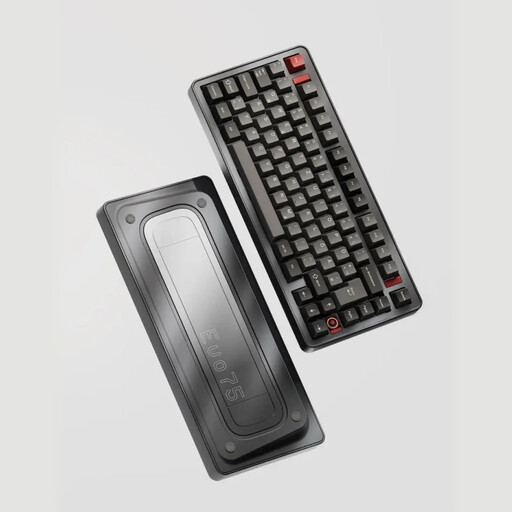
Ticktype EVO75: The Masterpiece for Purists
Why It Stands Out
The Ticktype EVO75 is aimed squarely at connoisseurs. Its fully CNC-machined aluminium chassis gives it a weight, stability, and sound signature that plastic cases cannot match. It stands out with its Leaf Spring mount, a refined alternative to the gasket mount that offers unique flexibility and bounce under the fingers. Its native compatibility with VIA software makes it a formidable tool for productivity and customisation.
-
Highlights:
- 100% CNC-machined aluminium chassis for exceptional durability and finish.
- Leaf Spring mount offering a flexible and distinctive typing experience.
- VIA-compatible keyboard for complete and intuitive key remapping.
- Very high-capacity 8000 mAh battery for extended wireless autonomy.
- Hot-swappable design and south-facing RGB LEDs for perfect compatibility with all keycaps.
-
Who Is It For?
- Keyboard purists for whom material quality and a refined typing feel are non-negotiable.
- Developers, writers, and all typing professionals looking for the ultimate, infinitely customisable tool.
Looking for Other Options?
Because style matters too... If your keyboard's look is as crucial as its spec sheet, take a look at our collection of grey keyboards to find the design that will elevate your setup.
Frequently Asked Questions
Q1: What is a hot-swappable keyboard?
A "hot-swappable" keyboard is one where the switches can be removed and replaced without any soldering. It's the ultimate feature for anyone who wants to experiment with different types of switches to find the perfect typing feel and sound.
Q2: Why choose a keyboard with a gasket mount structure?
The gasket mount style involves inserting flexible joints (the gaskets) to "suspend" the keyboard's plate inside the chassis. This design isolates the plate from vibrations, resulting in a softer, less harsh typing feel. It also helps achieve a deeper, more muted sound by eliminating the metallic resonance found in more traditional mounts.
Q3: Is an aluminium keyboard really different from a plastic one?
Absolutely, and the difference is felt on several levels. An aluminium chassis is much heavier and denser, which anchors the keyboard to the desk. Acoustically, metal provides a fuller, more muted sound, whereas plastic can sound hollow. Finally, the feel and finish are incomparable, lending a decidedly premium look and feel.


