
Livraison le jour même ou le lendemain

Qualité garantie

Débloquez vos offres de bienvenue: Livraison GRATUITE | Jusqu'à -80 % | 30 jours d'essai gratuits à JoyPlus
Téléchargez l'application
The world of custom mechanical keyboards is a dream: a tailored typing feel, unique acoustics, and a design that reflects you. But behind the promise lies a veritable jungle. Between the technical jargon and the siren song of marketing, it's easy to make a misstep. This guide is here to give you clear benchmarks, help you decipher what truly matters, and avoid the most common pitfalls.
Before even diving into spec sheets, let's learn to spot misleading marketing claims.
To ensure you make the right choice, three technical elements must be examined closely.
The choice of switches is crucial. There are three main families:
The way the plate (which holds the switches) is mounted in the chassis (mounting style) has a direct impact on typing comfort and sound profile.
Your keyboard's form factor should match your use case and the space available on your desk.
Finally, a Tri-Mode wireless mechanical keyboard (Bluetooth, 2.4 GHz, and wired USB-C) is the pinnacle of versatility for juggling multiple devices and maintaining a pristine desk setup.
Here are a few models that check all the boxes, for very different profiles.
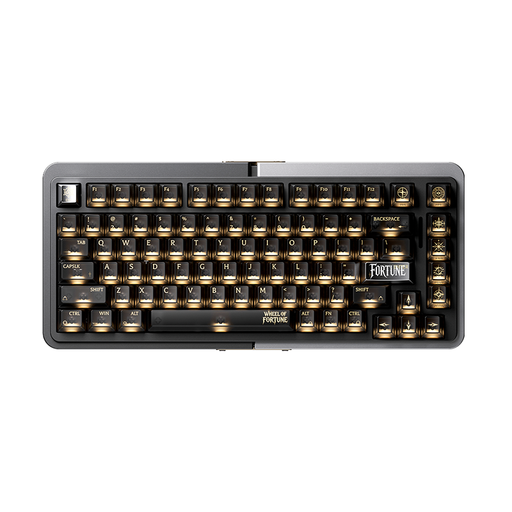
Why we chose it: Engineered for pure performance. This 75% keyboard features TTC magnetic switches, a cutting-edge technology designed for FPS players (Valorant, CS2) where every millisecond counts.
It doesn't just slap on a "pro" label. It justifies it with technology (Hall Effect) that delivers concrete, measurable advantages (Rapid Trigger, adjustable actuation point), a far cry from mere marketing claims.
Surgical responsiveness thanks to TTC magnetic switches, all within a CNC aluminum chassis that guarantees rock-solid stability.

Why we chose it: The perfect companion for prolific typists. This full-size keyboard combines an aluminum chassis, a comfort-focused Leaf Spring mount, and silent tactile switches. A sleek, high-performance, and discreet work tool, ideal for open offices and remote work alike.
It doesn't give in to the "thocky-at-all-costs" trend. By offering a version with silent tactile switches, it addresses a real need in the professional world: discretion takes precedence over acoustic showmanship.
Excellent long-term comfort thanks to the Leaf Spring mount, and marathon battery life provided by the 8000 mAh battery and wireless connectivity.
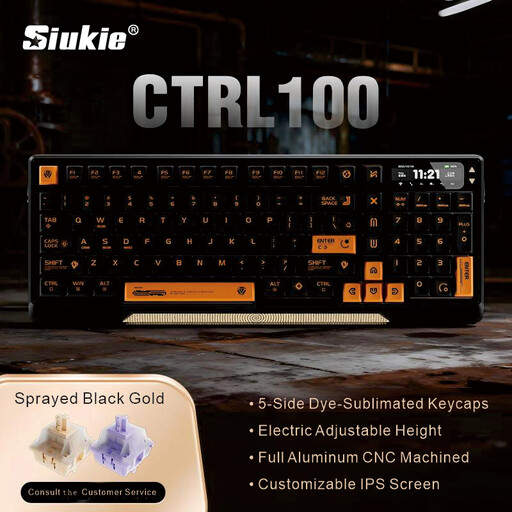
Why we chose it: More than a keyboard, it's a centerpiece for your setup. Its flagship innovation: a motorized lifting system to precisely adjust the typing angle. Add to that a CNC aluminum chassis, a Gasket Mount, and a customizable IPS screen, and you have a true object of design and technology.
It sidesteps the "all-aluminum" trap by specifying it's CNC machined—a true mark of quality. Its major innovation, the motorized lift, isn't just a gimmick: it's a useful ergonomic feature that truly makes it stand out.
The motorized lifting mechanism for tailor-made ergonomics, coupled with a premium build (Gasket Mount, pre-lubed HMX switches).
We have curated a complete selection of keyboards that meet our demanding criteria for quality and safety.
Absolutely. Especially if you're just starting out or love to experiment. Hot-swappable gives you the freedom to test linear, tactile, or other switches without having to buy a new keyboard or break out the soldering iron. It's a long-term investment in durability and personalization.
Nearly all custom keyboards come in the QWERTY keyboard layout (specifically, ANSI US). But this is not a deal-breaker at all if you use a different layout. You just need to set your operating system (Windows, macOS, Linux) to your preferred layout (like AZERTY, QWERTZ, etc.) for your typing to be correct. For a visual match, many keycap sets are sold separately in various regional layouts. That's the whole point of customization!
It's very simple. For the chassis of an aluminum mechanical keyboard, a dry microfiber cloth is all you need for dust and fingerprints. Most importantly, do not use harsh cleaning products that could damage the anodization or paint. For the space between the keys, a blast from a can of compressed air or a small brush will do the trick perfectly.