
Livraison le jour même ou le lendemain

Qualité garantie

Débloquez vos offres de bienvenue: Livraison GRATUITE | Jusqu'à -80 % | 30 jours d'essai gratuits à JoyPlus
Téléchargez l'application
Immersion is the watchword of modern video games. Whether you're exploring vast open worlds, flying a flight simulator, or seeking a competitive edge, the monitor is your gateway to these digital universes. A curved PC gaming monitor promises to plunge you into the heart of the action. Yet, faced with an avalanche of technical terms—curvature, refresh rate, panel type—it's easy to get lost.
This guide demystifies the jargon and presents a selection of monitors for every type of user, helping you make the right choice.
Choosing a monitor is about more than just its screen size. Here are the key points to check to find the model that's truly right for you.
A screen's curvature, expressed in "R" (radius), determines how much the image wraps around your field of view. A 1500R curvature is more pronounced than 1800R and offers a stronger sense of immersion, which is particularly beneficial on an ultrawide gaming monitor. These wide formats (21:9 or 32:9) expand your peripheral vision, a decisive advantage in simulation games and RPGs. For office work and multitasking, they allow you to display multiple windows side-by-side without the unsightly bezels of a dual-monitor setup.
The refresh rate, measured in Hertz (Hz), indicates the number of frames the screen can display per second. Upgrading from 60 Hz to a 144Hz gaming monitor (or higher) literally transforms the gaming experience: movements are sharper, smoother, and responsiveness is massively boosted. For competitive players in fast-paced titles (FPS, esports), a rate of 170 Hz or even 240 Hz can provide a clear advantage. The response time (in ms) is also crucial for eliminating motion blur.
A 1440p PC monitor (QHD, 2560 x 1440 pixels) is now the sweet spot between image sharpness and performance, as it's less demanding on the graphics card than 4K. The panel type directly influences visual quality:
Some models also include very practical features like a PC monitor with a KVM switch, which allows you to control two computers with a single keyboard and mouse. A boon for remote work.
Here are a few models that caught our attention and cater to very specific needs.
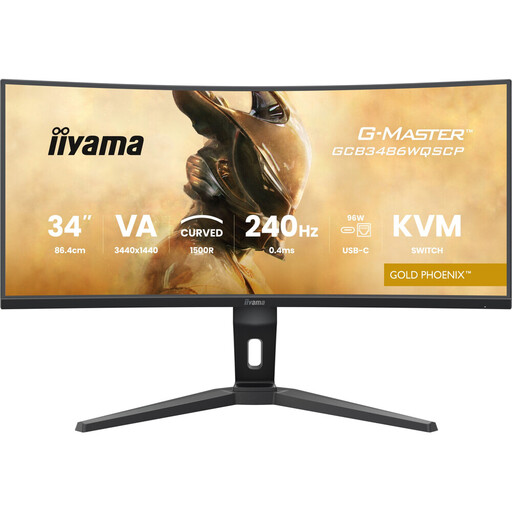
Why it stands out: This 34-inch monitor is a true Swiss Army knife. It combines the immersion of a 1500R VA panel in an ultrawide QHD format with top-tier performance for competitive gaming, thanks to its 240 Hz refresh rate. Its comprehensive connectivity, including a USB-C dock and a built-in KVM switch, makes it the perfect companion for those who juggle gaming and work.
Advantages:
Who is it for? The versatile gamer who is also a remote professional. Ideal for switching from an intense gaming session to a productive workday in an instant, using a single screen to control both a gaming PC and a laptop.
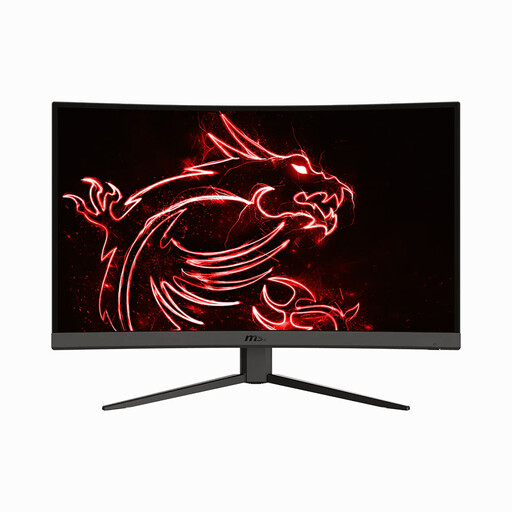
Why it stands out: The MSI G32CQ4 E2 is an excellent entry point into the world of large-screen curved gaming. It packs the essential features for a modern and fluid experience—1440p resolution, 170 Hz refresh rate, and 1500R curvature—in a 31.5-inch format that fits comfortably on most desks.
Advantages:
Who is it for? The gamer looking to upgrade from a standard 1080p monitor to a more immersive and fluid 1440p experience without breaking the bank. It's a balanced choice for enjoying all game genres, from single-player adventures to intense multiplayer matches.
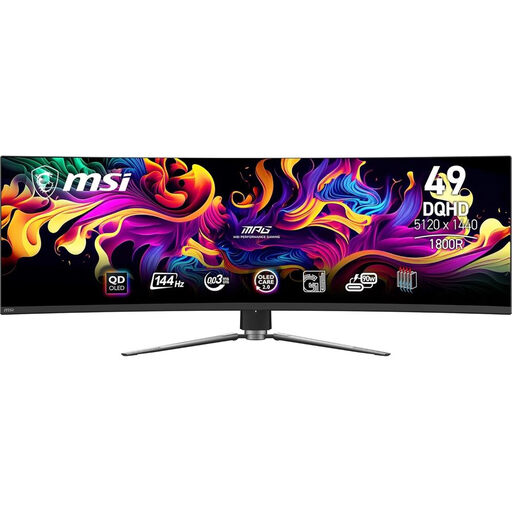
Why it stands out: This monitor plays in the big leagues of visual immersion. With its gigantic 49-inch QD-OLED panel in a 32:9 format and 1800R curvature, it completely fills your field of view. The QD-OLED technology ensures vibrant colours, perfect blacks, and a near-instantaneous response time of 0.03 ms (GtG), delivering breathtaking image quality and responsiveness.
Advantages:
Who is it for? The simulation enthusiast (racing, flight) and fan of spectacular adventure games who seeks the most total immersion possible. It's also a productivity powerhouse for content creators or professionals who need a vast workspace.
This selection highlights models with diverse profiles, but the monitor market is particularly bustling. If you're looking for a different size, a specific design, or other features, there's no shortage of alternatives.
To explore a wider range of models, feel free to browse our complete selection of black monitors, where you'll find screens suited for all needs and budgets.
A curved screen primarily enhances immersion by wrapping around your peripheral vision, which makes simulation, racing, and RPG games more captivating. On large screens (27 inches and up), the curve also helps maintain a more uniform viewing distance between your eyes and the edges of the screen, which can reduce eye strain. For competitive shooters, it's largely a matter of personal preference.
To put it simply:
It all depends on your games and how demanding you are. For a casual player or a fan of single-player games, a 144 Hz or 170 Hz monitor already offers a dramatic improvement over the 60 Hz standard. A 240 Hz screen is mainly intended for high-level competitive players in very fast-paced titles (like Valorant or CS:GO), where every millisecond of responsiveness counts.