
Livraison le jour même ou le lendemain

Qualité garantie

Débloquez vos offres de bienvenue: Livraison GRATUITE | Jusqu'à -80 % | 30 jours d'essai gratuits à JoyPlus
Téléchargez l'application
A well-chosen CPU cooler helps keep temperatures under control, reduce noise and maintain your PC’s stability. However, choosing an air cooler is not simply a matter of counting heat pipes or looking for ARGB lighting. Certain technical details can make a model incompatible with your setup, or simply impractical for everyday use.
Before placing your order, check three essential points : your motherboard’s socket, the space available inside the case and the cooling capacity required by your processor.
An air cooler may support your processor’s socket while still causing problems inside the case or with your RAM modules. The most common platforms include Intel LGA 1700 and LGA 1851, as well as AMD AM4 and AM5. Even so, you still need to check the cooler’s dimensions and the space available around the socket.
A model measuring 158 or 159 mm in height may not fit inside a compact case. Check the case’s technical specifications before confirming your purchase.
The number of heat pipes is not enough to distinguish between two air-cooling solutions. The contact area with the processor, fin design, airflow and the fan’s static pressure also play an important role.
The TDP stated by some manufacturers should be treated as an indication of the product’s positioning, rather than a promise of identical temperatures in every PC. Case airflow, thermal paste and motherboard settings can all significantly affect the result.
An ARGB air cooler generally requires a 3-pin 5 V ARGB connector on the motherboard. It must not be confused with a 4-pin 12 V RGB connector : connecting it incorrectly can damage the lighting.
ARGB adds an attractive touch to your build, but it does not improve cooling performance. Also check whether the fan comes with a controller or needs to be connected directly to the motherboard.
For a recent build, look specifically for Intel LGA 1700 and 1851 compatibility or AMD AM4 and AM5 compatibility. The models featured here support several of these platforms, but you should always compare the product’s compatibility list with that of your motherboard.
If you are replacing an older cooler, also check that the appropriate mounting kit is included. Some models come with an Intel bracket pre-assembled, while installation on an AMD platform relies on the accessories included in the box.
The maximum height supported by the case is an essential consideration. Also bear in mind the heatsink’s width : a large model may cover the first RAM slot, particularly when using modules with tall heatsinks.
As a guide, the MSI MAG CoreFrozr AA13 measures 152 mm in height, the Cooler Master Hyper 212 3DHP ARGB 158 mm, and the Hyper 612 APEX 159 mm. Compare these measurements with the precise specifications of your ATX or micro-ATX case.
Air cooling uses a heatsink combined with one or more fans. Easy to install, it has no pump or liquid circuit and is suitable for many gaming and advanced office PC builds.
An all-in-one PC water-cooling system can free up space around the socket and integrate neatly into a build with several ARGB fans. However, your case must be compatible with the radiator, and you need to take particular care when transporting the PC. With complete PCs, especially models equipped with an Intel Core i5-14400F and an RTX 5060 or RTX 5060 Ti, check whether liquid cooling is included, how many fans there are and how much space is available around the radiator.
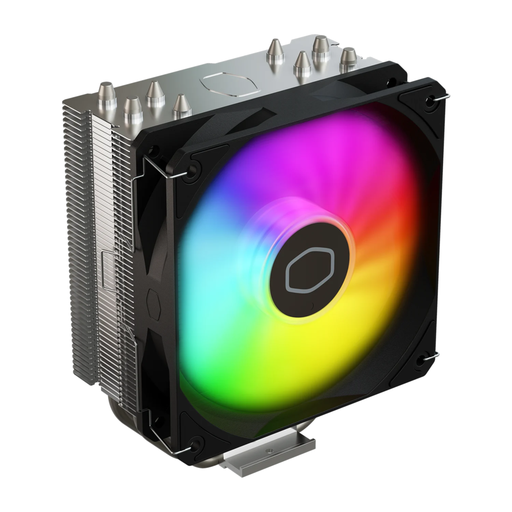
Why it suits this profile : At 152 mm high, this air cooler is ideal for anyone looking for straightforward installation, broad compatibility and customisable lighting.
The specification lists Intel LGA 1851/1700 and AMD AM5/AM4 sockets, so you do not have to rely solely on the product range name.
Four direct-contact heat pipes, a 120 mm fan and a 4-pin PWM connector, with stated ARGB compatibility.
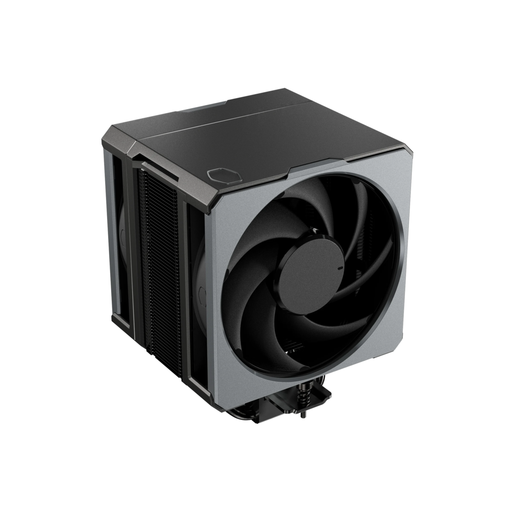
Why it suits this profile : Its dual-fan design is aimed at users looking for more powerful heat dissipation during long gaming sessions or sustained workloads.
Its dimensions are clearly stated : 127 × 114 × 159 mm. You can therefore check the available space inside the case before buying.
Six heat pipes, two Mobius 120P fans and a 4-pin PWM connector. Compatibility with LGA 1851/1700 and AM5/AM4 sockets is stated.
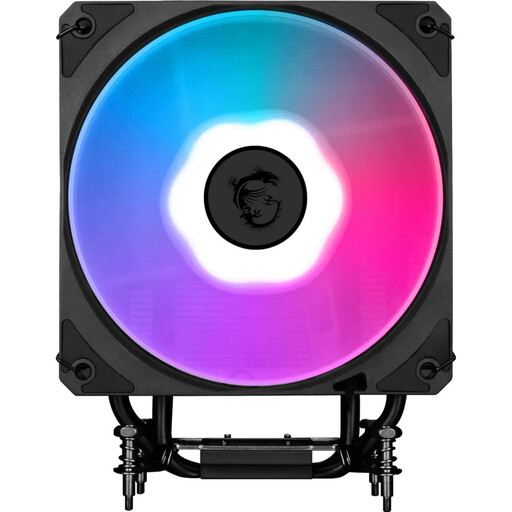
Why it suits this profile : This compact CPU cooler is designed for builds where space is limited, with a stated height of 152 mm and broad compatibility.
The thermal paste is pre-applied and the Intel bracket is already installed, reducing the number of steps required for a first installation.
For a targeted upgrade, buying an air cooler allows you to keep most of your existing components. For a first build, a complete gaming PC makes it easier to choose the processor, graphics card, memory, storage and cooling system.
Models equipped with a Core i5-14400F, an RTX 5060 or an RTX 5060 Ti, 16 GB of DDR4 memory, a 1 TB NVMe SSD, Wi-Fi 6 and seven ARGB fans provide a ready-to-use foundation. However, check the specifications for the RTX 5060 Ti gaming PC with water cooling or the RTX 5060 gaming PC with water cooling to confirm the power supply wattage, chassis dimensions and included version of Windows.
We have put together a complete, real-time updated selection of products that meet these strict criteria and European safety requirements.
Start by identifying the socket used by your motherboard, then compare it with the list provided by the manufacturer. Next, check the maximum height supported by the case and the space available around the RAM modules.
A metal heatsink can remain functional for many years, but the fan is a moving part that will eventually wear out. Dust your PC regularly and watch out for vibrations, unusual noises or a persistent increase in temperatures. Depending on usage and the manufacturer’s recommendations, the thermal paste may also need replacing.
The pump and fans are powered by the motherboard, so they use a small amount of electricity. This consumption generally remains low compared with that of the processor and graphics card. The main points to monitor are maintenance, radiator compatibility and the condition of the sealed circuit.