
Livraison le jour même ou le lendemain

Qualité garantie

Débloquez vos offres de bienvenue: Livraison GRATUITE | Jusqu'à -80 % | 30 jours d'essai gratuits à JoyPlus
Téléchargez l'application
A suitable CPU cooler helps keep temperatures under control, reduce noise and maintain system stability. But making the right choice involves more than simply counting heat pipes or checking whether it has ARGB lighting.
Some marketing claims should be taken with a pinch of salt. A cooler rated for a high thermal load will not necessarily be compatible with your case or genuinely suitable for your processor. Likewise, a very fast fan can quickly become noisy, while an AIO liquid cooler requires a compatible mounting position for its radiator.
Here are the main criteria to consider before buying a processor cooler, whether you are building a gaming PC, a workstation or a compact system.
The TDP value indicates the thermal load that a cooling system can handle, but it is not enough to predict how every processor will perform. The manufacturer, motherboard power limits, case airflow and ambient temperature all play a part.
A model rated at 190 or 240 W will not automatically turn a power-hungry processor into a silent machine. This figure should be treated as a compatibility indicator, not as a guarantee that applies in every situation.
A CPU air cooler that is too tall may prevent the side panel from closing. A large heatsink can also cover some RAM slots or interfere with heatsinks installed on the motherboard.
Before placing your order, measure the maximum cooler height supported by the case and check the available space around the socket. With an AIO liquid cooler, also make sure that the chassis can accommodate a 240 or 360 mm radiator in the intended position — at the front or on top.
An ARGB cooler generally requires a 3-pin 5 V ARGB connector on the motherboard. Do not confuse it with a 4-pin 12 V RGB connector: connecting it incorrectly can damage the lighting components.
If LEDs are not particularly important to you, a processor fan without lighting will be easier to integrate and will often help reduce the number of cables inside the case.
The cooler must be compatible with your processor socket and the motherboard mounting system. The models featured here support several common sockets, including Intel LGA 1700 and LGA 1851, as well as AMD AM4 and AM5.
Always check the product specifications and confirm which accessories are included. On AMD AM5, some models feature an offset mounting system that positions the heat pipes more effectively above the processor’s hottest area.
Compact models are particularly useful in medium-sized or smaller cases. The be quiet! PURE ROCK PRO 3 Slim, for example, is only 135 mm high according to the available information and leaves the RAM slots accessible.
Dual-tower models generally offer a larger heat exchange surface, but they also require more room. The Cooler Master Hyper 612 APEX is 159 mm high, while the Cooler Master V4 Alpha 3DHP Black measures 161 mm. These dimensions must be compared with your case specifications.
The 4-pin PWM connector allows the motherboard to adjust fan speed automatically according to the temperature. Check the advertised noise level in dB(A), bearing in mind that it varies depending on the rotation speed and processor load.
Even the quietest air cooler will eventually become less effective if dust builds up. Regularly cleaning the fins and fans with compressed air helps maintain proper airflow. With an AIO, never dismantle the sealed loop and stop using the system immediately if you notice any sign of a leak.
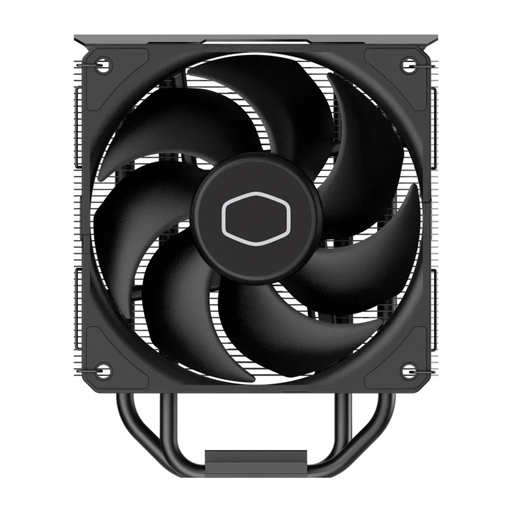
Why it suits this profile: this CPU air cooler is easy to install, comes with CryoFuze thermal paste and supports Intel LGA 1851/1700 and AMD AM5/AM4 sockets.
Its 125 × 74 × 152 mm dimensions make it easy to check compatibility with a mid-sized case, rather than relying on a simple cooling claim.
Four direct-contact heat pipes, a 120 mm PWM fan and an advertised noise level of 32.8 dBA.
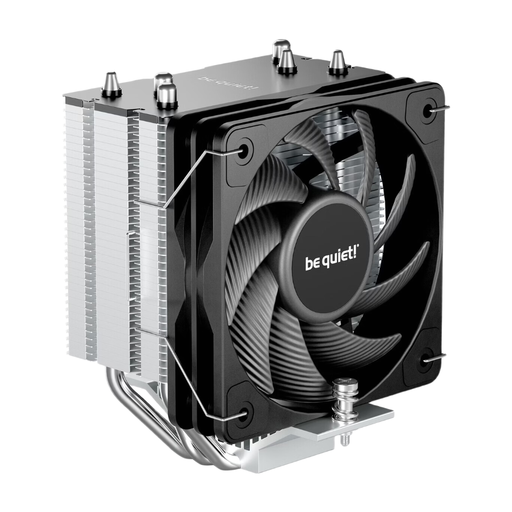
Why it suits this profile: its compact design is ideal for cases where access to the RAM and the space around the socket are limited.
The specifications state that it is suitable for restricted spaces and include a mounting system designed for Intel and AMD platforms.
Three 6 mm heat pipes, an advertised TDP of 130 W and a maximum noise level of 24.8 dB(A).
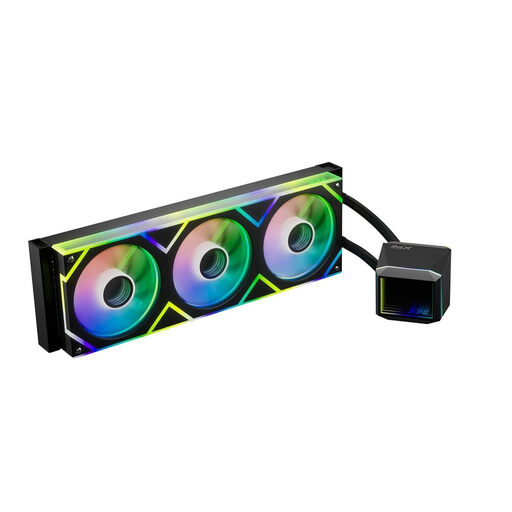
Why it suits this profile: this 360 mm liquid cooling system is designed for powerful builds with a case capable of accommodating a large radiator.
The radiator size is clearly stated : check the available mounting positions in your case before ordering, rather than focusing solely on the RGB design.
A mirror-effect pump with RGB lighting, hydraulic-bearing fans and an advertised capacity of up to 340 W.
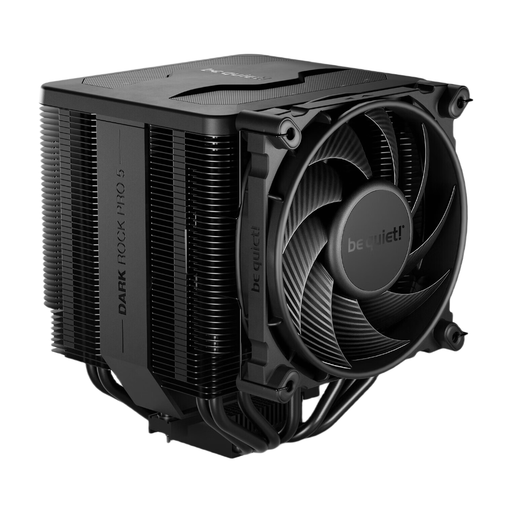
Why it suits this profile: its two fans and seven heat pipes are designed for workstations, rendering tasks and heavily loaded processors.
Its switch lets you choose between a mode rated at 1 500 rpm and another at 2 000 rpm, depending on the workload and how important quiet operation is to you.
Two Silent Wings PWM fans, copper heat pipes and advertised compatibility with liquid-metal thermal pastes.
We have put together a complete, real-time updated selection of products that meet these demanding criteria as well as European safety standards.
Before installing your gaming PC cooler, switch off the computer, unplug the mains cable and allow the components to cool down. Clean the processor surface before applying a small amount of thermal paste, unless it has already been pre-applied.
Next, check that the cooler is secured evenly and that the fan or fans are connected to the correct headers. With an ARGB model, make sure the 5 V connector is oriented correctly. Finally, ensure that no cable can come into contact with a rotating blade.
Start by checking the socket, then compare the advertised thermal capacity, dimensions and available space around the RAM. A cooler compatible with Intel and AMD will only be genuinely suitable if the correct mounting hardware is included and your case can accommodate its size.
Its electricity consumption is generally limited to that of the pump and fans. However, an AIO has more components than an air cooler : a pump, radiator and tubes. You should therefore carry out regular visual checks and never open the sealed loop.
Its lifespan depends on dust build-up, usage and fan quality. Regular cleaning helps maintain good airflow. With an AIO, watch out for unusual pump noises and the slightest sign of a leak. With an air cooler, the fan can generally be replaced separately, depending on the model.