
Livraison le jour même ou le lendemain

Qualité garantie

Débloquez vos offres de bienvenue: Livraison GRATUITE | Jusqu'à -80 % | 30 jours d'essai gratuits à JoyPlus
Téléchargez l'application
A CPU cooler should not be chosen based solely on its appearance or the number of fans. Whether you are building a gaming PC, a creative workstation or a recent Intel or AMD system, the wrong choice can result in excessive temperatures, constant noise or incompatibility with your case.
Here are the most common mistakes:
For recent processors, explicitly check compatibility with Intel LGA 1851 or AMD AM5. LGA 1700 and AM4 sockets are also still very widely used.
Having a suitable mounting kit is essential. An Intel LGA 1851 or AMD AM5-compatible cooler may also require a particular orientation, especially to position its base correctly over the processor’s hottest area. Always consult the technical specifications and the manufacturer’s manual before dismantling your machine.
For an air cooler, measure the maximum height supported by the case. As a guide, the Cooler Master Hyper 212 Black measures 152 mm, compared with 161 mm for the Cooler Master V4 Alpha 3DHP Black.
For an AIO liquid cooler, check:
A 240 mm AIO is generally a straightforward option to install in many cases. A 360 mm model requires more room, but is better suited to heavily loaded systems when the chassis supports this format.
To assess how quiet a CPU cooler is, compare measurements taken under similar conditions. A level expressed in dB(A) and measured at maximum speed does not necessarily reflect everyday noise levels: the motherboard will generally adjust the speed using the PWM signal.
For example, be quiet! quotes 29.8 dB(A) maximum for its DARK ROCK 5 and 34.8 dB(A) maximum for the Pure Rock Pro 3 Black. These figures come from the manufacturers’ specifications and, on their own, do not provide a universal basis for comparing acoustic performance. Case ventilation, the PWM curve and ambient temperature also have an impact.
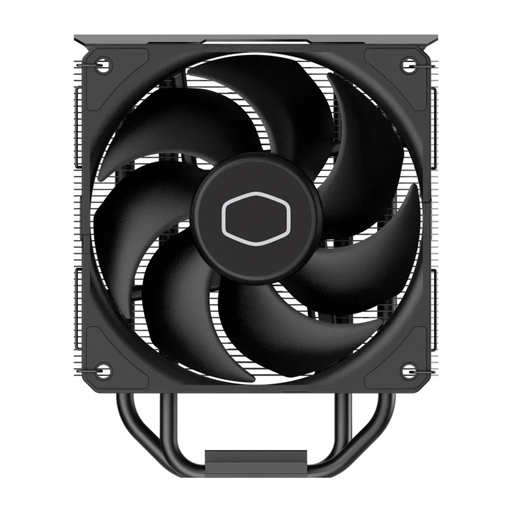
Why this model is suitable : This 152 mm air cooler combines four direct-contact heat pipes with a 120 mm PWM fan. It is ideal for builders looking for a conventional installation without a pump or radiator.
The product details state compatibility with Intel LGA 1851/1700 and AMD AM5/AM4, along with CryoFuze thermal paste included in the box. You will still need to check the maximum height supported by your case.
Four heat pipes, a 120 mm PWM fan, dimensions of 125 × 74 × 152 mm and an advertised noise level of 32.8 dBA.
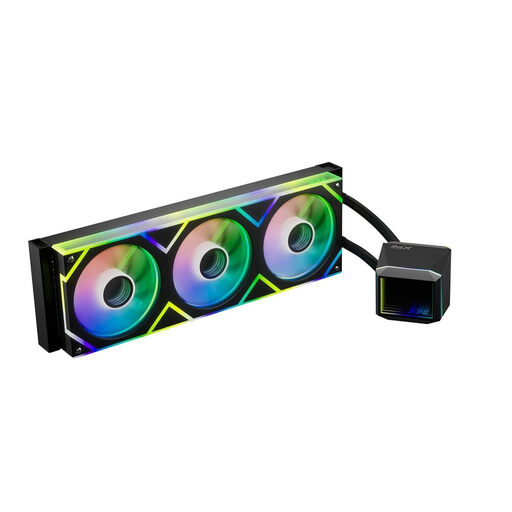
Why this model is suitable : This 360 mm liquid cooler is designed for systems with a heavily loaded processor, provided you have a compatible case and like the RGB lighting on the pump block.
The radiator format is clearly specified, and the product details mention compatibility with Intel LGA sockets as well as AMD AM5/AM4. Even so, check that your case can accommodate a 360 mm radiator.
360 mm radiator, hydraulic-bearing fans, RGB lighting on the pump and a manufacturer-rated thermal capacity of up to 340 W.
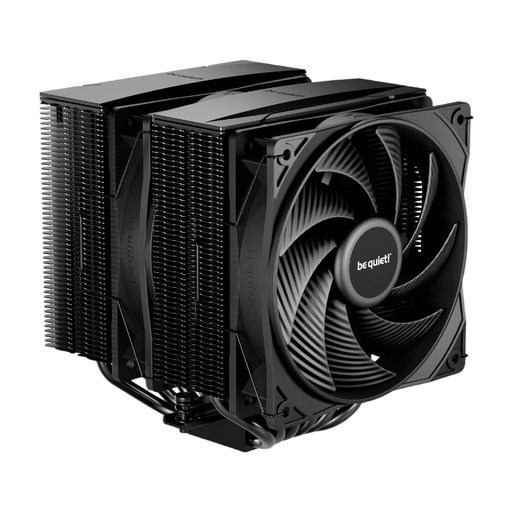
Why this model is suitable : Its dual-tower design and two 120 mm fans are well suited to a gaming PC or workstation used for long sessions.
The front fan can be adjusted vertically to make room for the RAM. This still needs to be checked when using memory modules with large heatsinks.
Six 6 mm heat pipes, two Pure Wings 3 PWM fans and an advertised maximum noise level of 34.8 dB(A).
We have brought together a complete, real-time updated selection of products that meet these demanding criteria, while complying with European safety regulations.
Before carrying out any work, switch off your PC, unplug it and allow the components to cool down. If you are replacing the old system, clean the processor surface with a suitable product. When no thermal paste has been pre-applied, a small pea-sized amount placed in the centre is generally sufficient.
Then check that:
Regularly remove dust from the fins and filters. With an AIO, never open the sealed circuit. In the event of a leak, stop using the PC immediately and follow the procedure specified by the manufacturer. Old coolers and electronic packaging must be taken to an appropriate collection point, in accordance with the rules applicable to electrical and electronic equipment.
Start by confirming the exact socket, then check the case dimensions and the thermal power rating specified by the manufacturer. An air cooler may be perfectly suitable for a compact system, whereas a 240 or 360 mm AIO liquid cooler requires dedicated mounting points.
Not necessarily. An AIO adds pump noise to that of several fans. Noise levels depend on the PWM settings, processor load and airflow inside the case. Compare the dB(A) figures, bearing in mind that they are not directly comparable from one brand to another.
It all depends on maintenance, workload intensity and wear affecting the fan or pump. Cleaning the filters, monitoring temperatures and replacing a fan that has become noisy can extend its service life. With an AIO, a leak or unusual pump noise should prompt you to carry out a check as soon as possible.